 IGUANIFY
Solo Creators: Ship a Pilot Episode in One Session, Lock Continuity

Turning a one-line premise into a publish-ready pilot follows a fixed order: write a short vertical script, lock your character references, storyboard each beat for 9:16, generate the clips with reference chaining, then finish with voice, lip-sync, music, and captions before a QC pass. Iguanify runs this exact flow for creators who’d rather skip the tool-juggling. Budget a single working session and a modest one-time cost for a locked pilot.
TL;DR:
- Lock character references, wardrobe, and voice profiles before generation to prevent visual drift between episodes.
- Prioritize tools that handle character lock and batch generation for efficient, consistent pipeline management.
- Export a pilot within 15 to 90 seconds, focusing on a clear hook, concise beats, and a strong cliffhanger for platform suitability.
- Use retention, rewatch rates, and comment engagement within two weeks to determine if the series needs pacing adjustments rather than script rewrites.
- Platform ownership terms vary; ensure the chosen tool grants full rights to the content, especially when using real actors or copyrighted material.
Table of Contents
- How Do You Turn an Idea Into a Pilot Episode?
- What Does the Full Production Pipeline Look Like?
- How Do You Stop Character Drift From Wrecking Continuity?
- Which Tools Actually Speed Up Pilot Production?
- When Should You Publish, and What Should You Track First?
- Who Owns AI-Generated Pilot Content?
- How Fast Should You Test and Iterate on a Pilot?
- What I’ve Learned Producing AI Pilots
- Let Iguanify Run the Pipeline for You
- Sources
- FAQ
How Do You Turn an Idea Into a Pilot Episode?
You don’t need six tools open in six browser tabs to get a pilot out the door. You need a checklist that forces you through the same order every time, because skipping a step (usually character locking) is what turns episode two into a continuity disaster.
Run through this in one sitting:
- Write your one-line premise and decide what the episode needs to accomplish (introduce a conflict, plant a question, tease a reveal).
- Draft a 1 to 2 page vertical script with 3 to 5 beats and a hard cliffhanger at the end.
- Build character reference sheets for every speaking role and assign a voice profile to each.
- Storyboard each beat for 9:16 framing, noting where captions will sit so they don’t cover faces.
- Generate clips using reference chaining, then assemble voice, music, and captions.
- Run a drift check against your locked references, export the vertical cut, publish, and check the first metrics.
Pro Tip: Write your cliffhanger before you storyboard anything. If you don’t know the last frame, you’ll end up padding the middle beats and the episode drags.
What Does the Full Production Pipeline Look Like?
A repeatable pipeline for AI short-drama production moves through script, episode beats, character lock, storyboard, generation, motion assembly, voice, lip-sync, music, captions, and final vertical cut. Each stage exists to protect the one before it. Skip character lock and your generation stage produces a different-looking lead in every third clip.
Start with the one-line premise and stretch it into an episode goal: what does the viewer know at the end that they didn’t know at the start? Map that goal onto 3 to 5 beats sized for a 15 to 90-second vertical episode. Anything longer and you’re writing for a platform that doesn’t reward it.
Your character bible needs more than a name and a face. Include:
- Physical descriptors specific enough that a generation tool can’t drift (hair length, exact wardrobe pieces, distinguishing marks)
- Wardrobe rules per episode or per scene, so a character doesn’t swap jackets mid-conversation
- A locked voice profile tied to that character ID
- Approved reference images pulled forward into every new episode
The ScreenWeaver workflow treats the season grid and locked cast references as the real decision point for whether a series holds an audience. Generation itself is the cheap part.
Generation isn’t where series succeed or fail. Planning and continuity are. Treat every generation pass as executing a plan you already locked, not as a place to improvise.
Storyboard for vertical framing with text-safe zones top and bottom, since captions and platform UI eat into both. Keep one movement per clip and favor short clip durations. It’s easier to stitch five clean 3-second clips than to fix one messy 15-second take. Decide early whether you’re recording voice first and animating lips to match, or generating video first and syncing audio after. Audio-first tends to produce cleaner lip-sync; audio-last gives you more flexibility to punch up a line reading later.
How Do You Stop Character Drift From Wrecking Continuity?
Visual drift, a character’s face, hair, or wardrobe shifting between episodes, is the single most common failure mode in multi-episode production. Locking identity assets before generation begins is the most reliable fix.

Register every asset with a character ID the moment you finalize it: face reference, wardrobe set, voice profile, and any props tied to that character. That registry becomes your source of truth for every future episode, not just this one.
Run a drift check before you export anything:
- Compare the new clip’s face against the locked reference image, side by side
- Check hair length, color, and style against the wardrobe sheet
- Confirm lighting direction and color temperature roughly match the established look
- Flag anything off and regenerate immediately rather than “fixing it later”
Give yourself a stop-after-two-failures rule. If a shot fails drift check twice, the problem usually isn’t the prompt. It’s the base reference asset, and no amount of regenerating will fix a reference that’s ambiguous to begin with.
Pro Tip: Update your episode bible the moment you publish, not before the next writing session. Note which shots drifted and why. That log is what makes episode three faster to produce than episode one.
Which Tools Actually Speed Up Pilot Production?
The right tool category matters more than any specific brand. Look for platforms built around character-lock or character ID systems, since that’s the feature that actually prevents the rework nobody budgets time for.
Prioritize tools that handle:
- Character-lock and reference chaining, so identity carries forward automatically instead of manually reloading reference images every clip
- Storyboard-first workflows and batch script generation, which speed up the planning stage where watchability actually gets decided
- Auto-repurposing and instant platform-formatted exports, cutting the resizing and recaptioning work that eats hours after a shoot
- Batch voice casting and parallel generation, letting you produce several beats at once instead of waiting on one clip at a time
Creators consistently ask for auto-repurposing (19%) and instant platform-specific edits (14%) ahead of flashier features, because those two save recurring manual work on every single episode. Template music beds are worth setting up once. A locked three-track rotation for tension, transition, and resolution beats means you’re never scoring an episode from scratch. For a deeper look at how these stages map to specific tools, the AI video production workflow breaks down which tool class fits which stage.
When Should You Publish, and What Should You Track First?
Export checks come before anything else touches a platform:
- Confirm the aspect ratio is true 9:16, not a cropped 16:9 that letterboxes on mobile.
- Check that captions land inside safe zones and stay synced within a couple frames of the dialogue.
- Normalize audio levels so dialogue doesn’t get buried under the music bed.
- Pick a thumbnail frame that reads clearly at a thumbnail size, not just a still that looks good full screen.
- Post on a consistent cadence and A/B test one variable at a time, usually the hook line or the caption wording.
Watch three numbers over the first 7 to 14 days: retention through the first 3 seconds, rewatch rate, and comments per follower. A pilot that holds retention past the hook but gets weak comment engagement usually has a pacing problem, not a story problem. Feed whatever you learn straight back into the episode bible: which hook style worked, which beat lost viewers, which caption phrasing got shared. That’s the same document that should be structured before you generate anything. The episodic video publishing guide covers cadence and formatting specifics if you’re posting across TikTok and YouTube at the same time.
Who Owns AI-Generated Pilot Content?
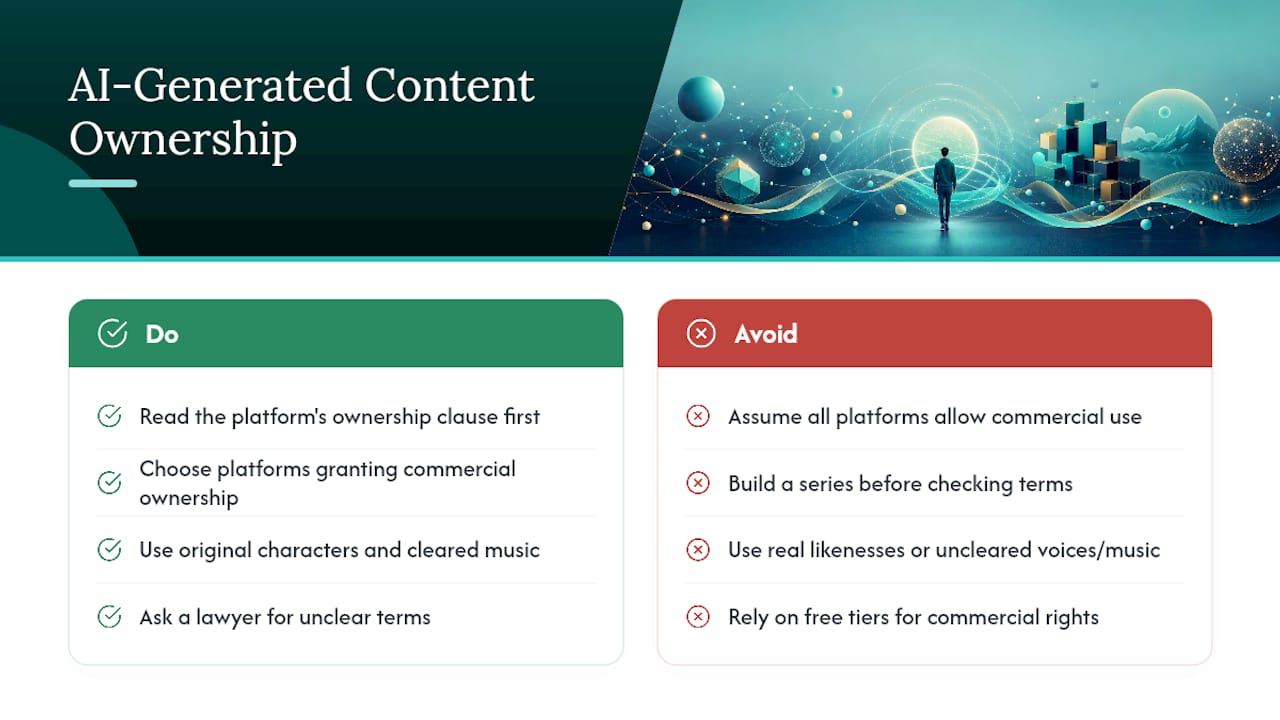
Ownership questions come up fast once you’ve generated a full episode instead of a single clip. In general, content you generate through a platform you’re paying for is yours to publish and monetize, but the actual terms live in that platform’s specific license, not in a general rule you can assume applies everywhere.
Read the ownership clause before you commit to a tool, not after you’ve built three episodes on it. Some platforms grant full commercial rights on anything you generate. Others retain a license to use your output for their own training or marketing, or restrict commercial use unless you’re on a paid tier. Neither approach is wrong, but you need to know which one you signed up for before you build a series around it.
If your pilot uses a real actor’s likeness, a licensed voice, or copyrighted music you didn’t clear, ownership of the AI-generated frame doesn’t erase those underlying rights. That’s a separate legal layer platforms generally don’t indemnify you against. Keep it simple: original characters, original or cleared music, and a platform whose terms explicitly hand you commercial ownership of the finished episode. When in doubt on a specific platform’s terms, that’s a question for its published license text or a lawyer, not a general assumption carried over from a different tool.
How Fast Should You Test and Iterate on a Pilot?
Treat your first pilot as a test, not a finished product. The fastest creators run several small iterations in the time it takes a slower workflow to finish one polished draft, and that speed is the actual advantage of an AI-driven pipeline over a traditional shoot.
Batch your script drafts before you generate anything. Write three or four versions of your hook line and your cliffhanger, then pick the strongest pair rather than committing to the first version you wrote. Once you’re generating, batching scripts and using avatar libraries lets a single person produce a month of cross-platform content in a day, which means you can afford to test two versions of the same beat instead of settling for one.
After publishing, don’t wait for a full season to course-correct. Pull retention and comment data after the first pilot, adjust the hook or pacing, and apply that fix to episode two immediately. A validation-first approach to idea testing applies just as well to a pilot episode as it does to a product: cheap, fast tests beat one expensive, “perfect” attempt every time. The goal isn’t a flawless pilot. It’s a pilot that teaches you enough to make episode two better than episode one.
What I’ve Learned Producing AI Pilots
I’ve watched more pilots die in episode two than episode one, and it’s almost never the writing. It’s a wardrobe detail that shifted, a face that got slightly younger-looking, a voice that drifted half a register. The fix isn’t better prompts. It’s a character bible you actually lock before you generate a single frame.
Scripting the full season grid before you touch generation tools beats prompt-first improvising every time. You’ll waste far less time regenerating shots when the plan was solid going in.
On creative choices: pick a trope you can sustain for at least five episodes, keep your pilot under 60 seconds unless the hook genuinely earns more, and choose a voice model for consistency across episodes, not for how impressive it sounds on a single line.
— Leonard
Let Iguanify Run the Pipeline for You
If the checklist above sounds like a lot to manage solo, that’s the exact gap Iguanify closes. Feed it a one-line premise and it handles character continuity, episode generation, and platform-ready exports as one connected process instead of six separate tools you have to babysit.

Some platforms lock character identity across episodes automatically, helping to avoid manual reference-chaining and drift checks. You can obtain platform-formatted exports suitable for TikTok and YouTube, with ownership terms defined by the service used. Some platforms offer one-time purchase credits for episodes or season packs, without subscriptions or lock-in, and may allow free show concept and cast generation before purchase. If you want to see rough cost expectations before committing credits, the AI video cost breakdown lays out realistic budget math. When you’re ready to turn your premise into a locked pilot, start with the AI Drama Generator and generate your cast for free.
Sources
This pipeline draws on production workflows from the AI microdrama vertical series guide, the ScreenWeaver short-drama workflow, and feature-demand data from Adobe’s creator survey. For tool selection specifics, see best AI tools for short films and the InVideo alternatives roundup.
- AI Microdrama: Multi-Episode Vertical Series Guide | AIVid.
- How to Make a Short Drama With AI: From Premise to a 70-Episode Season | ScreenWeaver Blog
- How creators are using AI video tools across platforms
FAQ
How Long Should a Pilot Episode Be?
Most vertical pilots run 15 to 90 seconds, sized to a single hook, 3 to 5 beats, and one cliffhanger rather than a full narrative arc.
Do I Need a Full Script Before Generating Clips?
Yes. A locked 1- to 2-page script with defined beats determines watchability far more than generation quality does, according to the ScreenWeaver workflow.
What Causes Character Drift, and How Do I Prevent It?
Drift happens when generation tools don’t reference a locked identity asset for each character. Registering character IDs with approved reference images before generation is the most reliable fix.
Can I Own the Rights to an AI-Generated Pilot?
In most cases, yes, but ownership terms vary by platform. Iguanify gives creators full ownership of finished episodes, while other tools may retain broader usage rights, so check any platform’s license before building a series on it.
How Do I Know Whether to Continue a Series Past the Pilot?
Watch retention, rewatch rate, and comments per follower over the first 7 to 14 days. Strong retention with weak engagement usually signals a pacing fix, not a story rewrite.