 IGUANIFY
Best AI for Short Films: Serialized Vertical Drama Guide

For serialized, vertical short-form drama built for TikTok, Instagram Reels, and YouTube Shorts, Iguanify is the strongest choice available to solo creators in 2026. The reason comes down to one thing most AI video tools cannot deliver: episodic continuity across a full season, managed through a director-mode pipeline that runs from script to final render without a production team.
TL;DR decision drivers:
- Episodic continuity: character and element locking across every episode
- Vertical-native exports: compositions built for 9:16, not cropped from widescreen
- Director-mode controls: structured shot cards for camera, dialogue, and timing
- Draft-first workflow: cheap rounds to lock pace before spending final-render credits
- Creator ownership: you own the IP on every episode you produce
Table of Contents
- Why generic AI tools fail serialized short films
- How to choose the right AI platform for episodic vertical drama
- How Iguanify meets these criteria
- What does a realistic production timeline look like?
- Practical tips for consistent serialized vertical drama
- Key Takeaways
- The part of AI filmmaking most creators underestimate
- Ready to produce your first episode with Iguanify?
Why generic AI tools fail serialized short films
The core problem with single-clip generative models is character drift. Render the same character in two separate clips and you get two slightly different people. For a standalone video, that is manageable. For a six-episode drama where the audience is following a specific protagonist, it breaks the story.
Purpose-built platforms for episodic content solve this by locking character elements across the entire series, not just within a single clip. They also handle vertical framing at the composition level. Generating platform-native vertical versions rather than cropping a widescreen master preserves shot composition for TikTok and Reels, where a poorly framed face or cut-off subtitle kills retention in the first two seconds.
The third failure mode is pipeline fragmentation as explained in this complete production guide on live-mix video, helping creators streamline workflows for mixed-format short content. Most creators using generic tools spend more time stitching clips together in a separate editor than they do directing the story. An integrated script-to-storyboard-to-multi-shot pipeline eliminates that rework by reading the entire synopsis as one film, keeping cast and look consistent across scenes.
How to choose the right AI platform for episodic vertical drama
Evaluate any platform against four categories before committing credits or a subscription.
1. Continuity and multi-shot engine The platform must lock character elements across episodes, not just within a single render. Director-mode interfaces with structured shot cards replace adjective-heavy prompts with concrete fields for camera move, shot timing, and dialogue, which is what actually reduces character drift.
2. Vertical-native output Confirm the platform generates 9:16 compositions natively. A crop-based export is a composition problem waiting to happen.
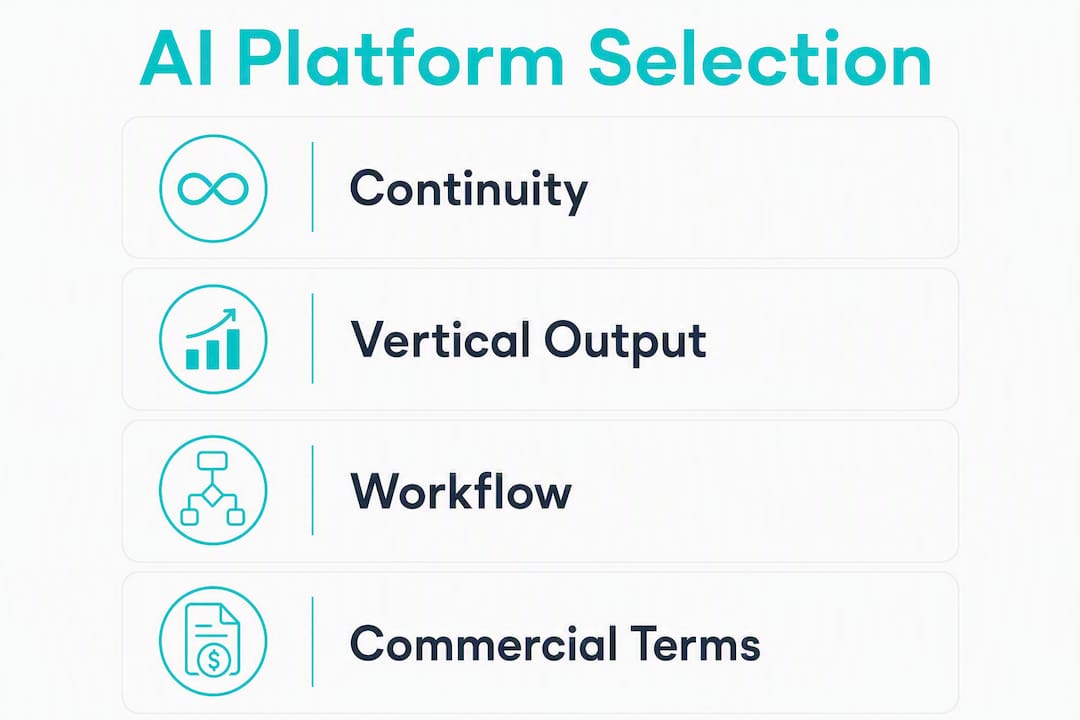
3. Workflow: script to final render Look for: synopsis breakdown into shot cards, audition/casting tools, native speech and lip-sync, draft render rounds, and a cinema-grade final render step. Browser-based studios that require no local install lower the barrier for one-person operations.
4. Commercial terms Credits-based models let you pay per episode or season pack rather than a recurring subscription. Confirm ownership terms before you publish anything.
Pro Tip: Run at least two full-film draft rounds on a budget engine before triggering the final cinema-grade render. Locking pace and story rhythm in drafts costs a fraction of a re-render.
| Pricing model | Typical cost structure | Best for |
|---|---|---|
| Credits per episode | Pay per production; no recurring fee | Creators with variable output cadence |
| Season pack (credits) | Bulk credits at lower per-episode rate | Creators committing to a full series |
| Monthly subscription | Fixed monthly fee regardless of output | High-volume producers |
For AI video workflow comparisons across pipeline types, the key differentiator is always whether the tool manages rhythm across cuts or just generates isolated clips.
How Iguanify meets these criteria
Iguanify is built specifically for the episodic, vertical drama use case. Here is what you get at each stage of production.
Core features:
- Multi-shot native engine that reads the full storyboard as one film
- Character and element locking across episodes to prevent drift
- Director-mode shot cards: set camera angle, shot duration, character action, and dialogue per card
- Native speech and lip-sync rendered as part of the multi-shot pass
- Vertical-ready exports formatted for TikTok, Instagram Reels, and YouTube Shorts
- One-click publishing to social platforms
Production workflow:
- Write your synopsis or premise
- Iguanify’s AI Director breaks it into structured shot cards
- Lock your cast and visual elements
- Run draft render rounds to validate pacing and story rhythm
- Trigger the cinema-grade final render once the storyboard is approved
- Export in vertical format and publish directly
Iguanify uses a credits-based model with no subscription required. Free concept generation and storyboard previews let you validate your idea before spending any credits on a render. You own the IP on everything produced. The platform is available to US creators, with support and training resources included.
| Production stage | Credit cost (illustrative) | Estimated USD (example range) |
|---|---|---|
| Draft render (single episode) | Low credit spend | a low cost range |
| Final render (single episode) | Standard credit pack | a moderate cost range |
| Season pack (6 episodes, final renders) | Bulk credit pack | a higher cost range |
Figures are illustrative ranges based on Iguanify’s credit model structure; actual costs depend on episode length and selected production tier.
The two features that most directly address episodic failure modes are element locking (prevents character drift) and structured shot cards (prevents framing inconsistency). Native speech means dialogue-heavy scenes arrive with synced audio, cutting post-production time significantly.
What does a realistic production timeline look like?
Two scenarios cover most creators starting out: a single 3–5 shot episode (a brief vertical format) and a short season with multiple episodes.
Single episode timeline:
- Synopsis and shot card setup: half an hour to an hour
- Draft render round 1: quarter to half an hour (review pacing, adjust cards)
- Draft render round 2 (if needed): around 15 to 20 minutes
- Final cinema-grade render: between 20 and 40 minutes
- Review, subtitle pass, and export: about 20 to 30 minutes
- Publish to platforms: a short period
Total: roughly 2–3 hours for a polished single episode.
Six-episode season timeline:
- Episodes 1–2: expect a longer setup phase while you lock character elements and establish shot card templates (add 30–45 minutes per episode)
- Episodes 3–6: setup time drops sharply once your cast and look are locked
- Total season production: several hours across all episodes, depending on complexity
The draft-first approach is where you save the most. Running two cheap draft rounds before a final render avoids expensive re-renders caused by pacing problems you could have caught earlier. For episodic AI video production, this two-tier strategy is standard practice among creators producing consistent output.
Practical tips for consistent serialized vertical drama
Lock your elements before episode one. Character photos and visual references set in episode one become the anchor for every episode that follows. Changing them mid-season creates drift that no tool can fully correct retroactively.

Write shot cards, not adjective prompts. “Close-up, slow push-in, character turns to camera, line: ‘I knew you’d come back’” outperforms “emotional, cinematic, dramatic close-up” every time. Concrete fields produce predictable outputs.
Generate separate exports per platform. A 9:16 TikTok composition and a 1:1 Instagram square are different creative decisions, not the same crop. Platform-native vertical exports preserve the framing intent for each audience.
Use an external editor for finishing when needed. Timeline-based AI editors like Adobe Firefly let you trim, rearrange, and generate missing clips that match existing footage, which is useful for adding custom music or branded intros. Iguanify’s output is export-ready, but finishing in a dedicated editor is always an option.
For audio: add platform-specific metadata, captions, and music in your finishing pass. Native speech from Iguanify handles dialogue, but background score and sound design are worth a separate pass for voice-over and audio quality.
Always confirm your ownership and licensing terms before distributing any AI-produced content commercially.
Pro Tip: Before buying a full season pack, produce one complete episode draft and share it with a small test audience. Real retention data from a single episode tells you more about pacing than any amount of internal review.
Key Takeaways
Iguanify’s combination of element locking, director-mode shot cards, and a draft-first credits model makes it the most practical choice for creators building serialized vertical drama for social platforms.
| Point | Details |
|---|---|
| Continuity is the core problem | Character drift across episodes breaks serialized storytelling; element locking is the fix. |
| Director-mode beats prompt guessing | Structured shot cards for camera, dialogue, and timing produce consistent, predictable outputs. |
| Draft rounds save real money | Running cheap draft renders before the final cinema-grade pass avoids costly re-renders. |
| Ownership matters before you publish | Confirm creator IP rights are included in your platform’s terms before distributing commercially. |
| Iguanify for episodic vertical drama | Start with a free concept preview, run one draft episode, then buy final-render credits once the rhythm is locked. |
The part of AI filmmaking most creators underestimate
Most of the conversation around AI for short films focuses on visual quality: how photorealistic is the output, how smooth is the motion. That is the wrong question for serialized drama.
The real bottleneck is editorial rhythm across episodes. A viewer who watches episode one and comes back for episode two is not evaluating render quality. They are checking whether the story held together, whether the characters feel like the same people, and whether the pacing kept them watching past the 10-second mark. Those are structural problems, not visual ones.
What changed the production calculus for episodic AI content was the shift from single-clip generation to pipeline management. When a platform reads your entire storyboard as one film and locks your cast across that whole document, you stop fighting the tool and start directing. The learning curve is real, especially in the first episode when you are building your shot card templates from scratch. But by episode three of a season, the setup time drops sharply and the output becomes genuinely consistent.
The creators who see the biggest gains are not the ones with the most technical skill. They are the ones who treat the draft rounds seriously, adjust shot cards based on what the draft reveals, and resist the urge to jump straight to a final render. That discipline is what separates a polished serialized series from a collection of disconnected clips.
Ready to produce your first episode with Iguanify?
If you have been researching the best AI for short films and want to move from research to production, Iguanify gives you a concrete starting point: generate your show concept and storyboard for free before spending a single credit.

Your first episode purchase includes the full pipeline: structured shot cards, draft render rounds, a cinema-grade final render, vertical exports formatted for TikTok, Instagram Reels, and YouTube Shorts, and full ownership of everything produced. No subscription, no recurring fees, no production team required.
Start with the AI Drama Generator to build your concept and preview your storyboard. If you are planning a full series from the start, the AI Micro Drama Generator covers season packs and recurring cast management. Support and training resources are included with every account.