
A cast and world
you can return to.
Keep characters, locations and props in a reusable asset library. Carry the same production references into the next scene.
Explore asset reuse ↗Iguana Engine v3
THE AI PRODUCTION ENGINE FOR FILM & TELEVISION
Turn the screenplay into a production you can direct. Build your cast and world, shape every shot in 3D, and take generation through a workflow your studio can review.
01 / FROM GENERATION TO PRODUCTION
Character drift. Camera instructions lost in a prompt. Revisions scattered across files. A film needs those decisions to hold together across the entire edit.
Keep characters, locations and props in a reusable asset library. Carry the same production references into the next scene.
Explore asset reuse ↗Set the camera, blocking and lighting on an editable 3D stage. Review the scene in space, then shape the shot.
See 3D stage editing ↗Work from script to shot plan, appearance review and generated take. Keep revisions, approvals and generation records attached to the production.
Follow the workflow ↗02 / CREATIVE AUTHORITY
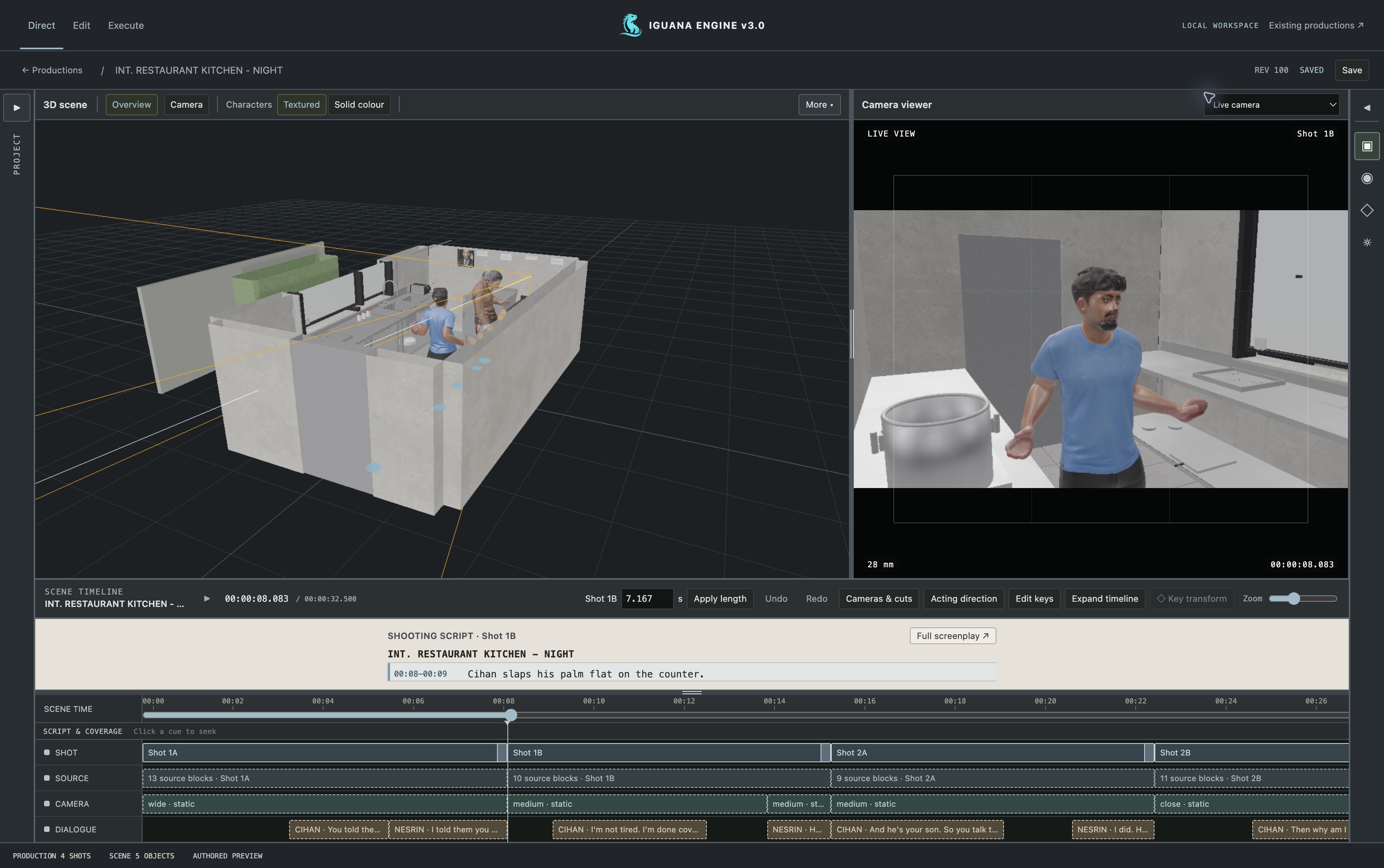
Move the camera. Reframe the action. Change the light. Iguana gives your creative decisions an editable 3D stage, with shot controls and a timeline to work against.
PRODUCTION WORKSPACE Actual engine capture
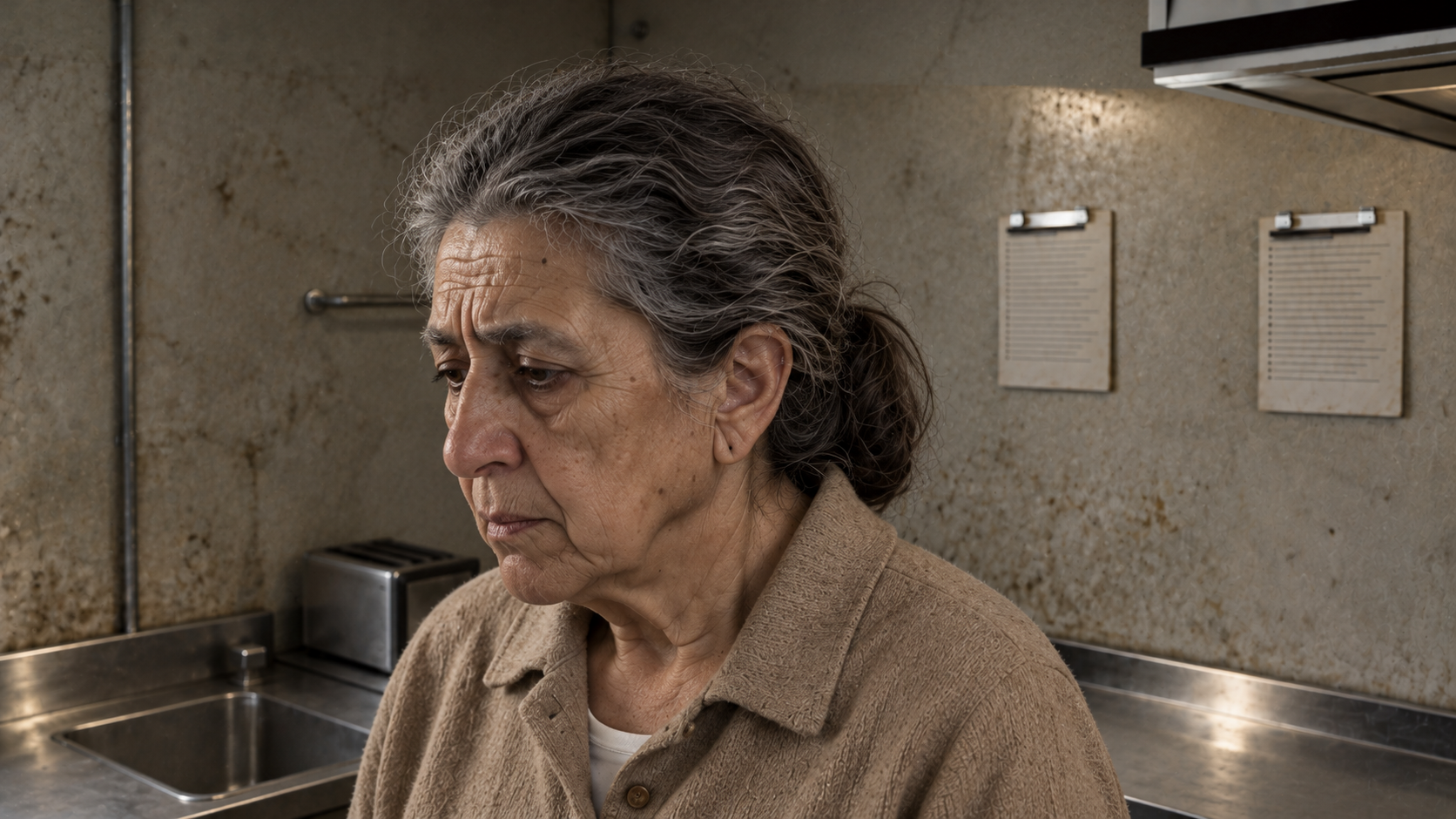
PRODUCTION FRAME Selected kitchen shot
A selected generated frame from the kitchen production.
Three ways to keep your direction in the scene.
Stage the action, move your cast and find the camera angle—all in the same editable scene.
Describe the adjustment, then inspect the staged result. Keep refining the shot as the direction develops.
Bring your approved cast and locations into another setup. Build the next shot from the world you already have.
03 / TOOLS THAT KEEP THE STORY MOVING
Use AI to prepare and propose. Keep the scene editable, the decisions visible and the production moving through clear review points.
Import and review the script. Identify characters, locations and props, then build the production inventory around the story.
Place assets and adjust camera, lighting, blocking and timing. See how a direction changes the shot before requesting a generated take.
Let Auto propose shots, blocking and cameras, or start a scene manually. Review and revise the staged plan as your creative decisions evolve.
Reuse approved character, set and prop assets. Import existing models and references so the next scene starts with the world you have already built.
Manage shots and timing in the production workspace. Follow saved revisions, approval state and generation receipts as the edit develops.
Inspect appearance frames and review estimates before generation. Review the resulting takes against the scene before choosing what moves forward.
04 / ONE PRODUCTION WORKFLOW
Keep development, direction and generation connected. Each stage gives your studio a concrete result to review and a clear decision about what happens next.
Review the screenplay, identify the assets and prepare the cast and world you need.
Plan shots automatically or manually. Refine camera, blocking, lighting and timing in the stage.
Approve appearance frames and generation estimates, then review the takes against the direction.
05 / SELECTED PRODUCTIONS
Selected narrative work from Iguanify. Explore suspense, episodic drama and character-led storytelling.
06 / A DEMO BUILT AROUND YOUR STUDIO
Bring a workflow question. We’ll show you the software, explore the controls that matter to your team and discuss a practical next step.
Book a studio demo ↗Continuity, direction, revision or production oversight—tell us where the current process slows you down.
Walk through script breakdown, reusable assets and 3D shot control in the current workspace.
Discuss your format, studio setup and what a useful production evaluation would look like.
BEFORE WE MEET
Iguana is a film and television production engine. We discuss feature films, episodic television, shorts and micro-drama around the same core needs: story, cast, locations, shot direction and review. Your demo is scoped to the workflow you want to explore.
The production workspace runs locally on Mac, with Blender for scene work and configured cloud providers for generation. We confirm your hardware, provider setup and access requirements together before onboarding.
You can edit the 3D stage, cameras, lighting and timing, or use Direct with Words for targeted changes. Automatic plans remain editable. Generated takes are reviewed against your direction before approval.
The team, asset-rights and royalty screens are a simulated commercial demo. Multiuser access, legal verification and payouts are not live services. We’ll distinguish the working production tools from those concepts during your session.
MAKE ROOM FOR YOUR NEXT PRODUCTION
A focused conversation about your studio, your creative process and the work you want to make.
Book a studio demo ↗