 IGUANIFY
Opus Clip Alternatives for Serialized AI Episodes

If you’re producing serialized, AI-generated drama episodes rather than repurposing existing footage, the best Opus Clip alternatives aren’t clip-first tools at all. End-to-end episode platforms like Iguanify are built for your workflow. Clip-first tools (Opus Clip, Kapwing, Veed, Wisecut) handle repurposing well but leave you to solve continuity, casting, and scripting yourself. Transcript-first editors like Descript give you precision control over long-form content. Clip-and-schedule pipelines suit teams batching daily social clips from finished episodes.
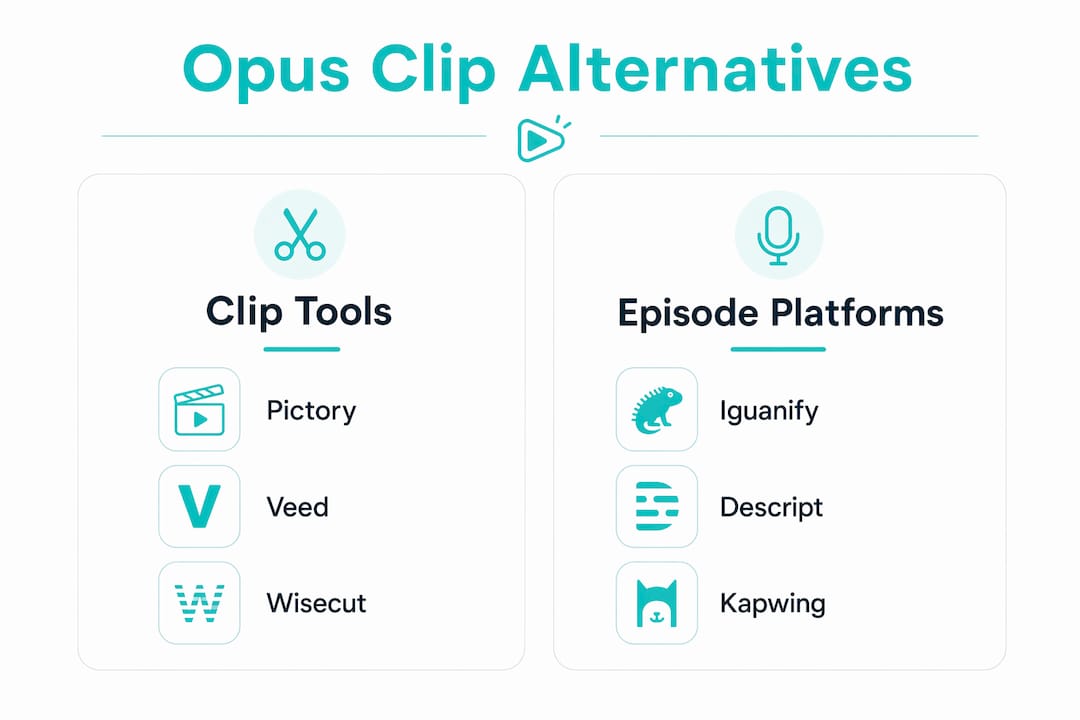
TL;DR: Pick an end-to-end episode platform when you need recurring-cast continuity and finished episodes. Pick a clip-first or transcript-first tool when you already have produced footage and need to repurpose it.
Three signals to check before choosing any tool:
- Automation level: Does the AI decide what matters, or do you?
- Episodic continuity: Does the platform maintain consistent characters across episodes?
- Pricing shape: Per-minute, flat monthly, or one-time episode credits — the model matters more than the headline price.
Table of Contents
- How do the major Opus Clip alternatives compare?
- How do you pick the right tool for serialized AI video?
- What does each alternative category actually offer episodic creators?
- What do real episodic production workflows look like?
- What do pricing models actually cost serialized creators?
- What should you check about content ownership before uploading?
- Key Takeaways
- Why end-to-end episode production beats clip-first for serialized creators
- Iguanify produces finished episodes, not just clips
- Useful sources
How do the major Opus Clip alternatives compare?
| Category | Automation level | Control & editability | Episodic continuity | Output formats | Pricing shape |
|---|---|---|---|---|---|
| End-to-end episode platforms | Full AI (script to episode) | Low manual overhead | Yes, recurring cast | TikTok, YouTube, Reels | One-time episode credits |
| Transcript-first editors | You-decide | Frame-accurate, transcript-driven | None built-in | MP4, export to NLE | Flat monthly |
| Clip-and-schedule pipelines | AI-decides + scheduler | Limited post-generation edits | None | Platform-ready vertical | Flat monthly, unlimited |
| Clip-only / lightweight tools | AI-decides | Minimal | None | Vertical clips | Per-minute or credit |
End-to-end episode platforms
- ✅ Finished episodes with recurring cast; no editing team required
- ❌ Less suited for repurposing existing footage
Verdict: Best for creators whose goal is a new episode, not a clip.
Transcript-first editors (Descript, Kapwing)
- ✅ Precise, readable editing; strong for podcast-style long-form
- ❌ No continuity support; you still produce the source video
Verdict: Best when you have footage and want editorial control.
Clip-and-schedule pipelines
- ✅ Reduces manual export steps; flat pricing suits high-volume publishing
- ❌ Virality scoring is opaque; no episodic asset reuse
Verdict: Best for teams batching daily clips from finished episodes.
Clip-only / lightweight tools (Pictory, Wisecut, Veed)
- ✅ Low barrier to entry; fast first clip
- ❌ Per-minute pricing scales poorly for season production
Verdict: Best for occasional repurposing, not weekly serialized output.
Pro Tip: Before committing to any tool, run the same 10-minute episode segment through two different categories. The cleanup time difference will tell you more than any feature list.
How do you pick the right tool for serialized AI video?
Start with these must-have questions:
- Does the tool maintain recurring characters across episodes? If not, you’ll rebuild your cast every episode.
- Who controls clip selection? AI-decides vs. transcript-driven is the core trade-off in this market.
- What does the pricing model cost at 4+ hours of content per month? Per-minute rates punish serialized producers.
- Does the platform export platform-ready files without watermarks on paid tiers?
- Who owns the generated content? Check the terms before uploading a pilot episode.
Defer these until you’ve confirmed the above:
- Scheduling integrations and API access
- Multi-language caption support
- Team collaboration seats
Red flags that signal workflow mismatch:
- Per-minute pricing with no credit bundle option
- Virality scoring with no explanation of the logic
- No mention of recurring-cast or series-bible support
- Upload caps that would block a 45-minute episode file
Pro Tip: Test any tool with a single canonical episode master file — your best-produced episode at full length. If the tool struggles with that file, it won’t survive a full season.
What does each alternative category actually offer episodic creators?
End-to-end episode platforms (Iguanify)
Iguanify generates finished, platform-ready drama episodes from a single premise. The platform handles scriptwriting, series bible creation, recurring cast generation, dialogue, sound, and final export in one pass. You own the IP outright. There’s no editing team required and no continuity drift between episodes because the cast is locked to your series.
- ✅ Recurring characters maintained across every episode
- ✅ Full content ownership; exportable masters
- ❌ Not designed for repurposing existing footage
For creators building a serialized AI drama series, this is the only category that solves the whole problem.
Transcript-first editors (Descript, Kapwing)
These tools let you edit video by reading and editing a transcript. Delete a sentence, and the video cut follows. Descript is the clearest example: it’s precise, fast for long-form podcast content, and reduces manual review time on multi-episode audio-driven shows. Kapwing adds broader editing features but is less focused on the long-video-to-clip workflow.
- ✅ Frame-accurate edits without scrubbing timelines
- ❌ You still need source footage; no episode generation
Explore Descript alternatives if transcript-first editing fits your process but Descript’s pricing doesn’t.
Clip-and-schedule pipelines
These combine AI clip selection with a built-in scheduler that posts directly to TikTok, YouTube Shorts, and Reels. Integrated pipelines eliminate one or two manual export steps per clip in a high-volume publishing workflow. The trade-off is limited editorial control after generation.
- ✅ Flat monthly pricing; unlimited processing on paid plans
- ❌ Opaque clip selection; no series continuity
Clip-only / lightweight tools (Pictory, Veed, Wisecut)
Tools like Pictory, Veed, and Wisecut are accessible entry points for occasional repurposing. Talking-head clip accuracy trends in the low 90s for best-in-class tools on interview-style content, but multi-speaker and B-roll-heavy formats are less reliable. These tools work well for a creator publishing one or two clips per week from a single source.
- ✅ Low cost to start; fast first output
- ❌ Manual cleanup adds up fast at serialized volume
Pro Tip: If your content is visual-action heavy (gaming, events, heavy B-roll), format mismatch with a speech-trained clipper will cost you more in cleanup time than the tool saves.
What do real episodic production workflows look like?
Workflow A: End-to-end episode production (one tool, finished episode)
- Submit your series premise and cast brief (5 min)
- Platform generates script, series bible, and cast (10–15 min)
- Review generated episode draft (15 min)
- Export platform-ready vertical file for TikTok/YouTube (5 min)
- Post directly or hand off to scheduler (5 min)
Total active time: roughly 40 minutes per episode. Keep your series bible file as the canonical asset for every future episode.
Workflow B: Transcript-first editing for long-form episodes
- Record or ingest source episode (variable)
- Upload to transcript-first editor; auto-transcribe (10 min)
- Read transcript; mark segments for clips (20–30 min per episode)
- Export clips with captions (10 min)
- Brand polish pass on captions and trims (15–20 min)
Transcript workflows speed selection on long episodes because you read rather than scrub. Budget 45–60 minutes of active editing per episode for a weekly serialized show.
Workflow C: Clip-and-schedule pipeline for daily publishing
- Upload finished episode to pipeline tool (5 min)
- AI generates clip candidates (10–15 min)
- QA pass: check brand safety, caption accuracy, trim points (20 min)
- Schedule clips to TikTok, YouTube Shorts, Reels via built-in scheduler (5 min)
Flat monthly pricing makes this model economical when you’re processing 4+ hours of content per month. The QA pass is non-negotiable: one-click output is rarely publish-ready without a final review.
What do pricing models actually cost serialized creators?
| Pricing model | Best for | Typical cost shape | Serialized episode risk |
|---|---|---|---|
| Per-minute | Occasional creators | Low entry, scales up fast | High — punishes long episodes |
| Flat monthly (unlimited) | High-volume clip publishers | Predictable; economical at 4+ hrs/mo | Low for clip tools |
| Credit-based bundles | Mid-volume creators | Flexible; watch expiry dates | Medium |
| One-time episode credits | Episodic producers | Pay per episode or season | Low — matches production cadence |
Common cost traps to check before committing:
- Watermarks on free tiers — most clip tools watermark free output; confirm paid tiers are clean
- Upload size caps — a 45-minute episode file can exceed limits on entry-tier plans
- Credit expiry — unused credits that expire monthly punish producers with irregular schedules
- Processing minute caps — Opus Clip’s Pro plan caps at 300 processing minutes per month, which a serialized producer can hit quickly
Check the vendor’s pricing page for the exact tier that covers your weekly episode runtime before purchasing. For a broader look at fast video production economics, the math changes significantly by category.
What should you check about content ownership before uploading?
Ownership terms vary widely across AI video tools. Before you hand over a pilot episode, confirm:
- Who owns the generated media? Some platforms claim a license to derivative works.
- Are masters exportable? You need the full-resolution file, not just a social-ready preview.
- What happens to your source files? Check retention and deletion policies for uploaded footage and transcripts.
- Can your uploads be used to train the model? This is often buried in terms of service.
Iguanify grants creators full ownership of generated episodes and provides exportable masters. Your IP stays yours.
Pro Tip: Export your master files immediately after production and keep a local copy of your series bible. Never rely solely on a cloud platform’s storage for your canonical episode assets.
Key Takeaways
For serialized AI-episode producers, the right tool category depends on whether you need finished episodes or clip repurposing: end-to-end platforms solve the whole problem; clip tools solve only part of it.
| Point | Details |
|---|---|
| Match tool to workflow | End-to-end platforms suit episode production; clip tools suit repurposing existing footage. |
| Episodic continuity is the key differentiator | Only platforms with recurring-cast support avoid continuity drift across a full season. |
| Avoid per-minute pricing at volume | Per-minute rates scale poorly for creators running multiple long episodes per week. |
| Confirm ownership before uploading | Check export rights, master file access, and training-use clauses before committing to any platform. |
| Iguanify for finished episodes | Iguanify automates end-to-end episode production with recurring-cast continuity and full creator ownership. |
Why end-to-end episode production beats clip-first for serialized creators
Most comparisons of Opus Clip alternatives focus on clip accuracy and pricing. That framing misses the actual problem for serialized creators: you don’t have existing footage to clip. You’re building a show from scratch, episode by episode, with a recurring cast that needs to look and sound consistent across a full season.
Clip-first tools were designed for a different job. They’re excellent at what they do: taking a finished recording and surfacing shareable moments. But they don’t write your script, generate your cast, or maintain your characters from episode 3 to episode 12. Virality scoring, which many tools treat as a headline feature, is largely decorative for producers whose goal is narrative continuity rather than social reach.
The tools worth evaluating for episodic work are the ones that think in episodes, not clips. Transcript-first editors give you control over existing footage. Clip-and-schedule pipelines reduce publishing friction. But only end-to-end platforms like Iguanify treat the episode itself as the unit of production.
Iguanify produces finished episodes, not just clips
If your goal is a finished, platform-ready drama episode with a consistent cast, Iguanify is the direct path. You submit a premise, and the platform handles scriptwriting, cast generation, dialogue, sound, and export in one workflow. No editing team. No continuity drift. You own the IP.


That’s a fundamentally different value proposition from any clip tool on this list. Clip tools assume you already have footage. Iguanify produces the episode itself, with recurring characters locked to your series from episode one through the season finale.
Generate your free show concept and cast before you spend a dollar. See the full episode production workflow on the AI Drama Generator page, or browse Iguanify’s full production studio to check episode credit pricing and available formats.
Useful sources
- AI Drama Generator: Finished Episodes, Not Clips — Iguanify: Product details on recurring-cast continuity, ownership terms, and one-step episode export.
- Best Opus Clip Alternatives in 2026 (Tested With Real Videos) — Autoposting.ai: Hands-on test across multiple source formats; covers pricing models and cleanup time by category.
- Best AI Video Clipping Tools in 2026 (We Tested 8 With Real Footage) — Autoposting.ai: Defines the AI-decides vs. transcript-driven market axis and accuracy benchmarks by content format.
- Best Opus Clip Alternatives in 2026: For Every Budget — ToolsForHumans: Covers transcript-first workflow advantages and format-mismatch guidance for podcast creators.
- Opus Clip Review 2026 — Marc Andrews: Per-minute pricing analysis and cost scaling for serialized producers.
- Best Opus Clip Alternatives in 2026: 10 Tested by a Founder — Vugola Blog: Broad comparison table covering pricing, watermark policies, and platform integrations.
- 7 Best OpusClip Alternatives in 2026 — NexClip AI: Explains the AI-decides vs. you-decide spectrum and maps tools to content types.
- Content creation tools list for young creators in 2026 — MyChillPods: Broader creator tooling context and practical stack-building guidance.