 IGUANIFY
AI Video Workflow: Your 2026 Production Guide

An AI video workflow is a repeatable, structured process that uses artificial intelligence to take a video from concept to published output, with minimal manual editing at each stage. The core components are scripting, storyboarding, asset generation, automated editing, and distribution. Platforms like Visla Inc. cover this entire chain, letting creators produce polished videos without editing expertise. The practical payoff is speed and consistency: you get a repeatable production cadence instead of a one-off scramble every time you need new content.
Key benefits you can expect from a well-built AI video workflow:
- Speed: AI cuts production time from days to hours by automating editing, voice-over, and subtitle generation.
- Consistency: Automated processes apply the same style, pacing, and quality standards across every video.
- Scalability: You can produce more content without proportionally increasing your team or budget.
- Accessibility: Non-editors can produce broadcast-quality video using AI-guided tools.
- Ownership: The best platforms give you full rights to everything you produce.
Where AI video workflows actually add value
The strongest use cases share one trait: volume. When you need to produce a lot of content fast, a manual workflow breaks down. AI production automation holds up, as explained in this detailed guide to AI video workflows.
- Branded marketing campaigns: Rapidly generate product demos, testimonials, and ad variants without reshooting. AI video workflows are built for business expansion and engagement at scale.
- Training and onboarding content: HR and L&D teams use AI to convert written SOPs into narrated video modules, cutting production time significantly.
- Social media and short-form video: Vertical video for TikTok, Instagram Reels, and YouTube Shorts demands a constant content cadence. AI handles the volume.
- Internal communications: Executive updates, policy announcements, and team briefings become video assets without a production crew.
- Creative prototyping: Creators use AI to generate rough drafts and storyboards quickly, testing concepts before committing to full production.
- Serialized drama and episodic content: This is where continuity tools matter most. Maintaining consistent characters across episodes is a problem most general-purpose tools don’t solve well.
How to build your AI video production workflow step by step
A solid AI production workflow chains discrete stages together so the output of one step feeds directly into the next. Here’s how that looks in practice.
Step 1: Idea generation and scriptwriting
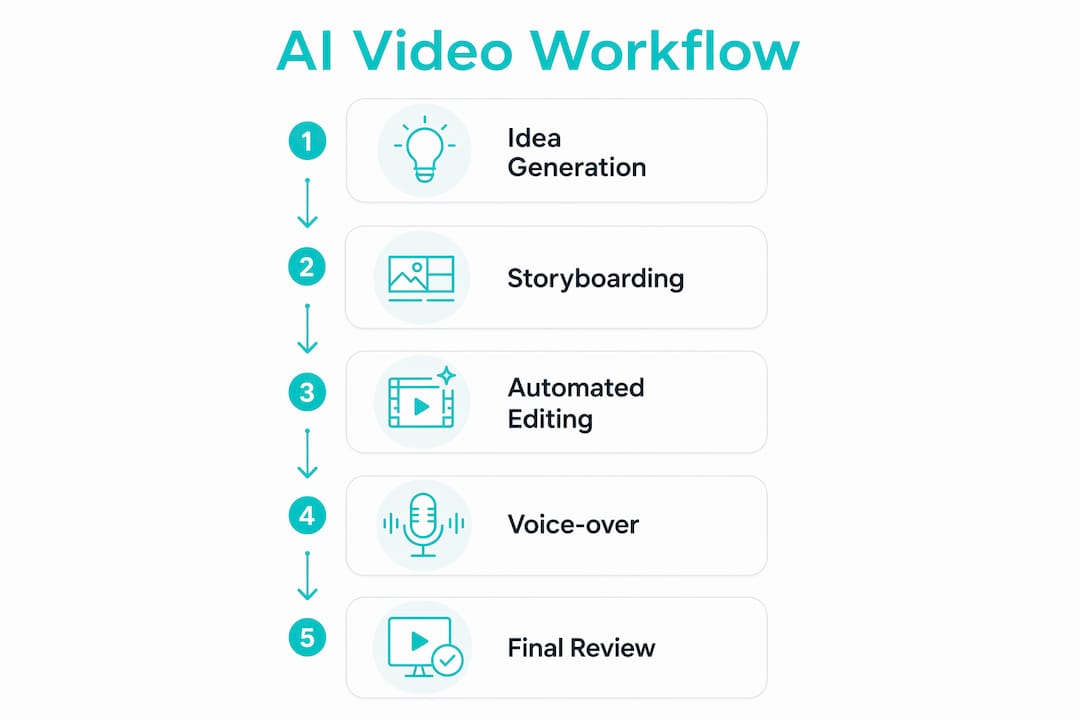
Start with a premise, a topic, or even a single sentence. AI scripting tools expand that into a full script, suggest scene breaks, and flag pacing issues. Your job at this stage is to edit for voice and accuracy, not to write from scratch.
Step 2: Storyboarding and visual asset creation
Feed your script into an AI storyboarding tool. It generates scene-by-scene visual references, either as static images or short video clips. This is where machine learning video editing begins to show its value: the AI matches visual style to script tone automatically.

Step 3: Automated editing and scene assembly
The AI assembles your scenes in sequence, applies transitions, and syncs audio to visuals. Most platforms handle color grading and pacing adjustments at this stage too.
Step 4: Voice-over and subtitle generation
AI voice synthesis generates narration from your script. Subtitle generation runs in parallel, producing accurate captions that meet platform accessibility standards.
Step 5: Final review and distribution prep
Watch the assembled video once through. Adjust timing, swap a scene, or tweak the script if something feels off. Then export in the format your target platform requires, whether that’s a 9:16 vertical for TikTok or a 16:9 horizontal for YouTube.
Pro Tip: Keep a “director’s eye” pass as a non-negotiable final step. AI handles the mechanics well, but it doesn’t know your audience the way you do. A five-minute review catches the moments that feel technically correct but creatively flat.
What to look for when choosing an AI video platform
Not every platform fits every production need. Evaluate tools across these dimensions before committing.
| Feature | What to look for |
|---|---|
| Automation depth | Does it cover scripting, editing, voice-over, and publishing, or just one stage? |
| User-friendliness | Can a non-editor produce a finished video without a tutorial? |
| Software integration | Does it connect with tools you already use, like editing software or social schedulers? |
| Output quality and formats | Does it export in 4K? Does it support vertical and horizontal formats? |
| Pricing model | Credit packages, pay-per-episode, or subscription? Match the model to your volume. |
| Content ownership | Do you own the IP outright, or does the platform retain a license? |
| Data privacy | Where is your content stored, and who can access it? |
A few points deserve more than a table cell. Pricing structure matters more than headline price. AI video credit packages let you pay for what you produce rather than locking into a monthly seat fee, which suits creators whose output volume varies. Content ownership is the other non-negotiable: read the terms before you publish anything commercially. Some platforms retain a broad license to your output, which creates problems the moment you try to monetize or license your content elsewhere.
Data privacy follows the same logic. If you’re producing branded content or proprietary training material, you need to know exactly where your assets are stored and who can access them. Platforms that are vague on this point are worth avoiding.
Pro Tip: Run a single test project on any platform before buying a large credit package. The gap between a platform’s demo videos and what you can actually produce in your first session tells you everything about the real learning curve.
How Iguanify approaches episodic AI video production
Most AI video tools are built for one-off content. Episodic production, where you need the same characters, visual style, and story continuity across ten or twenty episodes, exposes their limits fast. Character designs drift. Faces change between scenes. The visual tone shifts without warning.
Iguanify is built specifically for this problem. The platform automates the full production process for serialized drama, starting from a single script premise and producing a complete episode with consistent characters, dialogue, sound, and formatting ready for TikTok, YouTube, or Instagram. You don’t need a production team or a manual editing pass.
Key advantages of Iguanify’s approach:
- Character continuity: The same cast appears consistently across every episode, which is the foundational requirement for serialized storytelling.
- Full content ownership: You own the IP outright. No platform license, no revenue share on your content.
- No manual editing required: The platform delivers a finished episode, not raw clips you still have to assemble.
- Instant publishing readiness: Output is formatted for vertical video platforms from the start, not adapted after the fact.
- Series-level production: You can produce an entire season from a single creative premise, with the series bible, poster design, and recurring cast all generated as part of the process.
The fast video production guide on Iguanify’s blog goes deeper on how this workflow plays out episode by episode, including how to maintain creative control while letting the automation handle the heavy lifting.
For creators building a faceless drama channel or producing micro-drama content at volume, this kind of end-to-end automation is the difference between a sustainable production schedule and burning out after three episodes.

Iguanify’s AI drama generator takes your premise and delivers a finished episode, complete with cast, script, sound, and vertical formatting, ready to post. No editing suite. No production team. You own everything you create.
Key Takeaways
A well-structured AI video workflow covers every stage from scripting to publishing, and the platforms that handle all stages in one pass save the most time.
| Point | Details |
|---|---|
| Workflow covers five stages | Scripting, storyboarding, asset creation, editing, and distribution each benefit from AI automation. |
| Use cases favor high-volume needs | Marketing, training, social media, and episodic drama all gain the most from automated production. |
| Ownership terms vary by platform | Always confirm you hold full IP rights before publishing or monetizing AI-produced content. |
| Episodic content needs continuity tools | General-purpose AI tools struggle with character consistency across episodes; purpose-built platforms solve this. |
| US leads AI investment | US corporate AI investment supports the development of advanced video production tools available to American creators. |