 IGUANIFY
Automated Episodic Production: A Solo Creator’s Playbook
Automated episodic production is the use of AI to turn a single premise into a finished, serialized video series, complete with recurring characters, dialogue, voiceover, and delivery-ready exports for TikTok, YouTube, and Instagram. You write one line describing the show. The system builds the cast, writes the scripts, generates the scenes, and hands you a vertical video ready to post.
For solo creators, the verdict is straightforward: this approach works, and it works now. Iguanify is a practical option built around this exact workflow, and it holds character continuity across episodes while giving you full ownership of what gets made. Here’s what that typically means for your production life:
- Episode turnaround time is significantly reduced compared to the days a small crew would typically require.
- Full rights to the finished episodes, so you can post, monetize, or license them freely.
- No editing software, voice actors, or shot lists required to launch a series.
Key Takeaways
Automated episodic production succeeds when a platform combines series memory, per-shot visual anchors, and automated QC to prevent character drift across episodes.
| Point | Details |
|---|---|
| Anchors prevent drift | Per-shot visual anchors keep consistency scores high; removing them caused a documented drop from 7.99 to 0.55. |
| Pipeline beats point tools | An integrated script-to-export workflow avoids the friction of stitching separate apps together. |
| Lock canonical assets early | Freeze anchor images and voice profiles before generating a season to avoid costly rework. |
| Budget realistically | Expect roughly an hour of review, QC, and publishing time per episode beyond generation itself. |
| Iguanify maps to the checklist | Single-line premise to owned, finished episode with built-in identity persistence and instant delivery. |
Table of Contents
- What Automated Episodic Production Actually Does
- Why Do AI Characters Look Different Between Episodes?
- How Do You Produce a First Season Step by Step?
- What Should You Look For in an Episodic Production Platform?
- How Much Time and Money Should You Budget Per Episode?
- How Iguanify Handles Continuity and Ownership
- What Actually Changes When You Serialize Production
- Try Iguanify Before You Commit to a Season
- Sources
What Automated Episodic Production Actually Does
A real episodic pipeline is not one AI tool bolted onto another. It’s a sequence, and every stage feeds the next one without you re-uploading files or re-explaining your characters.
- Series bible — locks your world, tone, and character descriptions so nothing drifts episode to episode.
- Script generation with memory — writes dialogue and plot beats that remember prior episodes, not just the current prompt.
- Dialogue and voiceover — converts script to spoken performance with consistent voice casting.
- Scene and visual generation with anchors — builds each shot using locked reference images of your characters.
- Automated assembly and QC — stitches shots, checks pacing, and flags inconsistencies.
- Captions, metadata, and export — formats everything for vertical viewing with platform-ready text and thumbnails.
Stitching separate tools for each stage creates friction at every handoff. A single integrated pipeline compresses that same work into minutes rather than a multi-day relay between apps.
Pro Tip: Before generating a full season, run one throwaway episode through the entire pipeline just to confirm your series bible produces the tone you want. Fixing the bible early is cheaper than fixing ten episodes later.
Why Do AI Characters Look Different Between Episodes?
Cumulative drift is the real obstacle in episodic AI video, and it’s the reason most people who try to automate a series abandon it by episode three. Drift happens when a model regenerates a character from text description alone. Small variations compound: a jawline shifts, a jacket changes color, a hairstyle resets. Over a season, your lead character can end up looking like three different people.
Research from December 2025 measured this directly.
The numbers: Character consistency scores dropped from 7.99 down to 0.55 when per-shot visual anchors were removed from the generation process.
That’s not a marginal dip. It shows that text-only conditioning, the “describe the character in words” approach, cannot hold a face steady across a series. Anchoring the model to actual reference images is what keeps a character recognizable from episode 1 to episode 12.
Practical mitigations worth building into any workflow:
- Attach a locked visual anchor image to every shot, not just the first one.
- Maintain persistent identity embeddings rather than regenerating identity from scratch each time.
- Build a curated reference library covering expressions, angles, and wardrobe variants.
- Run automated QC scoring that flags and requeues frames that fall below a consistency threshold.
- Freeze your generation configuration once a season starts; don’t tweak settings mid-run.
How Do You Produce a First Season Step by Step?
You don’t need a writers’ room to launch a series. You need a clean sequence and the discipline to lock your canonical assets before you start generating episodes at scale.
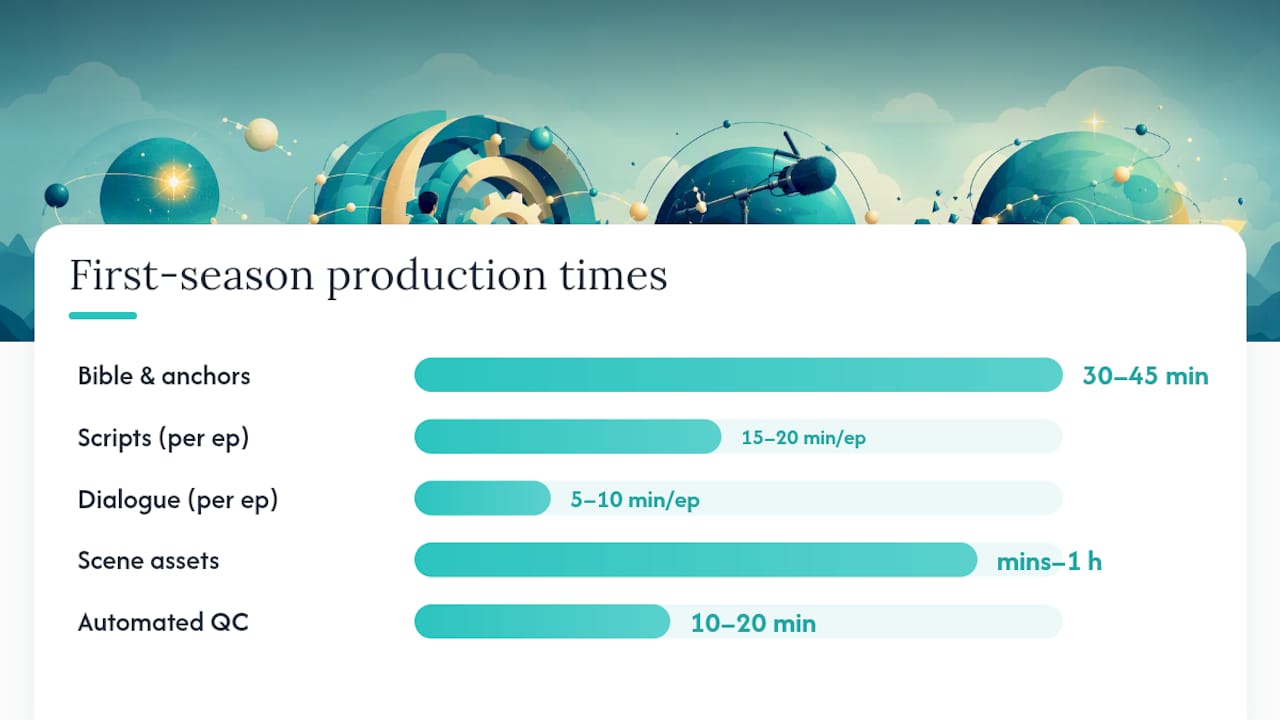
- Build your series bible and anchor images (30–45 min). Define your world, your two or three leads, and generate their reference images first.
- Generate scripts using series memory (15–20 min per episode). Feed the premise once; let the system carry character voice and prior plot points forward.
- Produce dialogue and voiceover (5–10 min per episode). Confirm the voice profile matches what you locked in step one.
- Create scene assets using your anchors (varies with queue length, often minutes to an hour).
- Assemble and run automated QC (10–20 min). Check pacing, continuity, and any flagged frames before moving on.
- Export vertical deliverables and publish or queue (10–15 min). Confirm captions, thumbnail, and metadata are platform-correct.
Before you hit publish, run a short QC pass: does the character match the anchor image, does the voice match the locked profile, and does the pacing hit a hook within the first three seconds?
Pro Tip: Write and queue three to five scripts in one batch instead of one at a time. Batching reduces model warm-up and keeps identity drift lower than generating episodes one-off, since the system stays “in character” across the whole run.
What Should You Look For in an Episodic Production Platform?
Not every AI video tool is built for series work, and the gap shows up fast once you try to produce episode four. Look for these before you commit:
- Series memory that carries plot and tone forward, not a tool that treats every prompt as a blank page.
- Persistent cast and identity support, so your lead doesn’t need re-description every episode.
- Per-shot visual anchors, the specific fix the arXiv findings point to for consistency.
- Automated QC and regeneration, so bad frames get caught and reshot without your manual review.
- Delivery-ready exports sized and captioned for vertical platforms out of the box.
- Clear IP ownership spelled out in plain language, not buried in a terms page.
- Predictable pricing, whether that’s credits or a subscription, tied to your actual publishing cadence.
Red flags run the opposite direction: no persistent identity system, exports that still need a manual edit pass, vague ownership language, or no QC layer at all. If a platform can’t show you how it prevents drift, assume it doesn’t. And if pricing is unclear about what one episode actually costs, you’ll struggle to plan a season budget. Tools built for single viral clips, rather than continuity across a cast, tend to fail this test first.
How Much Time and Money Should You Budget Per Episode?
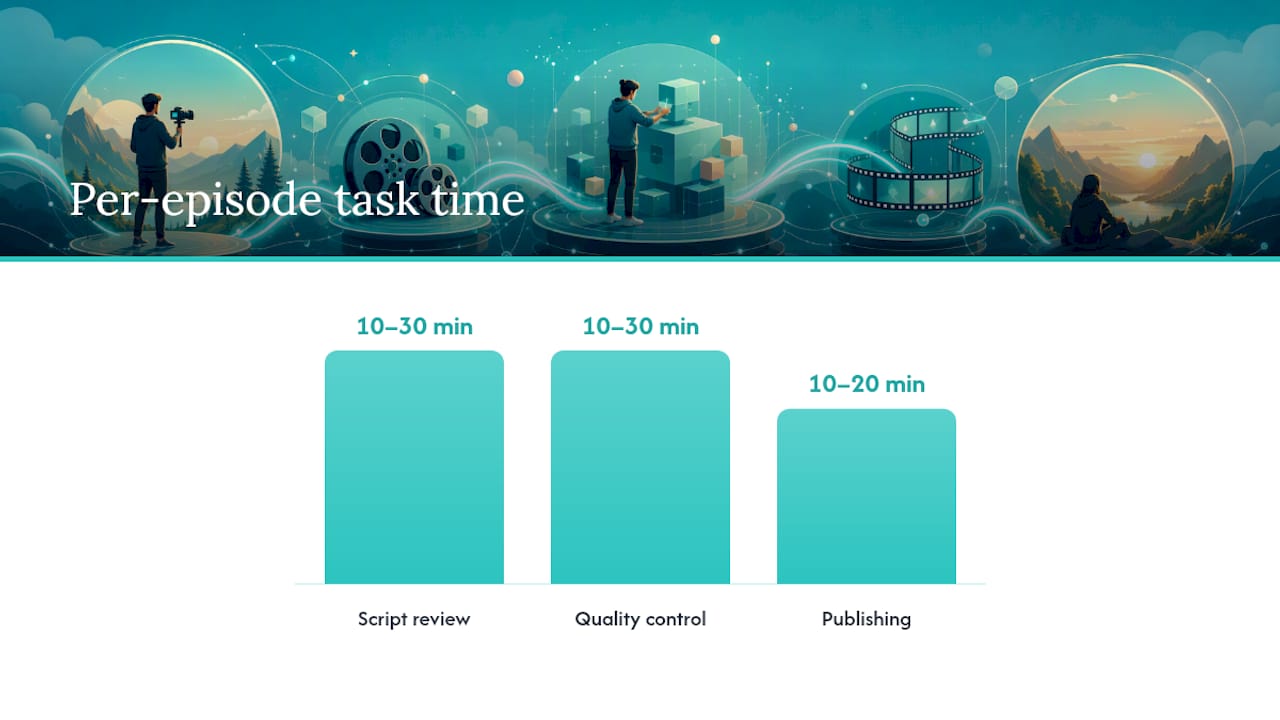
Realistic planning beats optimistic guessing. Here’s a rough breakdown for a single episode once your series bible and anchors already exist:
- Script review: 10–30 minutes, mostly reading and light editing.
- Generation and synthesis: minutes to a few hours, depending on queue volume and episode length.
- Quality control: 10–30 minutes to check continuity and catch flagged frames.
- Publishing: roughly 10–20 minutes to confirm captions, metadata, and scheduling.
On cost, most platforms in this space run on a credit model rather than a flat subscription, so your per-episode spend scales with how much you produce. That structure suits creators publishing in bursts rather than a fixed weekly output. For a fuller breakdown of what a season actually costs to produce, our AI video cost guide walks through the math in more detail.
One trade-off worth naming: faster throughput reduces the room for micro-polish on any single shot. Set an acceptable quality threshold up front and lean on your QC pass to catch anything that crosses it, rather than trying to perfect every frame manually.
How Iguanify Handles Continuity and Ownership
Iguanify was built around the exact pipeline above, not as an add-on to a general video generator. You write a single line of premise, and the platform builds the series bible, cast, scripts, and finished episodes from there.
- Single-line script to finished episode, so the heavy lifting starts from one sentence, not a shot list.
- Recurring cast and identity persistence across the season, addressing the drift problem the arXiv data highlights.
- AI dialogue writing built into the scriptwriting stage rather than handled by a separate tool.
- Real-time production and instant delivery, cutting the wait between generating an episode and having it ready to post.
- Full user ownership of every episode produced, with no licensing ambiguity around reposting or monetizing.
Because anchors and identity persistence are built into generation itself, you spend less time manually checking whether your lead character looks the same in episode 6 as episode 1. The pipeline checks that for you before an episode reaches your export queue.
| Point | Details |
|---|---|
| Continuity is engineered in | Persistent identity anchors reduce the manual QC work of catching drift episode to episode. |
| One input, full episode | A single-line premise expands into script, cast, dialogue, and finished video without added tools. |
| Ownership is explicit | Creators retain full rights to produced episodes, removing licensing ambiguity before publishing. |
What Actually Changes When You Serialize Production
Producing a series instead of one-off clips forces a different rhythm. You stop thinking episode by episode and start thinking in seasons, because a character’s face, voice, and wardrobe have to survive a dozen releases, not just one upload.
The single highest-leverage habit is locking your anchor images and voice profile before you generate a single script. Treat them as canonical the moment you approve them. Every downstream episode inherits whatever inconsistency you let slip through at that stage, and fixing it later means regenerating work you already published.
— Leonard
Try Iguanify Before You Commit to a Season
Iguanify turns a single premise into a finished, owned episode without the drift problem that derails most solo attempts at serialized AI video. You skip the manual re-editing that comes with stitching together separate script, voice, and video tools, and you keep full rights to what gets produced.

Start with a free show concept and cast generation before spending a single credit. Preview how your characters look and sound, confirm the tone matches your premise, and only then move to producing full episodes. If you’re building something closer to short-form vertical drama, the ReelShort-style production guide shows how that format maps onto the same pipeline. When you’re ready to produce your first episode, head to the AI drama generator and turn your premise into a finished season.
Sources
- Character consistency constraints in AI video generation (arXiv)
- How to automate YouTube video production end-to-end with AI (Kliptory blog)
- How AI video platforms keep characters consistent (Lychee blog)