 IGUANIFY
AI Dialogue Writing for Episodic Creators: A Producer’s Guide

AI dialogue writing, in the context of serialized episode production, means generating character-locked spoken lines inside an automated orchestrator pipeline that converts a single natural-language request into a complete episode: script, storyboard, keyframes, and final video. If you’re buying episode-production credits to publish on TikTok, YouTube, or Instagram, this is the workflow that saves you from rebuilding context every session and keeps your cast sounding like themselves across every episode.
The short recommendation: lock your character bibles and scene beats before you spend a single credit. Everything downstream, from voice synthesis to lip-sync, depends on those anchors being set.
- AI dialogue generation sits between character lock and voice synthesis in the pipeline.
- A one-prompt request feeds an orchestrator that routes tasks to specialist agents.
- Locked assets (character bibles, multi-view sheets, saved project state) carry continuity across episodes without manual re-entry.
Key Takeaways
AI dialogue writing for serialized episodes requires locked character assets, an orchestrator that holds project state, and human QA gates at every major handoff to keep quality predictable and credit spend under control.
| Point | Details |
|---|---|
| Lock assets before credits | Freeze character bibles, voice IDs, and multi-view sheets before purchasing any episode credits. |
| Use the 3-Take Rule | Budget three generations per complex shot and flag anything that fails MVF after three takes for post-production. |
| Context beats fidelity | Agent context and memory, not raw model quality, determined whether a six-episode series held character consistency. |
| Verify rights in writing | Confirm ownership and platform content policies before purchase, not after publishing. |
| Iguanify covers the full pipeline | Iguanify’s credit-based model produces script through platform-ready 9:16 MP4 with locked characters and full creator ownership. |
Table of Contents
- How does AI dialogue generation fit into an episodic production pipeline?
- What does the step-by-step workflow look like from prompt to finished episode?
- How do you keep dialogue and character voice consistent across episodes?
- What production controls and QA steps keep quality predictable?
- What export formats and platform settings do you need for delivery?
- How do credits, turnaround, and costs map to episode complexity?
- What does a one-prompt recipe look like in practice?
- What limitations and ethical considerations should you check before publishing?
- What should you look for when evaluating an AI episodic-production platform?
- What the transition to orchestrator-based production actually feels like
- Iguanify handles the full episodic pipeline, from dialogue to delivery
- Sources
How does AI dialogue generation fit into an episodic production pipeline?
Dialogue generation is not the first step. It follows character design and beat planning, and it precedes voice synthesis and lip-sync. Getting that order right is what separates a clean production run from a credit-burning restart.
The PureVis multi-agent orchestrator demonstrates this clearly: it separates planning, image, video, and QA into replaceable layers (orchestrator, director, visual_director, image_gen, video_gen, vision_analyzer) and persists local project state under output/projects/. Each agent handles one job. The director routes the script; the visual_director translates scene beats into shot parameters; image_gen and video_gen execute; the vision_analyzer checks the output. Dialogue feeds the director layer as structured scene text, not raw prose.
Agent-based systems that hold project context reduce repeated explanations and maintain continuity better than prompt-only workflows. A test project using an agent stack kept references, show notes, and visual rules in a single context store and produced six consistent episodes without restating base details each time. That is the production multiplier: context stored once, reused every episode.
- Character lock first: face, wardrobe, and style anchors must be frozen before any dialogue is generated.
- Asset persistence: character bibles, multi-view reference sheets, and storyboard JSON files flow between episodes automatically when the orchestrator holds project state.
- Swappable backends: image_gen and video_gen can be replaced without changing the top-level creative workflow, so you are not locked to one model provider.
Pro Tip: Before your first credit purchase, export your character bible as a JSON or structured text file and confirm the platform can ingest it as a persistent reference. If it cannot, your dialogue will drift by episode three.
What does the step-by-step workflow look like from prompt to finished episode?
- Project planning: Write a one-paragraph brief covering genre, tone, episode count, and target platform. Include aspect ratio (9:16), episode length, and any hard content constraints.
- Character design: Generate multi-view reference sheets (front, three-quarter, side) and lock face, wardrobe, and voice profile IDs. Do not proceed until these are approved.
- Script and scene breakdown: Submit your dialogue brief. The orchestrator produces a scene-by-scene script with speaker labels, line lengths capped for mobile readability, and emotional cues per line.
- Storyboard and keyframe generation: The director converts scene beats into a storyboard JSON. The AVB six-part shot recipe (Subject, Environment, Camera, Lighting, Mood, Style) structures each shot entry. Keyframe images are generated from those entries.
- Image-to-video synthesis: Approved keyframes feed the video_gen layer. Motion clips are typically short clips per shot.
- Voice and lip-sync: Locked voice profile IDs drive synthesis. Lip-sync parameters are applied per character, not per episode, so they carry over automatically.
- Edit and QA: The vision_analyzer runs automated checks. You review flagged frames manually.
- Render and export: Final 9:16 MP4, SRT captions, poster image, and metadata JSON are packaged for platform upload.
“A language model can produce a numbered shot list for each scene before generation — that single step converts creative intent into stable prompts that downstream image and video models can follow more reliably.” AVB Creator Playbook
Pro Tip: Write your one-prompt brief in this order: genre → character names → scene count → required deliverables → platform. Orchestrators parse structured input faster and produce fewer ambiguous outputs.
How do you keep dialogue and character voice consistent across episodes?
Consistency is a discipline, not a feature. The AIVid microdrama guide is direct about this: lock character bibles, multi-view references, and an asset registry early, because later episodes inherit the locked world rather than drifting. Drift is not a model failure. It is a workflow failure.
- Character bible: document vocabulary, cadence, filler words, sentence length limits (aim for lines under 12 words for vertical viewing), and emotional range per character.
- Voice profile IDs: record the exact ID string for each character’s voice asset and reuse it verbatim across every episode. Never regenerate a voice profile mid-series.
- Version control for scripts: keep numbered drafts (ep01_v1, ep01_v2) and log every change. When a line is revised, note why, so you can apply the same logic to future episodes.
- Lighting and spatial strings: Hailuo AI recommends generating a wide master reference shot as a virtual set blueprint and reusing exact lighting text verbatim across shots to prevent spatial drift.
Pro Tip: Treat your character bible as a living document with a version number. When you update a character’s vocabulary or tone, increment the version and note which episode introduced the change.
Statistic callout: Agent context and memory, not raw image or video fidelity, made the difference in finishing a multi-episode microdrama with stable characters — a finding that reframes where you should invest your setup time.
What production controls and QA steps keep quality predictable?
Techhoff’s analysis of the “Entropy Gap” frames the core problem well: visual drift accumulates across shots, and teams that treat AI outputs as finished product burn credits chasing artifacts. Treat every AI clip as raw footage. QA is not optional.
Minimum Viable Fidelity (MVF) checks to run on every episode:
- Temporal stability: no flickering faces or wardrobe changes mid-clip.
- Anatomical integrity: correct finger count, consistent eye color, no merged limbs.
- Brand-compliant lighting: color temperature matches the master reference shot.
- Caption sync: spoken line and on-screen text are within one frame of each other.
The 3-Take Rule: budget multiple generations per complex shot. If a shot has not passed MVF after several takes, flag it for post-production rather than continuing to reroll. Endless rerolls are the fastest way to exhaust a credit pack.
Automated vs. manual review:
- Automated: vision_analyzer flags frame-diff drift, anatomical anomalies, and lighting deviations.
- Manual: a human reviews flagged frames, approves or rejects, and logs the decision.
Pro Tip: Set your stop criteria before you start generating. Decide in advance what “good enough” looks like for a 15-second promo versus a 60-second episode. Applying the same standard to both wastes credits on the promo and under-delivers on the episode.
What export formats and platform settings do you need for delivery?
A finished episode package for vertical platforms should include:
- 9:16 MP4 with burn-in captions (for autoplay-safe viewing without sound).
- Separate SRT file for platforms that accept external caption tracks.
- Poster image and thumbnail sized to each platform’s current spec.
- Metadata JSON with title, description, tags, and episode number.
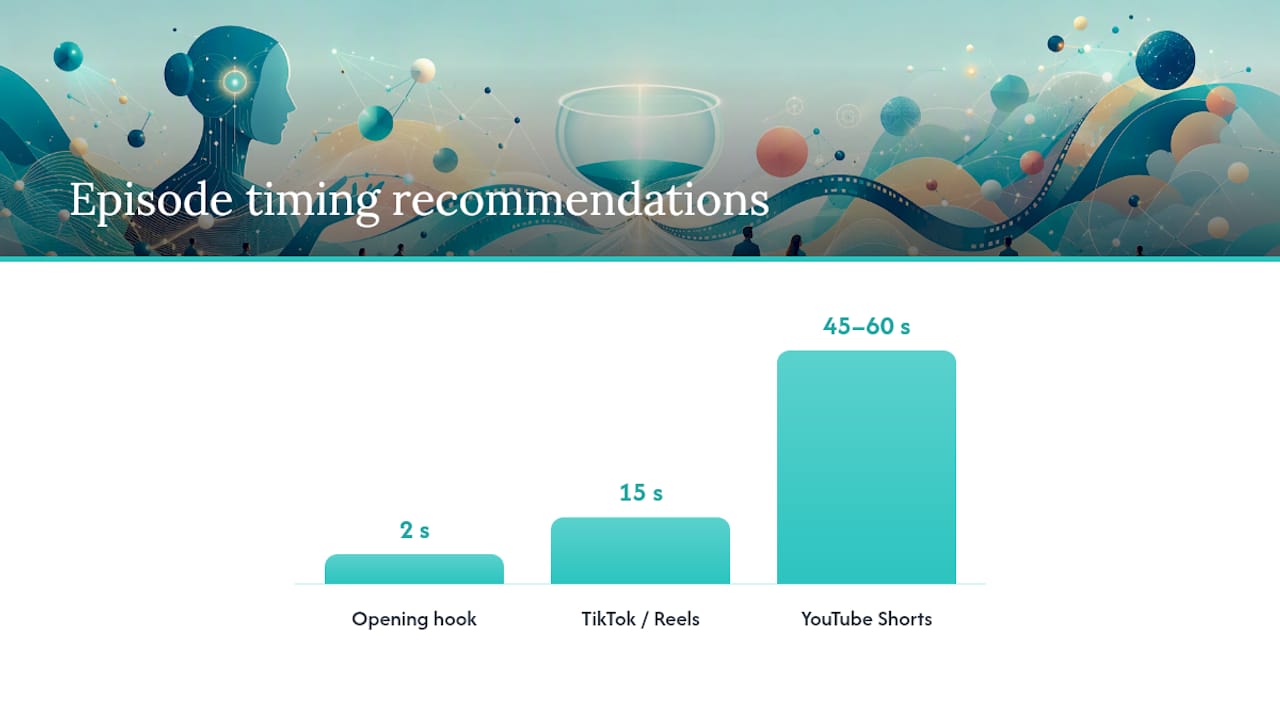
Platform-specific notes: TikTok and Instagram Reels favor hooks in the first two seconds, so confirm your opening frame is a close shot with visible action. YouTube Shorts accepts the same 9:16 MP4 but rewards slightly longer watch time, so a 45–60 second episode often outperforms a 15-second clip there. Loudness targets vary; aim for a true peak of -1 dBFS and an integrated loudness near -14 LUFS for most platforms.
On ownership: under Iguanify’s model, creators retain full rights to the episodes produced. Request written confirmation of this before purchase and keep it on file. Platform content policies change, so verify your episode does not trigger automated content flags before scheduling a post.
For reference images and visual assets that feed your storyboard, PTT Music’s photo library is a partner resource worth checking when you need clean reference shots for character or environment design.
How do credits, turnaround, and costs map to episode complexity?
Credit costs scale with scene count, character count, revision rounds, and native audio. A short 15-second promo typically requires fewer credits than a 60-second single episode, which in turn costs less than a multi-episode pack with a full cast and original voice synthesis.
Typical production tiers:
- 15-second promo: 1–2 scenes, 1–2 characters, minimal revisions. Fastest turnaround, lowest credit spend. Suitable for testing a new character or concept.
- 60-second single episode: 3–6 scenes, 2–4 characters, one revision round. Mid-range credit spend. Standard for a serialized TikTok or Shorts episode.
- Multi-episode pack: 6+ episodes, recurring cast, asset reuse across episodes. Per-episode credit cost drops when you buy in volume because locked assets reduce regeneration overhead.
Turnaround depends on fidelity tier and iteration count. A clean first-pass episode with locked assets and a well-structured brief can complete in a single session. Add two revision rounds and that timeline extends. Treating AI outputs as raw footage and applying MVF checks before requesting revisions keeps iteration counts low and turnaround predictable.
- Finalize your brief and lock all assets before purchasing credits.
- Run a 15-second test episode first to validate character and voice consistency.
- Buy a multi-episode pack only after the test episode passes your MVF checklist.
What does a one-prompt recipe look like in practice?
Here is a copy-ready one-prompt structure for a 15-second promotional micro-episode:
The orchestrator routes that request through the director (script and scene breakdown), visual_director (shot parameters using Subject/Environment/Camera/Lighting/Mood/Style), image_gen (keyframes), video_gen (motion clips), and vision_analyzer (QA). Outputs land in the project folder as structured files, not a single rendered video you cannot edit.
The PureVis demo follows this same path: natural-language input → planning → storyboard JSON → keyframes → video synthesis → visual QA, with project state persisted locally so the next episode picks up where this one left off.
Pro Tip: Always include locked character reference IDs in your prompt. An orchestrator that cannot find a reference ID will generate a new character rather than failing visibly, and you will not notice until the episode is rendered.
- Write the prompt using the structure above.
- Confirm reference IDs are active in the project state before submitting.
- Review storyboard JSON before keyframe generation starts.
- Approve keyframes before video synthesis begins.
- Run MVF checks on motion clips before requesting captions and final render.
What limitations and ethical considerations should you check before publishing?
No AI production pipeline eliminates post-production entirely. Know the failure modes before you publish.
-
Spatial and visual drift: fine motor interactions (hands picking up objects, fingers on keyboards) remain the most error-prone outputs. Budget post-production time for these shots.
-
Physics failures: cloth simulation, liquid, and hair motion are inconsistent across model providers. Flag these shot types during storyboard review, not after rendering.
-
Likeness and identity: do not generate realistic likenesses of real, identifiable individuals without explicit rights. This applies to voice synthesis as well as visual generation.
-
Platform disclosure: TikTok, YouTube, and Meta each have AI content disclosure requirements. Check current platform policies before scheduling any post. Requirements change faster than most production guides update.
-
Ownership confirmation: get it in writing from your platform provider before purchasing credits.
-
Content policy check: run your script against each platform’s prohibited content list before generating assets.
-
AI disclosure: add the required label at upload, not as a post-publish edit.
What should you look for when evaluating an AI episodic-production platform?
The buying decision comes down to five criteria. Use this as your evaluation checklist.
- Character locking: can the platform freeze face, wardrobe, and voice profile across episodes without manual re-entry?
- Asset persistence: does the system store project state locally or in the cloud, and can you export your assets if you leave?
- Multi-agent orchestration: are planning, image, video, and QA handled by separate, replaceable agents, or is it a single monolithic model?
- QA tools: does the platform include automated vision analysis, or do you review every frame manually?
- Rights assignment: does the creator own the output, and is that confirmed in writing?
Key questions to ask before purchasing:
- How does the platform handle character continuity across six or more episodes?
- How many rerolls are covered per credit, and what triggers an additional charge?
- Can you export raw assets (storyboard JSON, keyframe images, SRT files) separately from the final render?
- What happens to your project state if you do not purchase credits for 90 days?
Red flags: no asset export option, ownership language that assigns rights to the platform, no vision-analysis or QA layer, and turnaround estimates that do not account for iteration rounds. An agent platform that holds project context and lets you swap model backends without rebuilding your workflow is a meaningful operational advantage over a prompt-only tool.
What the transition to orchestrator-based production actually feels like
The first episode took longer than expected. Locking the character bible, building multi-view reference sheets, and structuring the initial brief felt like overhead compared to just typing a prompt and hitting generate. It was not. Every hour spent on setup saved three hours of revision later.
The iteration time surprised me most. Not because the model outputs were poor, but because approving storyboard JSON before keyframe generation, and approving keyframes before video synthesis, adds deliberate checkpoints that a prompt-only workflow skips. Those checkpoints are where you catch drift before it costs credits. After the first episode, the locked assets carried forward automatically, and episodes two through five moved noticeably faster. The learning curve is front-loaded, which is the honest version of what “one-prompt production” means in practice.
Iguanify handles the full episodic pipeline, from dialogue to delivery
Iguanify’s AI Drama Generator implements the orchestrator-plus-asset-lock approach this article describes. You submit a single brief, and the platform produces a complete episode: script, storyboard, keyframes, motion clips, captions, and a platform-ready 9:16 MP4. Characters stay locked across every episode in your series. You own the IP.

- One-line brief to full episode: no editing suite, no production team required.
- Character bible locking: face, wardrobe, and voice profiles persist across your entire series.
- Credit-based packs: buy what you need, no subscription or recurring fees.
- Platform exports: 9:16 MP4, SRT, poster image, and metadata JSON included.
- Full ownership: you retain all rights to every episode produced.
Check the AI Micro Drama Generator for series-level credit pricing, or review the vertical drama production guide for framing and caption best practices before you write your first brief.
Sources
- susirial/purevis_ve_cli: PureVis Ve CLI (demo and docs)
- I Let AI Agents Build a Whole TV Series. Here’s the Honest Breakdown.
- Scaling Generative Video: A Creative Ops Audit of Consistency and Control - techhoff