 IGUANIFY
Recurring AI Characters: How to Keep One Face Across Episodes
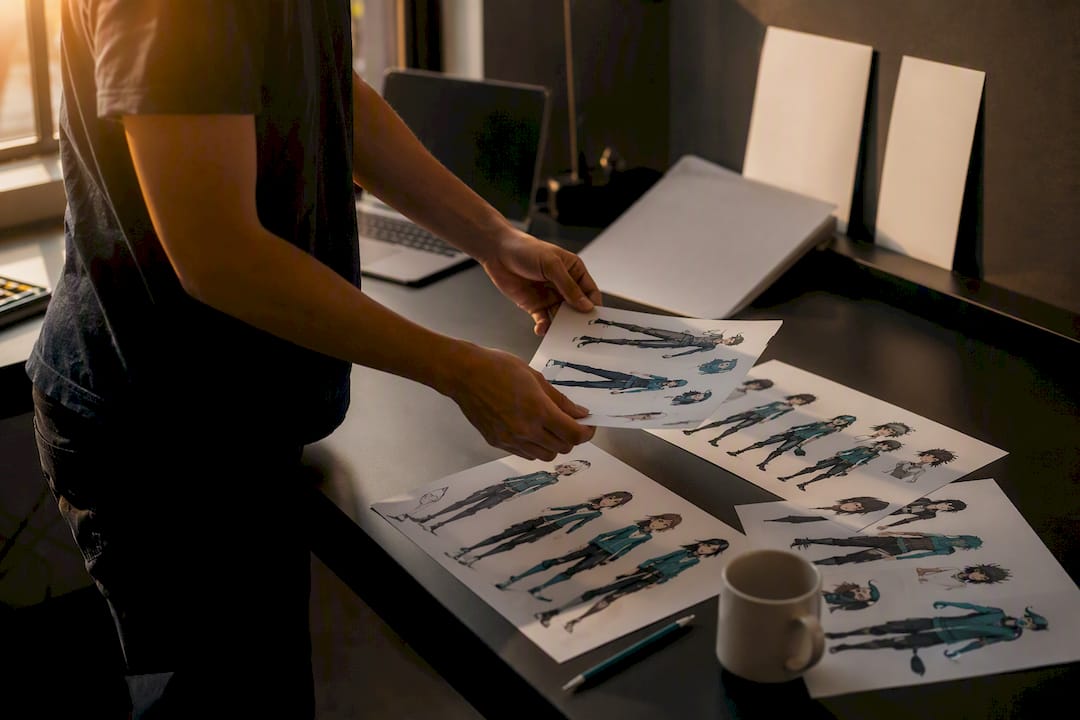
The fastest reliable way to build recurring AI characters is to create a single structured character master, both images and a written bible, and anchor it with either platform-level character memory or a light model adapter. Then you run that master through a repeatable image or video pipeline instead of re-prompting from scratch every time.
That’s the whole verdict. Everything else in this guide is the mechanics of making it work.
Three pillars hold this up: master assets (a locked reference sheet and a text profile that never changes), workflow discipline (the same prompt structure, the same settings, every session), and a persistence option (something that remembers the character so you’re not fighting the model each time). Skip any one of the three and the character drifts within two or three generations.
Here’s where creators actually land on effort versus payoff:
- Quick win (under an hour): A character sheet plus saved prompts gets you visually stable social posts and single images.
- Mid-tier investment (a weekend): A LoRA or embedding trained on your master images gets you strong identity lock for a short series.
- Production-scale (ongoing): A managed episodic pipeline, or a platform built for it, gets you continuity across dozens of episodes without you babysitting every frame.
Character consistency is the single biggest barrier creators report when working with generative tools. Survey data from Adobe, cited by AllAboutAI, found that many creators already use generative AI, yet consistency remains a frequent complaint. Pick your tier based on how many scenes you actually need to produce, not on how cool the advanced method sounds.
Key Takeaways
Reliable recurring AI characters depend on a locked character bible, a matched persistence method, and a repeatable generation pipeline, not clever prompting alone.
| Point | Details |
|---|---|
| Build the bible first | Lock a reference image set and a written profile before generating a single scene. |
| Match persistence to scale | Use saved-character memory under five scenes, an adapter for five to twenty, production tooling beyond that. |
| Fix video with keyframes | Anchor video generation to a proven still image instead of trusting motion synthesis alone. |
| Diagnose before you regenerate | Name the drifted attribute (face, outfit, pose, lighting) before applying any fix. |
| Scale with managed production | Iguanify anchors character continuity at the platform level across full episode runs, with creators retaining ownership of the output. |
Table of Contents
- Why Do AI Characters Lose Consistency Between Scenes?
- Which Workflow Should You Use: Quick, Robust, or Production?
- What Belongs in a Character Bible or Character Pack?
- How Do You Write Prompts That Actually Reduce Drift?
- Building Video Sequences Without Losing the Character Mid-Scene
- Saved-Character Memory, Model Training, or Managed Production: Which Fits Your Project?
- What Does the Research Say About Fixing Character Drift?
- How Do You Fix a Drifted Character Fast?
- What Legal and Ethical Issues Come With Recurring AI Characters?
- Can You Bring Recurring AI Characters Into Animation and Game Engines?
- How Do You Keep a Character’s Voice Consistent, Not Just Their Face?
- What Creators Get Wrong About Chasing Perfect Consistency
- Produce Episodes With a Character That Never Changes
- Sources
Why Do AI Characters Lose Consistency Between Scenes?
Most image and video models generate each output as an independent event. There’s no built-in memory connecting today’s render to yesterday’s, which means every new prompt is a fresh roll of the dice on face shape, hair color, and outfit details unless you actively force continuity.
Four forces work against you, and each one needs a different fix.
Stateless generation is the root cause. Diffusion models sample from a probability distribution every time you hit generate, so identical prompts can still produce a subtly different jawline or eye color on the second try. This isn’t a bug; it’s how the technology works, and no amount of clever wording eliminates it entirely.
Prompt ambiguity compounds the problem. If your character description changes even slightly between sessions, “athletic build” one day and “toned physique” the next, the model treats those as different instructions, not synonyms. Vague or shifting language is the single most avoidable source of drift.
Foreground and background entanglement is a subtler failure most creators never diagnose. Academic work on this problem, including the CharaConsist research presented at ICCV 2025, shows that many generation systems entangle a character’s identity with the scene around them. Change the background and the model quietly reshapes the face too, because it never learned to separate “who this person is” from “where they’re standing.” CharaConsist addresses this with point-tracking attention and adaptive token merging, techniques that anchor identity to specific facial and clothing points rather than to the overall composition.
Video adds a fourth problem: temporal coherence. A character has to hold their identity across hundreds of consecutive frames, not just one still. Kling notes that this is precisely why video is harder than static images. A drift that’s invisible frame to frame becomes obvious once you watch the clip, which is why keyframe anchoring matters more in video than almost anything else you’ll do.
Know which of these four is hitting you, and you’ll know which fix actually applies.
Which Workflow Should You Use: Quick, Robust, or Production?
Not every project needs the same level of machinery. A single TikTok skit and a twelve-episode drama series have completely different consistency requirements, and using the wrong tier wastes either your time or your money.
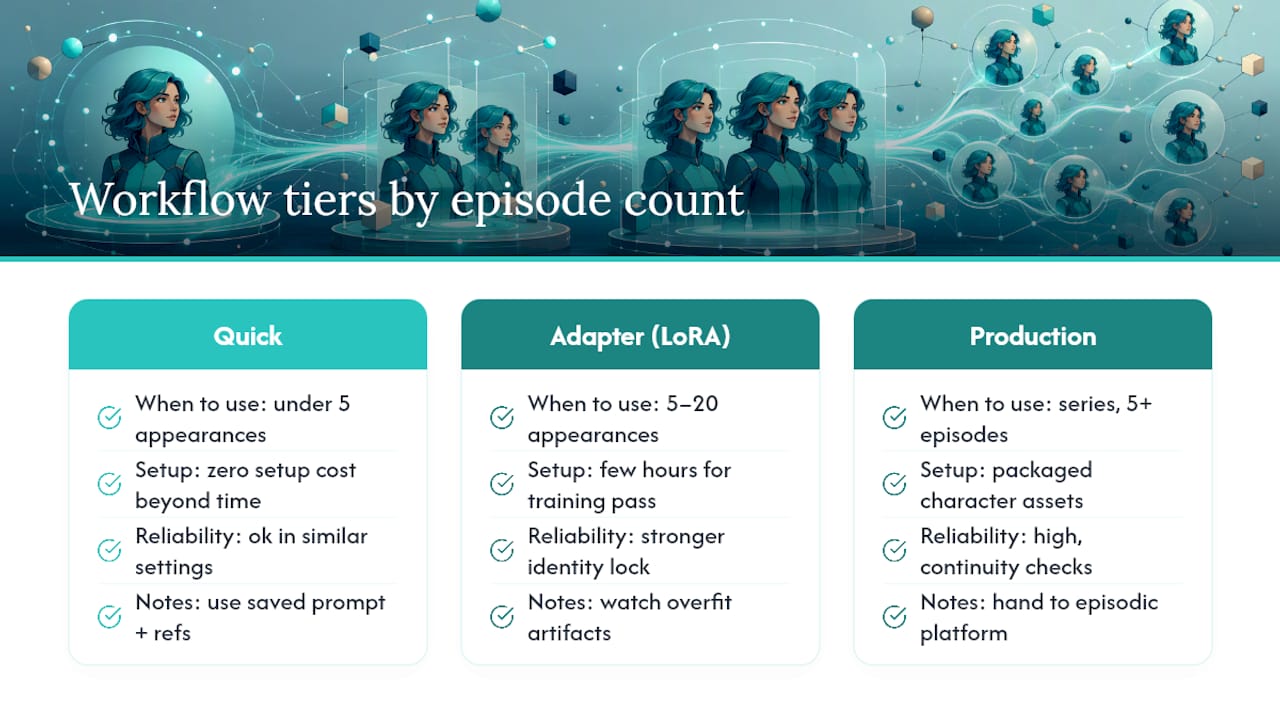
1. The quick-reference method. Build a character sheet (three to five reference images at different angles) and pair it with a saved prompt block you reuse verbatim. When you need a new scene, you feed the reference image into a tool with a subject-replacement or “change subject” feature and mask in the new setting rather than regenerating the whole frame. Platforms with saved-character memory, like Kapwing’s consistent character tool, let you upload a reference once and reuse that identity across projects without retraining anything. This tier gets you through a handful of scenes with zero setup cost beyond your time.
2. The model adapter or light fine-tune. When a character needs to survive dozens of generations across different poses and lighting, prompt-only methods start failing. A LoRA (low-rank adaptation) trained on ten to twenty clean images of your character, or an embedding built the same way, teaches the model the character’s actual features instead of describing them in words each time. Practical creator guidance points to combining a strong master reference with lightweight adapters as the sweet spot between speed and reliability, better identity lock than prompting alone, without the cost of a full model retrain. Implementation is straightforward if you keep training images consistent in lighting and crop, but budget a few hours for the training pass and a review round to catch overfit artifacts (waxy skin, repeated backgrounds baked into every output).
3. The production pipeline. Series work, five or more episodes, multiple characters, recurring locations, needs character assets treated as packaged, reusable objects rather than one-off files. This is where you build a character pack (covered in detail in the next section), run continuity checks against previous episodes before publishing, and often hand the heavy lifting to a platform built specifically for episodic output rather than stitching together five separate tools yourself. Iguanify’s showrunner-style approach exists precisely for this tier, where manual continuity checking across dozens of scenes stops being a reasonable ask for a solo creator.
Pro Tip: Match your workflow tier to your episode count, not your ambition. Starting a twelve-part series with only a saved prompt block is the single most common reason creators abandon a series by episode three.
Decide with one question: how many times will this character appear, and across how many distinct settings? Under five appearances in similar settings, go quick-reference. Five to twenty with varied poses, invest in an adapter. Beyond that, or if you’re publishing on a schedule, a production pipeline stops being optional.
What Belongs in a Character Bible or Character Pack?
A character bible is the document that keeps your character from becoming a different person every session. Think of it as the reference sheet a comic book artist keeps taped above their desk, except yours also has to feed directly into a generation tool.
The image set needs more than one flattering shot. You want a front-facing neutral pose, a three-quarter angle, a profile, and at least one full-body shot showing the outfit in the lighting you’ll actually shoot in. Production tutorials from Envato recommend building this master reference first, front, side, and back views, then reusing those exact images inside every downstream video generation step rather than regenerating a “similar” character each time.
The text profile is where most creators get sloppy, and it’s the easiest fix on this whole list. Write one locked paragraph of physical description and never rephrase it. “Athletic build” and “toned physique” read as two different characters to a model even though they mean the same thing to you. Add a short list of forbidden traits, details the model tends to hallucinate that you want to actively suppress, like “no glasses,” “no facial hair,” or “no tattoos,” functioning as negative prompts.
Naming and session hygiene matter more than most people expect. Creator workflows using named character sheets, a distinct name tied to a distinct visual reference, report far less bleed-through when working with multiple characters in the same project. Starting a fresh session with only the sheets you need for that scene, rather than every character you’ve ever built, also cuts down on the model borrowing traits from an unrelated character.
Here’s what a minimal, functional character pack should contain:
| Component | What to include |
|---|---|
| Reference images | Front, three-quarter, profile, and full-body shots in consistent lighting |
| Text profile | One locked physical description, never reworded between sessions |
| Forbidden traits list | Specific details to exclude, treated as negative prompts |
| Voice and tone notes | Speech patterns, vocabulary quirks, and emotional range for dialogue |
| Naming convention | A unique name mapped one-to-one with the visual reference set |
| File format | High-resolution PNG or JPEG references plus a plain-text or markdown profile document |
Package all of it into one folder, or one document if your pipeline allows attachments, and treat it as a single asset you drop into every new episode or scene rather than something you reconstruct from memory.
How Do You Write Prompts That Actually Reduce Drift?
Prompt structure matters more than prompt cleverness. The order you put information in changes how the model weights it, and creators who get consistent results tend to follow the same skeleton every time: character description, then action, then setting, then style modifiers.
Putting the character description first anchors the model’s attention on identity before it starts thinking about the scene. Reverse that order, lead with setting and style, and you’ll notice the character’s face becomes negotiable while the background stays locked in. That’s the entanglement problem showing up in your own prompt habits.
A few generation controls consistently help:
- Masks and subject-replacement tools let you keep an existing background or composition and swap only the character into it, instead of regenerating the whole frame and hoping the face survives.
- Fixed seeds are worth using when you want minor variations on an already-good result. Locking the seed and changing only one variable, pose or expression, keeps everything else anchored.
- Clamped style parameters (consistent CFG scale, consistent sampler) prevent the same prompt from producing wildly different renders session to session.
- Single-image identity anchors, the approach Ideogram’s Character feature is built around, work by locking identity from one reference photo across many subsequent generations, useful when you don’t want to build a full adapter.
There’s a real split between training-free and training-based batch consistency. Training-free methods, masking, fixed seeds, careful prompt order, work well for small batches and cost nothing but setup time. Training-based anchors, LoRAs and embeddings, cost more upfront but hold identity across far larger and more varied batches without you manually correcting each output.
Pro Tip: Generate four variations from the same locked prompt before you commit to a scene. If the face already wobbles across those four, no amount of post-editing will fix the underlying instability, fix the prompt or the anchor first.
Building Video Sequences Without Losing the Character Mid-Scene
Video punishes inconsistency in a way stills never do. A face that’s “close enough” in a single image becomes distractingly wrong once it shifts subtly across ninety frames of motion, which is why the smartest video workflows don’t try to solve continuity inside the video generator at all.
1. Generate stable keyframes first. Produce your strongest, most identity-accurate stills using the image workflow above, then use those keyframes as anchors for the video model rather than generating motion from a text prompt alone. This single step eliminates most of the drift that shows up in AI video, because you’re feeding the model a proven-correct starting point instead of asking it to invent one.
2. Replace subjects rather than regenerate them. When a scene needs your character in a new setting, composite the master reference into the new background or use a subject-replacement feature, instead of generating the character fresh in that context. Envato’s production guidance treats this as standard practice: build once, reuse everywhere, rather than rebuilding the character for every scene change.
3. Limit shot complexity until continuity holds. Extreme poses, fast camera motion, and rapid angle changes are exactly where video models lose the thread. Keep early scenes to moderate motion and simpler camera work, and save the ambitious cinematography for once you’ve confirmed the character holds up under easier conditions.
4. Run practical continuity checks before you publish. Sample frames every few seconds and lay them side by side. Look specifically at three things: does the face match your reference sheet, does the outfit match, and does the lighting direction stay consistent with the scene’s established source. Kling.ai’s guidance on this problem points out that consistency has to hold across hundreds of frames, not just a handful of samples, so spot checks at the start, middle, and end of a clip catch far more drift than checking only the opening frame.
Pro Tip: Build a simple visual regression habit: keep your original character sheet open in a second window while reviewing every new scene. Side-by-side comparison catches subtle drift, a slightly different nose bridge, a shifted hairline, far faster than reviewing footage in isolation ever will.
Treat video as a compositing problem more than a generation problem, and most of the “AI video looks uncanny” complaints disappear.
Saved-Character Memory, Model Training, or Managed Production: Which Fits Your Project?
Every persistence approach trades speed for fidelity somewhere. Knowing which trade-off you’re accepting up front saves you from rebuilding your workflow three episodes into a series.
Saved-character memory is the fastest and easiest option. Upload a reference image, name the character, and reuse it across projects, the model handles the rest. Fidelity holds up well for straightforward poses and static compositions but tends to soften on complex motion or unusual angles, since the underlying generation is still happening fresh each time with the reference as guidance rather than trained knowledge.
Model training (LoRA or embeddings) preserves identity more reliably because the model has actually learned the character’s features rather than referencing them. It takes real setup time, curating training images, running the training pass, testing for overfit, and it raises rights questions worth thinking through: who owns a model trained on your likeness or a client’s, and what happens if that adapter gets shared or reused elsewhere. Worth resolving before you start training, not after.
Managed episodic production offers the strongest continuity guarantee because the platform is built around treating character identity as a persistent object across an entire series, not a per-session setting you have to reapply. It costs more than a DIY prompt workflow but removes the ongoing manual QA burden, and clarity on content ownership becomes part of the deal rather than an assumption.
| Approach | Speed | Fidelity | Ownership clarity |
|---|---|---|---|
| Saved-character memory | Fastest | Moderate, weaker on complex motion | Depends on platform terms |
| Model training (LoRA/embeddings) | Moderate setup | High for trained poses | Requires resolving rights upfront |
| Managed episodic production | Slowest to set up, fastest per episode after | Highest, built for continuity | Typically explicit in platform terms |
If you’re producing under five scenes, saved-character memory covers you. Between five and twenty with varied settings, training an adapter pays off. Beyond that, especially on a publishing schedule, budgeting realistically for a managed production approach usually beats the hidden cost of your own hours spent fixing drift by hand.
What Does the Research Say About Fixing Character Drift?
The most rigorous answer to “why does this face keep changing” comes from academic work, not creator forums. CharaConsist, presented at ICCV 2025, diagnosed the entanglement problem directly and built a fix around it.
The core insight is that identity and background aren’t separate concerns to most generation systems, they’re tangled together by default. Point-tracking attention keeps facial and clothing features locked to specific points across a sequence, while adaptive token merging lets the background change without dragging the character’s identity along with it. That decoupling is what prevents the copy-paste artifacts and subtle identity shifts creators run into constantly.
Practical implications for your pipeline: if you’re seeing a character’s face shift every time you change the setting, you’re hitting exactly the failure CharaConsist was built to solve. Tools and platforms that implement point-tracking-style attention, or that separate character generation from background generation as distinct steps, will hold identity noticeably better than ones that generate everything in a single entangled pass.
Ownership matters just as much as technique. The U.S. Copyright Office’s guidance on AI-generated works advises creators to document their inputs and understand ownership expectations before relying heavily on AI tools, particularly important once you’ve invested real time into training a custom adapter on a character’s likeness.
Iguanify’s own approach leans on this research directly:
- Continuity is handled at the platform level across episodes, not re-solved manually per scene.
- Creators retain full ownership of the finished output.
- Production and delivery happen in real time, without a manual editing pass between script and finished episode.
Honest limitation: no automated pipeline, including this one, removes every need for human review. Complex action sequences and unusual props still benefit from a manual check before publishing, and no tool guarantees perfect results on the first render.
How Do You Fix a Drifted Character Fast?
When a character starts looking wrong, don’t start over. Diagnose first.
- Identify what actually drifted. Face shape, outfit color, pose proportions, or lighting direction, name the specific attribute before touching anything.
- Check your prompt wording against your locked profile. Most single-attribute drift traces back to rephrased description text, not a model failure.
- Apply the targeted fix. Face drift: regenerate from your master reference image, not from text alone. Outfit drift: add the exact outfit description back into your forbidden traits or locked profile. Pose drift: lower complexity and use a reference pose image. Lighting drift: specify a light direction and source explicitly instead of a vague mood word.
- Run a small regression batch. Generate three to four variations after the fix and compare against your character sheet side by side before committing to a full scene.
- Know when to escalate. If the same attribute drifts across three separate fix attempts, the issue is your persistence method, not your prompt. Move up a tier, from saved memory to a trained adapter, or from adapter to managed production.
Pro Tip: Keep a running log of which attribute drifted and what fixed it. After three or four episodes, that log becomes your own troubleshooting reference, often faster to consult than starting from general advice each time.
What Legal and Ethical Issues Come With Recurring AI Characters?
Ownership questions get more complicated the moment a character starts appearing across multiple episodes rather than a single image. The U.S. Copyright Office’s guidance on AI-generated works makes clear that documentation of your inputs, prompts, reference images, and the tools used matters for establishing what you actually created versus what the tool generated. If you’re building a character that will anchor a series, keep records of your character bible, your training images if you built an adapter, and the platform terms you agreed to.
Rights get murkier when a character is trained on a real person’s likeness, whether that’s yourself, a client, or a public figure. Training an adapter on someone’s face without clear consent creates exposure regardless of how the output gets used. If you’re building a character based on a real individual, get explicit permission and document it the same way you’d document any other content release.
Platform terms deserve a close read before you invest hours into a character. Some tools claim rights to outputs generated on their infrastructure; others grant full ownership to the creator. That distinction determines whether you can actually monetize, license, or move a character to a different platform later, so check it before you build a season around a character you might not fully own.
Ethically, disclosure matters more as AI characters get more convincing. Audiences generally respond well to transparency about AI-generated content; audiences who feel misled about what they’re watching respond far worse, and that reputational cost compounds across a series rather than a single post.
Can You Bring Recurring AI Characters Into Animation and Game Engines?
Moving a character from a still-image pipeline into an animation or game engine changes what “consistency” even means. A game engine needs a rigged 3D model with defined bone structures, not a flat reference image, so your character bible has to translate into something a technical artist or an automated rigging tool can actually use.
The image set you built for consistency work, front, side, profile, doubles as reference material for a 3D modeler or an AI-assisted rigging tool, but it won’t substitute for an actual model file. Expect an extra production step here: either manual 3D modeling based on your reference sheet, or an AI tool built specifically for 2D-to-3D character conversion.
For 2D animation pipelines, the translation is more direct. Your locked text profile and reference images map fairly cleanly onto animation software that supports puppet rigs or frame-by-frame character sheets, since 2D animation tools already expect a defined, reusable character asset rather than a freshly generated image per frame.
Game engines add a layer most video creators haven’t dealt with: performance constraints. A character asset that looks great in a rendered video might be too complex for real-time rendering in a game engine, so texture resolution and polygon count often need adjustment specifically for that use case.
If your primary output is episodic video rather than an interactive product, you likely don’t need to cross into engine territory at all. A platform built for episodic production, like the workflow behind Iguanify’s real-time video approach, keeps your character consistent purely within the video pipeline, which covers the vast majority of creator use cases without ever touching a game engine.
How Do You Keep a Character’s Voice Consistent, Not Just Their Face?
Visual consistency solves only half the problem. A character who looks identical episode to episode but speaks in a completely different register breaks immersion just as fast as a drifting face does, and it’s the part creators tend to neglect because it’s harder to spot-check visually.
Build a voice profile alongside your visual character bible, not as an afterthought. Write down specific speech patterns: does this character use contractions, favor short sentences, drop into slang under stress? Note vocabulary boundaries too, words this character would never say, phrases they overuse. That document does for dialogue what your locked physical description does for images: it stops you from unconsciously rewriting the character’s personality between sessions.
Emotional range needs the same specificity. A character who’s sarcastic under pressure in episode one but earnest under pressure in episode four reads as a different person, even with an identical face. Write down how this specific character reacts to conflict, good news, and failure, and refer back to those notes every time you draft dialogue for a new scene.
If you’re generating dialogue with AI assistance rather than writing it by hand, feed the voice profile into the prompt the same way you’d feed in the physical description, explicitly and every time, rather than trusting the model to remember tone from a previous session. Structured dialogue workflows built for episodic creators treat voice consistency as its own tracked asset for exactly this reason; personality drift is just as damaging to a series as visual drift, and it’s much easier to fix early than to untangle after ten episodes of inconsistent characterization.
What Creators Get Wrong About Chasing Perfect Consistency
The instinct most creators follow is to treat consistency as a prompt problem: find the magic phrasing, and the drift goes away. That instinct is wrong, and it wastes more time than any other mistake in this space. Drift is a structural issue, stateless generation, entangled backgrounds, no persistent memory, and no amount of prompt refinement fixes a structural problem. You need an anchor, not a better sentence.
The second mistake is treating every project like it needs the most sophisticated solution available. A three-post social campaign doesn’t need a trained LoRA any more than a twelve-episode series can survive on saved prompts alone. Match the tool to the scale, and half the frustration creators report simply disappears.
What deserves priority, based on everything the research actually supports, is building the character bible before you touch a generation tool at all. A locked text profile and a clean reference image set cost you an hour and prevent the majority of drift you’d otherwise spend days fixing after the fact. Everything downstream, adapters, masks, managed production, works better once that foundation exists and fails without it.
For creators serious about a recurring cast across real episode counts, the honest path runs through either a disciplined adapter workflow or a platform built around continuity as a core feature, not a prompt trick layered on top of a general-purpose tool.
Produce Episodes With a Character That Never Changes
Iguanify turns continuity from a manual chore into a built-in feature: describe your character once, and the platform carries that identity across every episode you produce, without you rebuilding a character sheet or re-training an adapter each time you need a new scene.

The system automates the full episode from a single line of script, dialogue, sound, and scene composition included, while keeping the recurring cast visually locked across the whole run. You keep full ownership of every episode produced, and delivery happens instantly, so there’s no waiting on a render queue or a production team before you can publish to TikTok, YouTube, or Instagram. For creators who’ve already tried the prompt-and-pray route and lost a weekend to a character’s face changing halfway through a series, that’s the actual difference: continuity that holds without you watching it.
If you’re planning a series and want to see how your character concept holds up across episodes, start with the AI Drama Generator and generate your first episode from a single script line.
Sources
- U.S. Copyright Office — AI guidance
- How to Create Consistent Characters Using AI for Stories, Images and Videos
- AI video consistent character guide — Envato Elements Learn