 IGUANIFY
3–5 Shorts/Week: YouTube Shorts Schedule Creators Test in 30–60 Days

The sustainable baseline is 3 to 5 Shorts per week, and you don’t need to publish live. YouTube Studio lets you schedule Shorts in advance, and third-party tools can queue or auto-post on top of that. Start by testing two windows: midday and early evening in your audience’s local time.
TL;DR:
- Testing the best posting windows involves trying midday and early evening times based on your audience’s activity, not just industry averages.
- Posting 2 to 3 Shorts weekly, especially 2 to 3 hours before peak viewing time, helps the algorithm build momentum and improve reach.
- Batch production and using scheduling tools in viewers’ local time zones prevent burnout and maximize consistency without rushing content quality.
- Monitoring watch-through rate and impressions weekly guides adjustments, with a 30 to 60 day window needed to evaluate schedule changes accurately.
- Using automation tools like Iguanify can scale content creation by maintaining character consistency and reducing manual workload for higher frequency.
Table of Contents
- Youtube Shorts Posting Schedule Templates You Can Copy Today
- How Do You Schedule Shorts in YouTube Studio?
- What Are the Best Times to Post Youtube Shorts?
- Setting a Frequency You Can Actually Sustain
- Which Metrics Should You Track Before Changing Your Schedule?
- How Iguanify Removes the Production Bottleneck Behind a Dense Schedule
- Adjusting Your Schedule as Performance Trends Shift
- Fitting Shorts Around Your Long-Form Upload Calendar
- Common Mistakes That Wreck a Posting Schedule
- Building a Calendar That Survives Contact With Reality
- A Faster Path to a Denser Shorts Schedule
- Sources
Youtube Shorts Posting Schedule Templates You Can Copy Today
You don’t need to build a calendar from scratch. Pick the template that matches your current output, plug in your own timing test results later, and adjust from there.
Starter template (2 to 3 per week) works for creators still finding their format:
- Monday 12 PM, Wednesday 7 PM, Friday 5 PM
- Leaves buffer days for editing without falling behind
Growth template (3 to 5 per week) adds batching and a trend slot:
- Monday 1 PM, Wednesday 12 PM, Thursday 7 PM, Saturday 6 PM
- One open slot (say, Friday) reserved for anything trending that week
High-frequency template (daily) only works with real prerequisites in place:
- A content bank of finished Shorts before you commit
- A repeatable production process, whether that’s a team or an automated tool
- A watch-through rate you’re already tracking, so you can catch quality drops early
Trending or time-sensitive Shorts don’t belong in your regular slots. Publish those the moment relevance peaks, then slide your scheduled content to the next open day rather than doubling up. Two Shorts on the same day usually split each other’s early momentum instead of adding up.
How Do You Schedule Shorts in YouTube Studio?
Scheduling ahead is what turns a posting plan into something you actually stick to. Here’s the flow inside YouTube Studio:
- Upload the vertical video file (under 3 minutes, formatted for Shorts)
- Add your title, description, and tags on the details screen
- Set visibility to “Scheduled” instead of “Public” or “Private”
- Pick the exact date and time you want it to go live
- Confirm captions or auto-generated subtitles are attached before saving
Shorts don’t let you customize a thumbnail the way long-form video does, so your first frame is doing that job. Save it as a draft if you’re not ready to commit to a time. Drafts sit untouched until you schedule or publish them, which is useful when you’re batching five Shorts on a Sunday but releasing them across the week.
Third-party schedulers, including tools like Buffer, add a shared calendar view, queue management, and crossposting to TikTok or Instagram in one pass. What they don’t do is guess your audience’s timezone for you. Always schedule in your viewers’ local time, not yours. If your audience is mostly in the Eastern time zone and you’re posting from the West Coast at what feels like a reasonable hour, you could be publishing three hours later than you think.
Pro Tip: Check “When your viewers are on YouTube” in Studio analytics before you lock in any schedule. That chart is built from your own audience’s activity, and it will often contradict generic best-time advice.
What Are the Best Times to Post Youtube Shorts?
The largest available dataset on this question comes from SocialPilot’s analysis of over 301,000 videos, and it points to two consistent windows: midday, from 12 to 3 PM, and early evening, from 6 to 9 PM. Friday afternoon into evening tends to outperform other single slots. HopperHQ’s timing research separately flags Tuesday at 11 AM as a strong universal starting point, though both sources agree that channel-specific testing beats copying anyone’s chart.
The pattern worth noting: publishing 2 to 3 hours before your audience’s evening peak gives a Short time to accumulate early signals before the algorithm decides how far to push it. A Short posted at 4 PM has already built momentum by the time your 7 PM peak crowd shows up.
Here’s a simple way to find your own sweet spot instead of trusting averages:
- Pick 2 to 3 candidate windows based on the data above
- Hold every creative variable stable (same format, similar length, same posting cadence)
- Run the test for 30 to 60 days, since shorter windows rarely produce reliable signal
- Compare average watch-through rate and impressions across windows, not just view counts
A meaningful shift is a change you can see clearly on the chart, not a one-video fluke. If one window consistently produces a noticeably higher watch-through rate across ten or more Shorts, that’s your answer. Anything smaller is probably noise.
Setting a Frequency You Can Actually Sustain
Before you raise your posting frequency, find your quality floor. Pull your last 30 Shorts, rank them by watch-through rate, and look at where quality starts to drop. That number, not a calendar goal, should set your ceiling.
Most creators land best with a hybrid approach:
- A 3 to 5 per week baseline, which multiple 2026 creator guides point to as the practical sweet spot
- Trend-on-demand posting outside the regular calendar when something time-sensitive breaks
- One or two higher-production Shorts per month that get extra polish and promotion
Batching is what makes this sustainable. Produce in blocks, run every one through a quick edit-pass checklist, and build toward a bank of finished Shorts before you even think about raising frequency. That buffer is what keeps you from publishing rushed content just to hit a number.
Daily posting only makes sense once your production is automated or AI-assisted enough that quality doesn’t drop as volume rises. Push past your real capacity and burnout shows up in your work before it shows up anywhere else.
Pro Tip: If you’re batching, build your calendar in a tool designed for it. The scheduling workflow that works for TikTok carries over almost directly to Shorts.
Which Metrics Should You Track Before Changing Your Schedule?
Five numbers matter more than everything else: average watch-through rate, average view duration, impressions, click-through rate, and subscriber conversion. Everything else is noise dressed up as data.
Here’s how to act on them:
- Track watch-through rate weekly as you adjust frequency, not just after a schedule change
- If watch-through drops as you increase volume, pull frequency back until it stabilizes, then hold there for 30 days before pushing again
- Cross-reference your own timing tests against Studio’s “When your viewers are on YouTube” chart to catch mismatches
- Log posting time, format, and length alongside performance for every experiment, so you can actually tell what caused a shift
Report on a rolling basis, weekly at minimum, monthly for bigger calendar decisions. The goal isn’t more data. It’s catching the moment your cadence outpaces your quality before your channel feels it.
How Iguanify Removes the Production Bottleneck Behind a Dense Schedule
Most creators who abandon a 5-per-week schedule don’t quit because the timing advice failed. They quit because production couldn’t keep pace. Iguanify automates the full episodic production process from a single line of script, and it keeps characters and continuity consistent across every episode, which is the part that usually breaks when creators try to scale manually.
That consistency maps directly onto a content calendar. Reusable characters and assets mean less setup time per Short, so batching five or ten episodes in one sitting becomes realistic instead of exhausting. For creators exploring higher output, Iguanify’s monetization guidance and episodic calendar workflow are worth a look before you commit to daily posting.
Adjusting Your Schedule as Performance Trends Shift
Your posting schedule isn’t a set-it-and-forget-it document. Shorts performance drifts, sometimes because the algorithm’s weighting shifts, sometimes because your audience’s habits change with the season, and a schedule that worked in January can quietly underperform by June.
Watch for the signal, not the noise. A single underperforming Short means nothing. A downward trend across eight or ten consecutive Shorts in the same slot means your window has stopped working, or your audience has moved.
When you spot a real trend, change one variable at a time. If watch-through is sliding across your 7 PM slot specifically, test a shift to 6 PM or 8 PM before you touch anything else. If the decline is happening across every slot regardless of timing, the problem is probably format or length, not schedule.
Give any change a real runway. A week isn’t enough to judge a timing shift. Give it the same 30 to 60 day window you used for your original test, and compare against your own historical baseline rather than an industry average that was never built for your channel.
Seasonal dips are common and often temporary. Back-to-school weeks, major holidays, and summer travel months all shift when your specific audience is actually online. Rather than panicking and overhauling your whole calendar, check Studio’s viewer-activity data first. Sometimes the fix is a two-hour shift, not a complete rebuild.
Build a quarterly check-in into your workflow. Every three months, pull your top and bottom ten Shorts by watch-through, look for patterns in posting time and day, and adjust incrementally. Schedules that get revisited regularly outperform ones that get set once and forgotten.
Fitting Shorts Around Your Long-Form Upload Calendar
Shorts and long-form videos compete for the same attention and, done right, feed each other instead of splitting your audience. The mistake is treating them as two unrelated calendars that happen to share a channel.
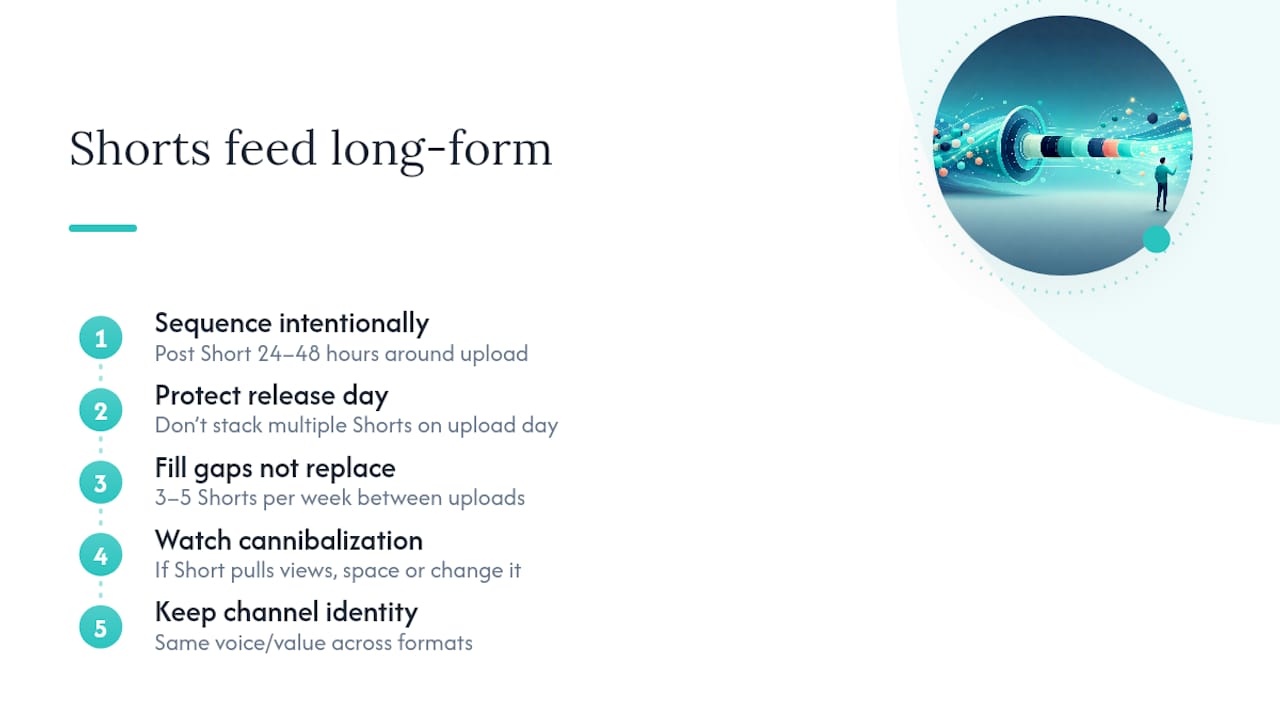
Sequence them on purpose. Post a Short that teases or recaps a long-form video within 24 to 48 hours of that video going live, and you give viewers a reason to check both. A Short pulled from a key moment in a new long-form upload can pull in viewers who’d never have clicked the full video cold.
Protect your long-form release days from Shorts clutter. If Tuesday is your big upload day, avoid stacking three Shorts on top of it, since that scatters your subscribers’ attention across too much content at once. Give your flagship video room to breathe, then pick up Shorts volume on the surrounding days.
Use Shorts to fill the gaps between long-form uploads, not to replace long-form momentum. If you post one long video a week, a 3 to 5 per week Shorts cadence keeps your channel active on the days between without competing for the same viewing session.
Watch for cannibalization. If a Short covering the same topic as an upcoming long-form video seems to be pulling views away from the full video rather than feeding it, that’s your signal to space the two further apart or change what the Short reveals.
Keep your channel’s overall identity intact across both formats. Viewers who land on your channel from a Short should recognize the same voice and value when they click into a long-form video, not a completely different creator.
Common Mistakes That Wreck a Posting Schedule
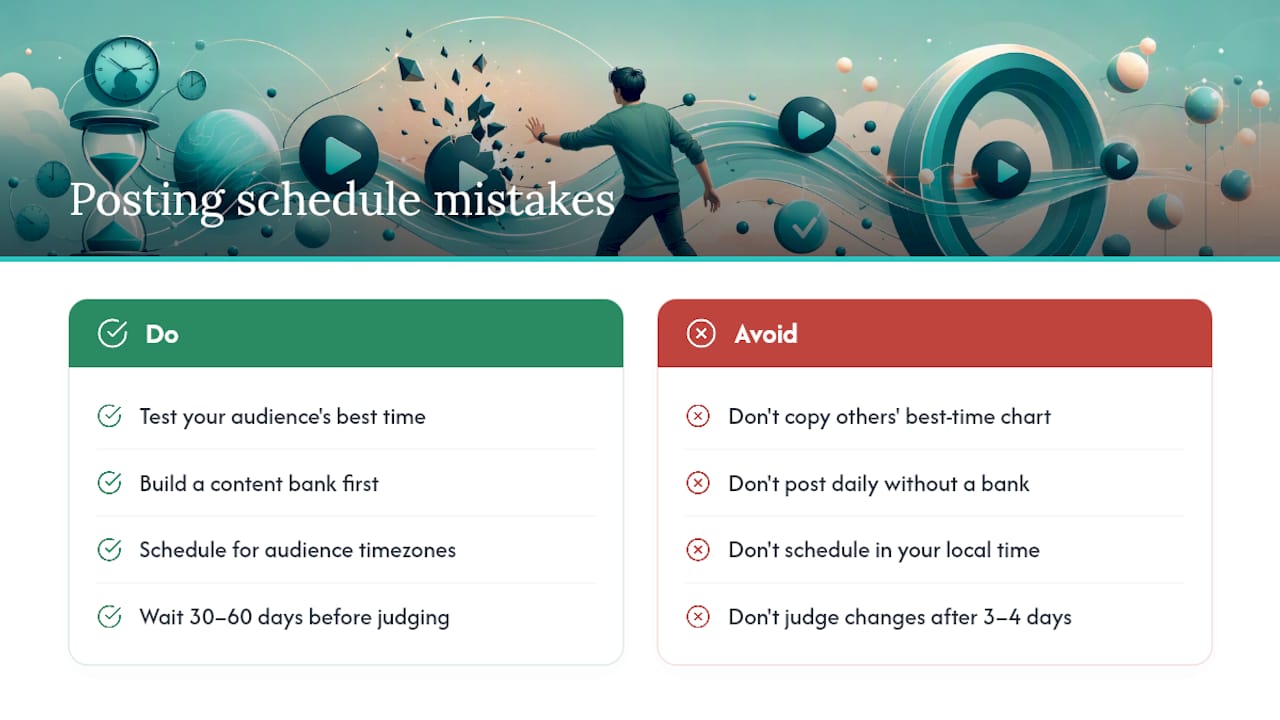
The most common mistake is copying someone else’s best-time chart and never testing your own audience. Averages from a 301,000-video study are a starting point, not a guarantee your specific audience behaves the same way.
Posting daily before you have the content bank to support it is close behind. Creators ramp up to seven Shorts a week, burn through their backlog in ten days, and either quit posting entirely or start publishing rushed content that tanks their watch-through rate.
Ignoring timezone math is a quiet killer. Scheduling in your own local time instead of your audience’s means you could be consistently missing your peak windows by hours, and you’d never know it without checking Studio’s viewer-activity data.
Changing too many variables at once during a timing test is another trap. If you shift the posting time and the format and the length all in the same week, you’ll have no idea which change actually moved your numbers.
Treating Shorts and long-form uploads as competitors instead of a coordinated calendar wastes the cross-promotion opportunity both formats offer.
And giving up on a schedule change after three or four days is probably the most avoidable mistake of all. YouTube’s own algorithm needs time to redistribute a Short to new audiences, and creator data consistently points to a 30 to 60 day window before a schedule change shows its real effect. Judge a change on day five and you’re judging noise, not results.
Building a Calendar That Survives Contact With Reality
A calendar only works if it survives the weeks when you’re tired, behind, or out of ideas. Protect your watch-through rate above your posting count every time the two conflict. Batch in blocks so a bad week doesn’t turn into a dead one. Test your timing windows for real, on your own channel, before trusting anyone’s chart. And keep a trend slot open so you’re never forced to choose between your schedule and something worth posting right now.
— Leonard
A Faster Path to a Denser Shorts Schedule
If your bottleneck is production, not planning, Iguanify gives you a way to post more without hiring an editor or burning out on manual work. It builds full episodes from a single line of script and keeps your characters consistent across every installment, so a growth or high-frequency template stops being a stretch goal and becomes something you can actually sustain week after week.

You keep full rights to everything produced, which matters if you’re building a series you plan to grow across YouTube, TikTok, or Instagram rather than a one-off experiment. The turnaround is fast enough that batching a week’s worth of episodic Shorts in one sitting is realistic, not aspirational.
If a 3 to 5 per week cadence feels like a ceiling right now because production is the holdup, explore what Iguanify can build from your next episode idea and see how much of your calendar it can fill without adding to your workload.
Sources
- Best Time to Post on YouTube (301K+ videos analyzed) — SocialPilot
- Upload schedule tips - Shorts - YouTube Help
- How often should you post on TikTok, YouTube Shorts and Instagram Reels? — Meteorra AI
- YouTube Shorts algorithm 2026 — Socialync