 IGUANIFY
How to Build an Episodic Content Calendar That Runs Itself

An episodic content calendar plans a whole series, not a scattering of posts. It tracks recurring premises, cadence, and episode-level assets across a full season rather than one publish date at a time. Your first move is simple: map six episodes, pick a cadence you can actually keep, and build the calendar around that season instead of a single video.
TL;DR:
- Creating a season of six to eight episodes allows testing the premise and building audience habits, which is essential for series success.
- An episodic calendar should include both season-level details like launch date and cadence, and episode-level specifics such as premise and assets.
- Consistent scheduling, approval lead times, and batching multiple episodes in advance help maintain cadence and prevent missed releases.
- Automating production with tools like Iguanify can ensure continuity across episodes and help solo creators meet weekly publishing goals.
- Most failures in season planning stem from production delays, stalled approvals, or testing premises with too few ideas upfront, which can be mitigated by careful pre-launch planning.
Table of Contents
- What Is an Episodic Content Calendar, Exactly?
- Why Episodic Planning Beats One-Off Posting
- Should You Go Episodic or Serialized, and How Often Should You Post?
- How to Build and Run Your Season Calendar Step by Step
- What Tools and Templates Actually Make This Easier?
- When Production Automation Changes What Cadence Is Possible
- Where Most Season Calendars Actually Fall Apart
- Iguanify Turns Your Season Map into Finished Episodes
- Sources
What Is an Episodic Content Calendar, Exactly?
A regular content calendar tracks isolated posts. An episodic content calendar tracks a series: a recurring premise, a consistent point of view, and a cadence viewers can set their clock by. Those three pillars, premise, anchor, and predictable timing, are what separate a series from a string of unrelated videos.
That distinction changes what your calendar needs to hold. You need episode-level fields (title, premise, assets, publish date) alongside season-level fields (series name, launch date, total episode count). Miss the season layer and you end up scheduling posts with no throughline.
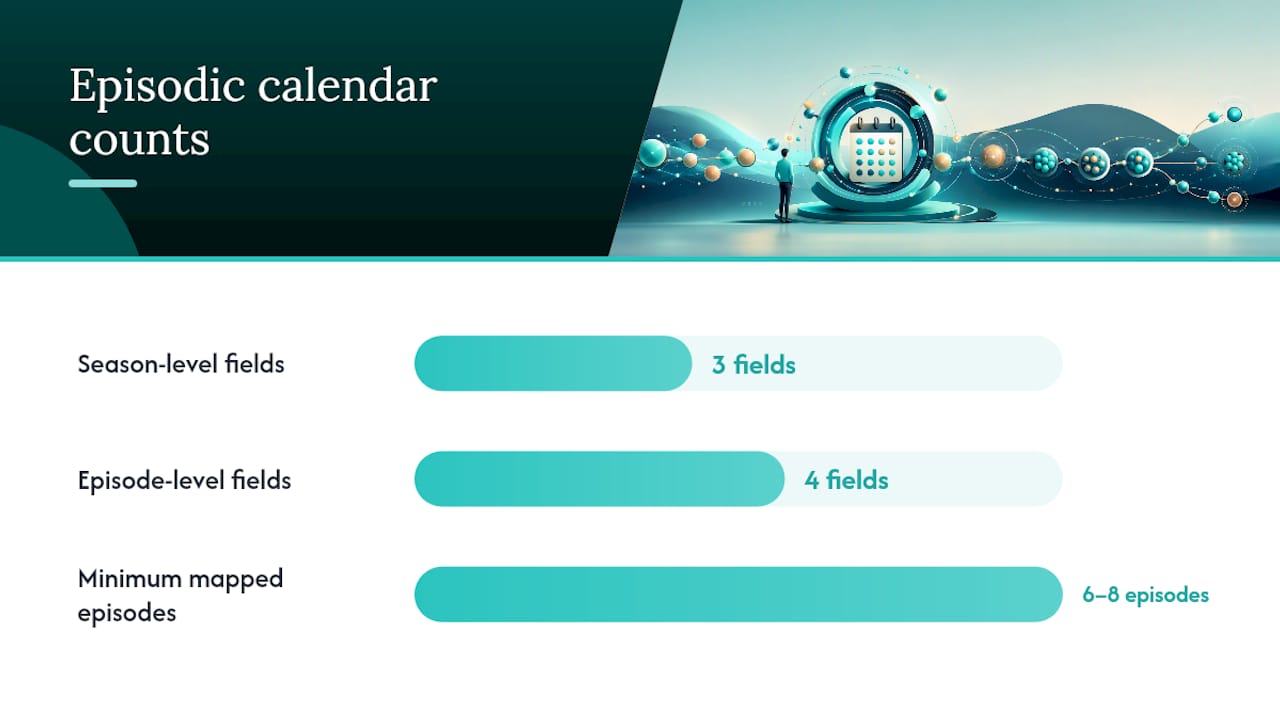
Before you launch anything, map at least six episodes. The Content Marketing Institute points to six to eight episodes as the minimum window for testing a premise and giving an audience time to form a habit around it. A calendar built around one episode at a time can’t tell you if the premise has legs.
Your calendar should carry:
- A season tracker with launch date, total episode count, and cadence
- Episode rows with premise, assets, and publish date
- A recurring anchor or host identity that ties every episode back to the series
Why Episodic Planning Beats One-Off Posting
Platforms are actively rewarding series structure now, not just tolerating it. Sprout Social’s analysis shows TikTok and Meta surfacing series content inside recommendation layers, meaning a well-tagged episode two gets a discoverability boost that a standalone post never sees.
Series content, once it clears the first few episodes, tends to compound rather than plateau. Cadence trains your audience to come back on schedule. A weekly drop trains the return visit the same way a TV timeslot used to. That habit is measurable: series-level metrics (episode-over-episode retention, return-viewer rate) show whether the format is working in a way a single post’s view count never captures.
The combination matters more than either piece alone. Algorithmic surfacing gets new viewers into episode one. Habit formation keeps existing viewers coming back for episode five. A calendar that only tracks individual post performance misses both signals.
Should You Go Episodic or Serialized, and How Often Should You Post?
Episodic and serialized aren’t the same format, and picking wrong burns out a creator fast. Episodic means each installment stands alone, same premise, new topic each time (think a weekly “ask me anything” or a recurring review format). Serialized means an ongoing arc where episode four assumes you watched episode three. Later’s guidance on signature content series frames this as thinking like a TV producer: episodic formats are more forgiving for growth, serialized formats build deeper loyalty but demand tighter continuity.
Cadence should follow your actual production capacity, not ambition:
- Solo creator: weekly is sustainable for episodic formats; biweekly is safer for serialized ones with heavier editing needs.
- Small team (two to four people): weekly serialized is workable if batching is in place.
- Higher-production setup: twice weekly is realistic once assets, scripts, and approvals run on a fixed rhythm.
Before you commit to either format, run a quick gut check: can you name six strong episode ideas right now, today, without forcing it? If you’re straining by episode three, your premise is too narrow. Widen it before you lock a launch date, not after.
Pro Tip: Write your six episode titles first, then the premise. If two titles feel interchangeable, you’ve found the edge of your format, not a coincidence.
How to Build and Run Your Season Calendar Step by Step
Start with the goal and the audience, not the calendar template. Who is this series for, and what’s the one pillar topic every episode will orbit? Lock that before you open a spreadsheet.
- Map Season 1. Block six to eight episode slots with tentative publish dates. Leave the dates flexible until step three.
- Fill the episode row template. Each row needs: episode number, short premise, assets needed, thumbnail, caption, call to action, the person responsible, approval status, publish date and time, and platform.
- Batch three to four episodes before launch. SocialPilot’s guide to content series makes the case plainly: a season scheduled in advance breaks cadence far less often than one produced episode by episode.
- Set approval lead times. Decide who signs off and how many days before publish that approval needs to land, then hold that line for every episode, not just the first few.
- Lock a consistent day and time slot, then test two or three time windows in the first month and keep whichever drives the best early retention.
Keep at least a one-episode buffer at all times. The moment your buffer hits zero, the series is one sick day away from a missed cadence, and missed cadence is what breaks the habit you just spent six episodes building.
| Calendar element | What it tracks | Why it matters |
|---|---|---|
| Season tracker | Launch date, total episodes, cadence | Keeps the whole run visible, not just next week |
| Episode row | Premise, assets, CTA, approval status | Prevents last-minute scrambling on production day |
| Buffer slot | One episode banked ahead | Absorbs delays without breaking the publish rhythm |
What Tools and Templates Actually Make This Easier?
A spreadsheet season map is the simplest starting point: one tab for the season tracker, one tab for episode rows. HubSpot’s content calendar template is a solid base if you’d rather adapt an existing structure than build columns from scratch.
A workable spreadsheet needs these columns at minimum: episode number, title, premise, platform, publish date, assets status, approval status, and CTA.
Beyond the spreadsheet, three tool categories cover most of what a season needs:
- Visual planners for previewing how a season’s thumbnails and captions look laid out together before anything publishes.
- Schedulers that automate the actual posting, including timezone-aware tools that convert a start date and cadence into real dated slots and flag gaps in the season map.
- Project tools for approvals and asset tracking, especially once more than one person touches an episode before it ships.
Exporting a season plan for collaborators is usually just a shared link or a PDF snapshot of the tracker tab. Whatever you use, keep the season tracker as the single source of truth: nobody should be guessing what episode four’s premise is from memory.
When Production Automation Changes What Cadence Is Possible
A calendar only works if production can keep pace with it, and that’s where most solo creators hit a wall. Iguanify automates the full episodic production process, from a single script line to a finished vertical episode, while keeping the same characters consistent across every installment. That continuity problem is usually what kills serialized formats before episode four.

Automation shortens the gap between “episode is on the calendar” and “episode is published,” which matters most when your team is one person trying to hold a weekly cadence.
Consider automation when:
- Your team size can’t match the cadence your calendar demands
- Character or story continuity keeps breaking between episodes
- Editing time is the bottleneck, not ideas
Pro Tip: If your season map has more empty slots than filled ones by week three, that’s a production capacity problem, not a creative one.
Where Most Season Calendars Actually Fall Apart
Three failures show up again and again in series planning: cadence breaks because production fell behind, approvals stall because nobody set a lead time, or the premise runs thin by episode four because it was never tested against six ideas up front.
The fixes are almost boringly simple. Lock a full season before launch, require sign-off on every episode using the same approval window, and batch at least three episodes before you post the first one. Check retention and completion at episode three, then again at episode six, and adjust the premise or cadence based on what you see, not on a hunch.
— Leonard
Iguanify Turns Your Season Map into Finished Episodes
Planning six episodes on a spreadsheet is the easy part. Producing them on schedule, with the same characters and tone holding steady from episode one to episode six, is where most solo calendars stall. Iguanify closes that gap: you write a single script line, and the platform handles scripting, recurring cast generation, dialogue, sound, and full production, delivering a finished vertical episode ready for TikTok, YouTube, or Instagram.

Pick Iguanify when your season calendar demands a cadence your current setup can’t hit alone, or when continuity across episodes matters more than you have editing hours to protect it. There’s no subscription to manage, either. You buy episode or season production credits as you need them, and you keep full rights to everything produced. If your Season 1 map is sitting ready in a spreadsheet, see what it looks like produced: check out the ReelShort-style production option or start from Iguanify’s main platform and turn that six-episode plan into a published series this week.
Sources
- Creating a Social Media Content Series | Sprout Social
- Experts share how to get episodic content right | Content Marketing Institute
- Social media content series guide | SocialPilot