 IGUANIFY
The Short Drama Script Format Creators Use for Vertical Episodes

The short drama script format is a timecode-driven, two-column layout built for 15 to 90-second vertical episodes, not the Courier-and-scene-heading style you’d use for a feature or a stage play. Every script needs five fields to actually work: TIMECODE (start and end marks), VISUAL (shot, prop, action), AUDIO (dialogue, sound effects, music cue), a CONTINUITY token (so cast and props stay consistent episode to episode), and DISTRIBUTION metadata (platform, aspect ratio, episode number). Skip any of these and you’re either handing a production tool ambiguous instructions or handing your editor a headache.
That’s the format Iguanify’s production engine reads natively. Feed it a single line of premise plus these fields, and it can generate a fully cast, fully continuous episode without you touching an editing timeline.
Key Takeaways
The short drama script format works because a strict timecode plus visual/audio column layout with continuity tokens helps both editors and automated engines render consistent, cliffhanger-driven episodes.
| Point | Details |
|---|---|
| Five required fields | Every script needs TIMECODE, VISUAL, AUDIO, CONTINUITY, and DISTRIBUTION fields to be production-ready. |
| Hook window is tiny | The hook must land in the first zero to three seconds or most viewers scroll past. |
| Use filmable actions | Write observable object-plus-verb actions instead of internal states so AI rendering has no ambiguity. |
| Tag your cast compactly | Engine, Wall, Witness, and Nuke tags keep casting and behavior consistent across episodes. |
| Iguanify handles the render | Iguanify converts a script built with these fields into a finished, owned episode without a manual production step. |
Table of Contents
- What Goes Into a Short Drama Script Template
- How Do You Time the Hook, Build, and Cliffhanger?
- Which Character Tags Keep AI Continuity Consistent
- What Aspect Ratio and Layout Rules Actually Matter?
- Formatting a Script for Automated Production and Continuity
- A Sample 60-Second Micro-Drama Script
- Pre-Production Checklist Before Sending to AI
- Why Continuity Beats Cleverness in This Format
- Turn One Script Line Into a Finished Episode With Iguanify
- Frequently Asked Questions
- Sources
What Goes Into a Short Drama Script Template
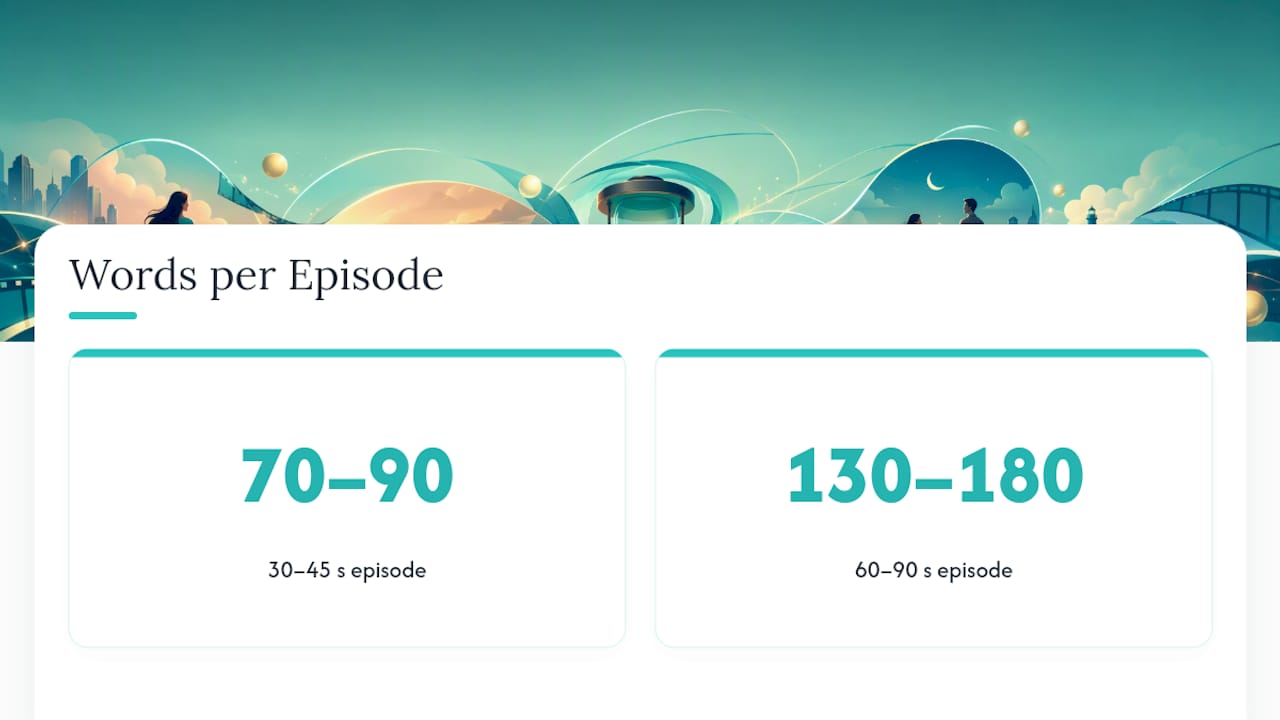
A workable script template scales with runtime. A 30 to 45 second episode runs tight: three or four beats, maybe 70 to 90 spoken words, no room for a subplot. A 60 to 90 second episode gives you a full four-beat arc with a mid-episode reveal, roughly 130 to 180 spoken words depending on pacing.
| Runtime | Beats | Suggested Word Count | Best For |
|---|---|---|---|
| 30–45s | Hook, friction, button | 70–90 words | Single-scene confrontations, reaction dramas |
| 60–90s | Hook, friction, spike, button | 130–180 words | Multi-location scenes, reveal-driven episodes |
For a 15-second extreme, cut straight to hook and button and let the friction beat live in a single visual (a slammed door, a torn note) rather than dialogue. For a full 90-second episode, add a second friction beat before the spike so the escalation doesn’t feel rushed. Iguanify’s own runtime guidance breaks down spoken-word pacing by episode length if you want a deeper table.
Text overlays and captions need their own consistency rule, since AI rendering treats them as a separate asset layer from spoken dialogue:
- Keep overlay text under 6 words per card so it doesn’t crowd the safe-frame.
- Reserve captions for dialogue only; use overlay text for time jumps, locations, or internal thought.
- Mark caption timing in the AUDIO column, not the VISUAL column, so the production engine syncs text to voice rather than to action.
How Do You Time the Hook, Build, and Cliffhanger?
Timing is where most short drama scripts fail before a single frame gets rendered. Vertical drama craft calls for a detonating hook in the first zero to three seconds, a friction stage that runs from there to roughly the midpoint, a spike or turn late in the build, and a cliffhanger button packed into the final five to ten seconds. Miss the three-second hook window and most viewers are already gone.
A Hook-Build-Payoff framework works as a simpler mental model for the same structure: the hook stops the scroll, the build creates tension, the payoff either resolves or dangles. Write the hook and the button first, then fill in the friction beat to connect them. It’s much easier to hit your ending on time when you’ve already written it.
The strongest hooks and payoffs are physical, not emotional descriptions. A receipt with the wrong name on it. A phone screen lit up mid-lie. A call that cuts out on one word. These “evidence” beats render cleanly on mute and give an AI system something concrete to shoot, rather than an internal state it has to interpret.

Pacing tactics that actually move retention: a pattern interrupt (a cut, a zoom, a location change) every three to five seconds, plus a micro-hook somewhere between the 15 and 30 second marks so mid-scroll viewers get a reason to keep watching.
Pro Tip: Write your button as a question the audience can’t answer from what they just watched. “Who sent that text?” works. “She’s furious now” doesn’t, because it’s already answered.
Which Character Tags Keep AI Continuity Consistent
Vertical drama scripts benefit from a compact tag system that tells an AI engine exactly who someone is and how they behave, without a page of backstory. Four tags cover most short-form casts:
- Engine — the character driving the plot forward; give them a job, a social role, and a moral contrast in one line (example: “Engine: broke student / campus insider / moral compromise”).
- Wall — the obstacle character who blocks or complicates the Engine’s goal.
- Witness — the observer who reacts, records, or spreads the consequences.
- Nuke — the disruptor who detonates the mid-episode turn.
Include two or three one-line cast descriptors in the script header itself (hair, wardrobe signature, a physical tell) so casting continuity survives across episodes rather than resetting each time. This is the same job/social/contrast logic that keeps series bible fields usable for AI casting from one episode to the next.
What Aspect Ratio and Layout Rules Actually Matter?
Every short drama episode needs 9:16 framing, with the critical action kept inside the 1080 by 1920 safe-frame margins so it survives cropping on TikTok, YouTube Shorts, and Instagram Reels. Side-by-side staging almost never works in this format. There’s no width for two characters to share the frame and still read clearly on a phone screen.
- Design the hook to work fully muted, since most viewers scroll with sound off until something earns their attention.
- Put narrative-critical information in dialogue with matching captions; reserve on-screen text for context the audience needs but nobody says out loud.
- Build the ending to loop cleanly back into the hook when possible, and choose your cliffhanger accordingly. A button that resolves too cleanly kills the loop’s momentum on autoplay.
Formatting a Script for Automated Production and Continuity
Iguanify’s production engine and similar automated tools need specific header fields to keep a series consistent across episodes: show title, episode number, a continuity token, cast IDs, a location tag, a runtime target, and a platform flag.
Beyond the header, the biggest failure point is vague action writing. Write filmable actions: an observable object plus a verb, not an internal state. “She slams the brass key into the lock” gives an engine something to render; “she angrily tries the lock” doesn’t. When a prop needs to carry narrative proof, like a receipt or a text thread, name it specifically in the VISUAL column so the same object reappears correctly in later episodes.
Mark every audio cue with intent, not just content: label SFX by function (“door slam, tension sting”) and music cues by mood (“low dread pad”) rather than a generic “music” note, so the engine selects assets that match tone instead of guessing.
Pro Tip: Treat your continuity token like a version number. If Episode 4 changes a prop or location, update the token and note the change in the header, or the engine may default back to Episode 1’s setup.
Iguanify’s production workflow guide walks through how these fields map to the actual render pipeline if you want the mechanics behind this.
A Sample 60-Second Micro-Drama Script
Here’s a complete 60-second script showing the timecode, visual, and audio columns in action, plus where continuity tokens live.
| Timecode | Visual | Audio |
|---|---|---|
| — | Close on phone screen: “Delivered” then “Read” flashes. CONTINUITY: — | SFX: notification ping |
| — | Wide, apartment kitchen. Engine (Mara) reads message, hand freezes over coffee cup | Dialogue: “You said you deleted his number.” |
| — | Wall (roommate) enters, sees Mara’s face, grabs the phone | Dialogue: “It’s not what you think.” Music: low dread pad |
| — | Nuke beat: second phone buzzes on counter, different name | SFX: buzz. Silence underneath. |
| — | Push in on Mara’s face, no dialogue | Overlay text: “Whose phone is this?” |
The button ends on an unanswered question, which is the point: it points straight into Episode 2 without resolving anything here.
Pre-Production Checklist Before Sending to AI
Run this before you send anything to production, whether that’s a human editor or an automated tool.
- Add up every timecode segment and confirm the total matches your runtime target exactly.
- Confirm every cast ID and continuity token is present and spelled identically to prior episodes.
- Check that each beat describes a filmable action, not an emotional state or a summary.
- Confirm the cliffhanger button ends on a genuinely unanswered question, not a soft resolution.
- Verify audio cues include mood or function labels, not just “SFX” or “music” alone.
Why Continuity Beats Cleverness in This Format
Most creators obsess over the cleverness of a twist and skip the boring part: making sure the twist is filmable and the character delivering it looks like the same person from three episodes ago. That’s backward. A great hook with broken continuity gets abandoned by viewers faster than a decent hook with a consistent cast, because continuity is what turns a single clip into a series someone follows.
Automated production tools like Iguanify remove the friction that used to make continuity expensive: matching cast, matching locations, matching tone, without hiring an editor for every episode. The format itself, the timecodes, the tags, the continuity tokens, does the heavy lifting. Write it once, correctly, and the fifth episode looks as coherent as the first.
Turn One Script Line Into a Finished Episode With Iguanify
Iguanify takes the exact fields covered above, timecodes, visual and audio columns, continuity tokens, and turns them into a rendered episode with a consistent cast, without you assembling a production pipeline first. The script fields you write map directly to episode continuity: your Engine and Wall tags become recurring characters, your continuity token keeps props and locations locked across the season, and the platform flag routes output to the right aspect ratio for TikTok, YouTube, or Instagram automatically.

You keep full ownership of everything produced, no production team, no editing software, no waiting on a freelancer’s calendar. If you want to see the format in motion before committing anything, try the free show concept and cast generator, or look at existing AI micro drama examples to see how the tag system plays out on screen. When you’re ready to produce, the AI Drama Generator is where a single premise line becomes a finished, ready-to-post episode.
Frequently Asked Questions
What is the standard short drama script format for vertical video? It’s a timecode-based, two-column layout with VISUAL and AUDIO fields, plus continuity tokens and distribution metadata, built for 15 to 90 second episodes rather than page-based screenplay formatting.
How long should a short drama script be in spoken words? A 30 to 45 second episode runs about 70 to 90 spoken words; a 60 to 90 second episode runs closer to 130 to 180 words, depending on how much visual storytelling carries the scene instead of dialogue.
Do I need special software to write in this format? No specialized software is required. A spreadsheet or a simple table in any text editor can hold timecode, visual, and audio columns, though production tools like Iguanify read this structure directly to generate finished episodes.
What’s the difference between this format and a traditional screenplay? Traditional screenplays use scene headings, character-centered dialogue blocks, and full-page action lines for horizontal film or TV production. This format uses timecoded columns and continuity tags built specifically for short, vertical, serialized episodes.
How do I keep characters consistent across multiple episodes? Use a compact tag system (Engine, Wall, Witness, Nuke) with one-line job, social, and contrast descriptors in the header, plus a continuity token that stays identical across the season unless a change is intentional.
Sources
For deeper craft guidance, Real Reel’s vertical drama guide covers the hook-friction-spike-button structure in more depth, ImagineVid’s TikTok writing guide breaks down the Hook-Build-Payoff model with more platform-specific examples, and CineVert Studios’ vertical script guide shows additional timecode table formats. For short-form tension techniques outside episodic drama, E. L. Ravenheart’s microhorror writing contest page is a useful look at compressed storytelling. On the production side, Iguanify’s vertical drama production guide and AI Micro Drama page expand on casting continuity and workflow.
- Writing Vertical Drama: A Guide for Film & TV Creators | Real Reel
- How to Write a Compelling Story for TikTok and Shorts | ImagineVid