 IGUANIFY
Continuity First End to End AI Production for Serialized Creators

End-to-end AI production turns one script or premise into a publish-ready vertical episode by automating scripting, character locking, generation, assembly, and delivery. It serves creators, faceless channel operators, and small publishers who need serialized short-form episodes without hiring an editor or actor. Iguanify builds this workflow around continuity, so your recurring cast doesn’t drift between episode 3 and episode 30. The output at the end is a finished vertical cut, not a pile of clips you still have to edit.
TL;DR:
- Lock character references and assets before generating scenes to prevent visual drift and reduce rework across episodes.
- Batch process scripts, assets, and assembly steps for multiple episodes to maximize efficiency and maintain consistency.
- Use a simple asset registry and version control system to track locked references and avoid losing continuity or producing outdated content.
- Incorporate targeted human review at concept approval and initial episodes to catch quality issues early and prevent costly rework.
Table of Contents
- What Is End-to-End AI Production for Episodic Video?
- The End-to-End Production Pipeline, Stage by Stage
- Continuity and QC: How Serialized Short-Form Fails and How to Stop It
- Automating, Batching, and Scheduling for Scaled Output
- How Much Does an AI Episode Really Cost?
- Data Management and Version Control in AI Production
- Collaboration Strategies Between AI and Human Creators
- Ethical Considerations and Bias Mitigation in AI-Generated Content
- Deployment and Distribution Methods for AI-Produced Media
- Monitoring and Analytics Post-Production to Inform Improvements
- How Iguanify Fits This Workflow
- Author Perspective: When to Trust Automation and When Not To
- Sources
- FAQ
What Is End-to-End AI Production for Episodic Video?
End-to-end AI production is a single pipeline that carries your idea from a written premise through to a finished vertical episode, without you touching a timeline editor. Every stage feeds the next: the script defines the scenes, the scenes define the shots, and the locked characters keep every shot recognizable as the same show. This is different from using a general AI video generator for one-off clips, because a one-off tool has no memory of your cast between sessions. Serialized short-form drama, sometimes called AI microdrama, depends on that memory. If your lead character looks different in episode 4 than in episode 1, viewers notice within seconds, and retention drops.
The term matters because “AI video production” and “end-to-end AI production” get used loosely across the industry. The distinction is the handoffs. A true pipeline moves a project through defined stages with locked outputs at each step, the same way a traditional production moves from script to storyboard to rough cut to final color. Skip a lock and you get rework. Automated AI deployment only works when the stages underneath it are disciplined.
The End-to-End Production Pipeline, Stage by Stage
A repeatable AI production pipeline for short-form serialized drama runs through a fixed order, and practitioner guides converge on roughly the same sequence:
- Story and script. You write or generate the premise, logline, and dialogue for the episode.
- Beats and scene list. The script breaks into discrete beats, each mapped to a scene with a clear visual goal.
- Character lock. Your recurring cast gets frozen as reference sheets and character IDs before any scene generates. This is the step most creators skip, and it’s the one that causes the most damage later.
- Storyboard and shot plan. Each scene gets a shot list, so the generation stage isn’t improvising camera angles episode to episode.
- Image and video generation. The actual visual assets get produced against the locked references.
- Motion assembly. Clips get sequenced into the scene order defined by the storyboard.
- Voice and lip sync. Dialogue gets voiced and matched to mouth movement.
- Music and sound design. Score and effects layer in to support pacing and mood.
- Captions. Text gets timed to dialogue, matching the reading speed your platform’s audience expects.
- Final vertical cut. Everything exports in the aspect ratio and format your distribution platform requires.
Order matters more than speed here. If you generate scenes before locking character assets, you’ll regenerate half your episode later. The same workflow research that maps this sequence stresses that each stage produces a specific deliverable the next stage depends on: a locked character ID feeds the storyboard, a finished storyboard feeds generation, and so on. Treat every handoff as a checkpoint, not a formality. Skipping one doesn’t save time. It just moves the rework to a later, more expensive stage.
Continuity and QC: How Serialized Short-Form Fails and How to Stop It
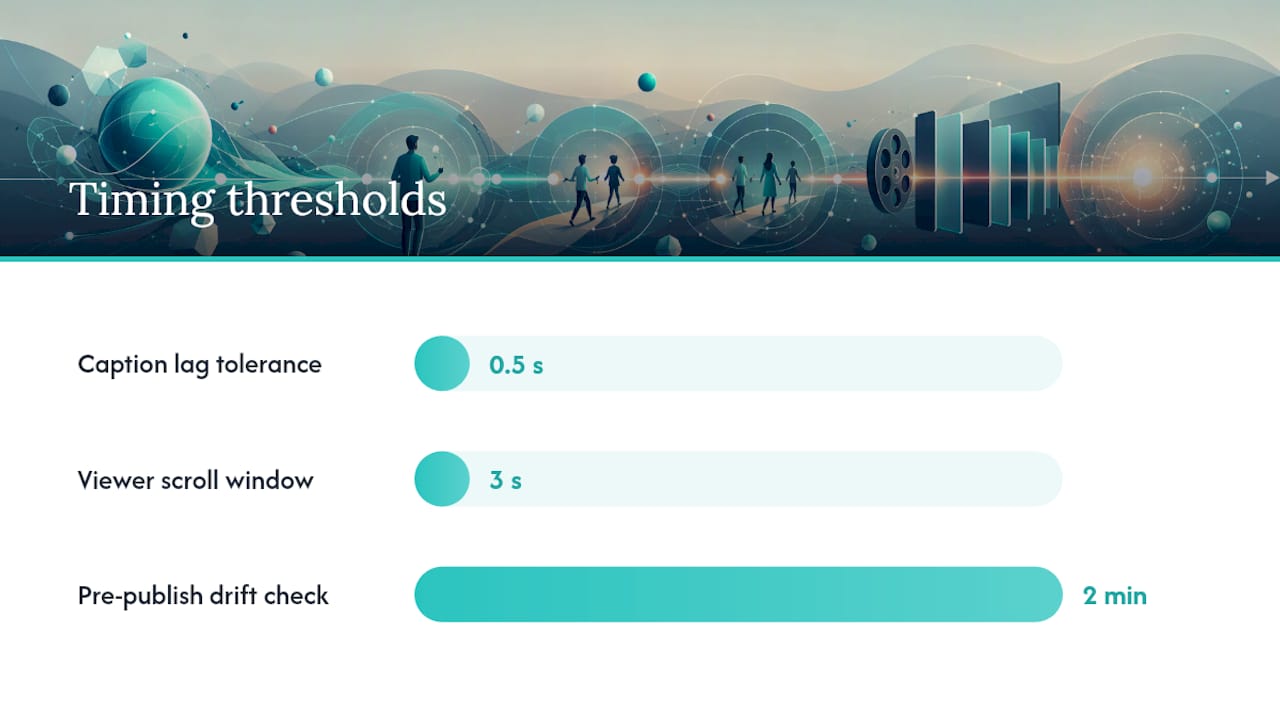
Most quality problems in serialized AI video trace back to one of four failure modes: visual drift, voice mismatch, caption timing errors, and endless regeneration loops that burn credits without fixing the underlying issue. Visual drift happens when a character’s face, outfit, or proportions shift slightly from episode to episode, usually because the character wasn’t locked with a strong enough reference set. Voice mismatch shows up when a character’s tone or pacing changes between episodes, breaking the illusion that it’s the same person. Caption timing errors are smaller but still costly. A caption that lags dialogue by even half a second reads as sloppy on a platform where viewers scroll away in under three seconds.
A short pre-publish checklist catches most of this before it reaches your audience:
- Does the lead character’s face and outfit match the locked reference sheet frame by frame?
- Does the voice match the same character’s tone from the prior episode?
- Are captions synced within a few frames of the spoken line?
- Does the background stay consistent within a scene, with no morphing props or walls?
- Common failure points like hands, teeth, and text rendering deserve a specific look, since these are where AI generation tends to slip.
If an item fails, the rule is simple: regenerate the shot if it’s an isolated glitch, but redesign the character asset if the drift is systemic across multiple shots. Regenerating a flawed reference sheet five times rarely fixes it. Redesigning it once usually does.
Pro Tip: Run a side-by-side drift check between your last published episode and your new rough cut before you finalize anything. Pull up the character’s face in both, at the same angle, and look for jaw shape, eye color, and hairline consistency. Catching drift here costs you two minutes. Catching it after publish costs you a re-edit and a confused audience.
Automating, Batching, and Scheduling for Scaled Output
Scaling from one episode a week to daily output requires treating production like a sprint, not a series of one-off projects. A production sprint model works well here: finalize all scripts for the batch first, then generate voice and visual assets in bulk, then assemble rough cuts, then apply captions and music across the batch, then export every aspect ratio you need in one pass.
- Batch scripting. Write or generate five to ten episode scripts in one sitting, using your locked series bible for consistency.
- Bulk asset generation. Run generation for the full batch against your locked character references, rather than one episode at a time.
- Assembly pass. Sequence, voice, and caption every episode in the batch before moving to review.
- Human review gate. Check the first episode of the batch closely, then spot check the rest.
- Scheduling. Queue the batch across your publishing calendar, spacing episodes to match your platform’s cadence.
Automation levels differ by stage. Script generation and asset rendering tolerate heavy automation well. Concept validation and the first episode of any new arc deserve a human look before you commit the rest of the batch to the same creative direction. A fully configured pipeline can cut weekly production time from 15 to 20 hours down to roughly 2 to 3 hours, mostly by moving your time from filming and editing into review and scheduling. Close the loop by checking watch-through analytics after each batch publishes, and feed what worked, and what didn’t, back into your next round of scripts. Tools that handle automated video editing at the assembly stage can free up even more of that review time for the creative decisions that actually need a person.
How Much Does an AI Episode Really Cost?
A 20 to 60 second vertical episode typically runs through several credit-consuming stages: character reference generation, scene rendering, voice synthesis, and final assembly. Reference-mode renders and hero shots are consistently the biggest line item, since credit-budget templates show these consuming more resources than any other stage in a typical 60-second piece.
The single biggest lever on cost is your generation ratio. Professionals plan for roughly three candidate clips generated for every one that makes the final cut, treating generation like a shoot day where you capture more than you need and edit down. That ratio isn’t waste. It’s what gives you editorial options instead of settling for the first result.
By the numbers: Plan for a 3:1 generation ratio on every scene, and budget your heaviest credit spend toward reference-mode renders and hero shots, not toward volume generation.
Practical ways to trim cost without cutting quality: reuse locked character references across every episode in a series instead of regenerating them, build assembly templates for caption and music placement so you’re not rebuilding the same settings each time, and batch your reference-mode renders separately from your bulk scene generation so you’re not paying premium rates for shots that don’t need them. For a fuller breakdown of what drives episode pricing up or down, Iguanify’s realistic budget math walks through actual credit allocations by stage.
Data Management and Version Control in AI Production
Serialized production generates a lot of files fast: script drafts, character reference sheets, storyboard notes, raw generation outputs, and final cuts. Without a system, you’ll lose track of which character reference is the “real” locked version by episode 10. The fix is a simple production discipline, not a fancy tool: keep an asset registry that tracks every locked character ID, prop reference, and voice profile by version number, and keep an episode bible that logs plot decisions, character arcs, and continuity notes as they happen.

The research on multi-episode continuity is direct about this: update your registry and bible immediately after every publish, then start your next episode from those locked notes rather than from memory. This matters more than it sounds like it should. A writer’s room for a traditional show has a script supervisor whose entire job is tracking continuity. As a solo creator or small team, your asset registry is that role.
Version control also protects you from your own regeneration habits. If you overwrite a character reference file every time you tweak it, you lose the ability to roll back when a “fix” introduces new drift. Keep dated versions of every locked asset, and label clearly which version is live in your current batch. It’s a small habit that saves hours the first time a batch goes sideways and you need to figure out exactly where things changed.
Collaboration Strategies Between AI and Human Creators
The strongest workflows are hybrid, not fully hands-off. Guides on AI social video production find that creators get the best retention and quality results when human review concentrates on three specific points: validating the initial concept, checking the first episode of any new arc closely, and running final QC before publish. Everything between those checkpoints can run with lighter oversight.
That division of labor plays to what each side does well. AI handles the repetitive, technically demanding work: generating consistent visuals against a locked reference, matching voice to lip movement, timing captions to dialogue. A human handles judgment calls: does this plot beat land emotionally, does this cliffhanger actually make someone want to tap for episode 2, does this joke read as intended once it’s voiced. Automating the judgment calls tends to produce technically clean episodes that don’t connect with anyone.
Practically, this means your role shifts from “editor” to “showrunner.” You’re not cutting timelines frame by frame. You’re approving concepts, reading rough cuts for tone, and deciding which episodes in a batch need a second pass. That’s a different skill set, and it’s one most creators pick up faster than they expect, because it’s closer to writing than to editing software.
Ethical Considerations and Bias Mitigation in AI-Generated Content
AI-generated characters and dialogue can carry the biases baked into their training data, whether that shows up as narrow representation in character design, stereotyped dialogue patterns, or visual defaults that skew toward a narrow range of appearances unless you actively direct otherwise. As the person building the series, you have more control over this than you might assume, because character locking happens at your direction. You choose the reference images, the names, the backstories, and the dialogue tone.
The practical fix is deliberate, not automatic. Review your locked character set for a new series and ask whether the cast reflects the range of people you actually intend to represent, rather than whatever the tool defaulted to on a generic prompt. Read dialogue drafts for stereotyped speech patterns tied to a character’s background, and rewrite lines that lean on lazy shorthand instead of an actual personality. This is a five-minute check per new character, not a research project.
There’s also a transparency question worth taking seriously. Audiences are increasingly aware that serialized short-form drama on platforms like TikTok is often AI-produced, and creators who are upfront about that tend to build more durable trust than ones who let viewers assume a full production crew. You don’t need a disclaimer on every episode. But how you talk about your process, in bios, captions, or comments, shapes whether your audience feels informed or misled.
Deployment and Distribution Methods for AI-Produced Media
Your final vertical cut needs to leave the production pipeline in the right format for wherever it’s headed. TikTok, YouTube Shorts, and Instagram Reels all favor 9:16 vertical video, but they don’t treat caption placement, safe zones, or file compression identically. A caption that sits perfectly on TikTok can get clipped by YouTube’s UI overlay if you export from a single template without checking each platform’s safe zone.
Instant delivery matters more in serialized drama than in one-off content, because your audience is trained to expect the next episode on a schedule. A pipeline that ends in manual export and manual upload adds friction exactly where you can least afford it: between finishing a batch and getting it in front of the audience waiting for it. Building your export step to generate platform-specific versions automatically, rather than reformatting manually per platform, removes a bottleneck that otherwise eats the time savings you gained upstream.
Cross-posting the same episode to multiple platforms with platform-appropriate captions and thumbnails is standard practice for creators running a real distribution strategy rather than a single-channel hobby account. Treat each platform’s poster or thumbnail as its own small design task, since a thumbnail built for YouTube’s grid view rarely performs the same way as a TikTok cover frame. The distribution layer is where a lot of the production effort either pays off or gets wasted, so it deserves the same checklist discipline you apply to QC.
Monitoring and Analytics Post-Production to Inform Improvements
Publishing an episode isn’t the end of the pipeline. It’s the start of the feedback loop that makes your next batch better. Watch-through rate, drop-off point, and comment sentiment tell you specific things a gut feeling can’t. A steep drop-off at the fifteen-second mark usually points to a slow opening hook, not a bad episode overall. Comments repeating the same complaint about a character’s voice are a signal to revisit that voice profile before your next batch, not after five more episodes compound the problem.
Track these metrics per episode, not just per channel average, because averages hide the specific scenes and characters that are underperforming. If episode 6 has a watch-through rate 20 percentage points below your series average, something concrete changed. Maybe the cliffhanger didn’t land, maybe a new character read as confusing, maybe the caption pacing was off. Go back to your episode bible and cross-reference what changed in that batch.
This feedback loop is also where your prompts and scripts should evolve. If a particular dialogue style consistently outperforms another across several episodes, that’s a signal worth building into your script templates going forward. Analytics-informed script refinement is one of the more underused parts of an AI production pipeline. Most creators check the numbers, feel good or bad about them, and move on without translating what they saw into a concrete change for the next batch.
How Iguanify Fits This Workflow
Iguanify is the direct route to everything covered above, without you having to stitch together a script tool, an image generator, a voice service, and an editor yourself. Iguanify delivers fully produced, serialized video episodes with consistent recurring characters and continuity built in, removing the need for manual editing, technical knowledge, or juggling multiple tools across platforms.

That continuity claim matters because it’s the exact failure point this article spent several sections on. Character locking, drift prevention, and asset registries are things Iguanify handles as part of its automated end-to-end production, so you’re not manually managing reference sheets between episodes. Instant delivery means your finished vertical cut is ready to publish, not sitting in a render queue while you wait. And because you own the rights to what gets produced, there’s no question about whether you can post it to TikTok, YouTube, or wherever your audience actually is.
Some platforms allow starting with a free show concept and cast generation before spending anything. When you’re ready to produce, the AI drama generator offers a Standard episode or Pilot at $34.99 per episode, with Creator, Season, Studio, and Slate options available for larger runs once you know your series works. Generate a pilot episode first, watch how your locked cast holds up across a scene or two, and decide from there whether to scale into a full season.
Author Perspective: When to Trust Automation and When Not To
Full automation sounds appealing until the first episode where a character’s face shifts mid-scene. My take: automate generation, assembly, and scheduling aggressively, but keep a human eye on concept approval and the first episode of any new arc. That’s a two-checkpoint QC schedule, not a twenty-item one, and it catches the failures that actually matter. For the deeper mechanics of building that discipline into your own workflow, Iguanify’s production guide is worth the read.
— Leonard
Sources
- AI Microdrama: Multi-Episode Vertical Series Guide | Creatide AI
- The Complete AI Video Workflow for Content Creators in 2026 - Seedance Blog
- AI Video Scheduling — How to Automate Your Content Pipeline in 2026
FAQ
How Do You Keep Characters Consistent Across Episodes?
Lock character identity with reference sheets and character IDs before generating any scenes, then reuse those locked assets in every subsequent episode rather than regenerating them from scratch.
Who Owns the Episodes an AI Platform Produces?
With Iguanify, creators own full rights to the episodes produced, so you can publish across TikTok, YouTube, and other platforms without licensing questions.
How Long Does One Episode Take to Produce?
A configured, automated pipeline can bring weekly production time down to roughly 2 to 3 hours of human review and scheduling, once the character locks and templates are in place.
When Should You Regenerate a Shot Versus Redesign a Character?
Regenerate an isolated shot for a one-off glitch; redesign the character reference asset if drift shows up across multiple shots or episodes, since repeated regeneration rarely fixes a systemic reference problem.
What Does Iguanify Cost per Episode?
The Standard episode and Pilot options on Iguanify’s AI drama generator are priced at $34.99 per episode, with Creator, Season, Studio, and Slate pricing available on request for larger productions.