 IGUANIFY
Solo Creators: Remote Video Production Workflow at $1,000 per Episode

An automated remote video production workflow turns one written premise into finished, publish-ready vertical episodes without a camera crew, editor, or remote team logging into shared storage. You feed it a script line and a character description; it handles script breakdown, shot generation, continuity checks, and export. The right use case is serialized short-form drama, faceless content, or episodic series where you want speed and volume over full manual control. Some platforms are built specifically for this end-to-end version of the job.
TL;DR:
- Producing a season of AI-generated micro-dramas requires managing versioned character packs, scripts, and show bibles to maintain consistency across episodes.
- Running the workflow independently demands infrastructure for generation, storage, cloud compute, and seamless tool integration to prevent manual handoffs.
- Building tight character DNA references and automated similarity checks is crucial for avoiding character drift over multiple episodes.
- An average episode with around 10 shots and multiple generation options costs roughly $1,000 when produced end-to-end with platforms like Iguanify, significantly cheaper than traditional methods.
- Using integrated platforms simplifies the process, as they handle script, shot, generation, and export steps automatically, allowing solo creators to produce serialized content efficiently.
Table of Contents
- How Does the Pipeline Move From Bible to Publish?
- How Do You Actually Run a Pilot Episode?
- Which Tools Cover Each Step of the Workflow?
- What Continuity Habits Prevent Character Drift?
- How Much Does a Pilot Episode Actually Cost?
- What Infrastructure Do You Need to Run This Yourself?
- How Do Automation Tools Connect Across Each Step?
- How Should You Write Scripts for AI Video Production?
- How Do You Manage Versions Across a Full Season?
- Where Does Automation Actually Change the Creative Job?
- Iguanify Gets You From Script Line to Published Episode Fastest
- Sources
- FAQ
How Does the Pipeline Move From Bible to Publish?
Every automated episodic pipeline follows roughly the same map, even when the tools underneath differ. Think of it as a relay: each stage hands off a specific artifact to the next one, and nothing moves forward until that artifact exists.
- Show bible: locks premise, tone, world rules, and season arc so every later stage pulls from the same source.
- Script: turns the bible into episode-length dialogue and action beats.
- Shot breakdown: splits the script into individual shots with camera direction, framing, and duration.
- Character pack: builds a reusable identity reference (face, wardrobe, proportions) so the same character reads consistently across shots and episodes.
- Generation: produces the actual video for each shot, often in batches with multiple options.
- Quality control: checks generated shots against the character pack and script intent, flags outliers for regeneration.
- Publish: formats and exports the finished episode for vertical platforms.
An agent-driven model where a showrunner agent holds the bible, a storyboard agent handles shot breakdown, and a routing agent (sometimes called a DOP agent) decides which model generates which shot is documented in production case studies of AI micro-drama pipelines. That structure replaces the writer, storyboard artist, and director of photography roles you’d otherwise need on a remote crew.
How Do You Actually Run a Pilot Episode?
Here’s the step-by-step version, written for someone doing this solo with no post team on standby.
- Lock the show bible and character DNA. Write a one-page document covering each character’s face, build, wardrobe, personality, and speech pattern. This becomes the reference every later shot checks against.
- Export a minimal character pack. Generate three to five reference images per character (front, profile, one expression variant) rather than dozens. A tight, curated pack outperforms a bloated one because it gives the model less room to drift.
- Break the script into shots. For a 90 second to 2 minute episode, expect 8 to 15 shots. Build vertical keyframes for any shot with a new location or a character pose the pack doesn’t cover.
- Generate anchors, then batch. Produce your first shot as an anchor frame, then batch the remaining shots against it, generating 3 to 4 options per shot, rather than committing to a single take. Industry workflow guides recommend this batching ratio because it gives you room to pick without paying for full regeneration cycles.
- Route by shot importance. Coverage shots (walking, reaction, background) can run on faster, cheaper models. Hero shots, close-ups, and anything carrying emotional weight should go through your highest-fidelity model option.
- Assemble selects and run verification. Pull your best take per shot, then run an automated similarity check against the character pack. This training-free approach, which shares and injects attention features across shots, is what recent research on multi-shot video generation identifies as the mechanism behind reliable character consistency.
- Apply a regeneration policy. Anything scoring below your similarity threshold gets regenerated automatically rather than manually patched. Set the threshold once, then trust it.
- Finish with lightweight post. Sync audio, run upscaling if needed, apply a consistent color grade, and burn in captions.
- Publish variants per platform. Export a TikTok cut, a YouTube Shorts cut, and an Instagram Reels cut, since aspect and caption placement differ slightly across each.
- Iterate on the next episode using the same bible and pack. This is where the real time savings show up, since setup work from episode one carries forward.
A solo creator running this loop for the first time should budget a full day for episode one and roughly half a day for each episode after, once the character pack and bible are locked.
Pro Tip: Generate your anchor shot for a scene before batching the rest of it. Every other shot in that scene should reference the anchor, not the character pack directly. It cuts down on lighting and color mismatches that a similarity check alone won’t catch.
Which Tools Cover Each Step of the Workflow?
You don’t need eight separate subscriptions to run this pipeline, but you do need to confirm that whatever you use covers each capability below. Skipping one usually means manual patchwork later.
- Show-bible manager: holds character names, world rules, and arc notes in one place the rest of the pipeline can reference.
- Script writer: generates episode dialogue and beats from the bible, ideally with tone controls so voice stays consistent. Tools built for YouTube scriptwriting can work here if they support recurring character voice.
- Keyframe or storyboard generator: produces still reference frames for new locations or poses before you commit to motion generation.
- Reference-conditioned text-to-video: the core engine that turns a shot description into motion while holding a character’s likeness steady, an example being general-purpose text-to-video generation from a prompt.
- Character pack manager: stores and versions your reference images so you’re not re-uploading them every episode.
- Verification and QC: runs automated similarity scoring between generated shots and the character pack.
- NLE plugins or export tools: handle grading, captions, and format conversion for final delivery.
When you’re evaluating any single tool, ask three questions: does it hold character identity across more than one shot, does it accept a reference image as a conditioning input rather than just a text prompt, and does it support multi-shot sequences without you re-entering the character description each time. If the answer to any of those is no, expect manual correction work downstream.
What Continuity Habits Prevent Character Drift?
Character DNA documents work best when they’re specific rather than descriptive. Instead of “a woman in her 30s with dark hair,” write exact details: hairline shape, jaw structure, a signature accessory. Practical character-consistency guides treat this separation of identity from motion as the single biggest lever against drift, since locking the character before you animate removes most of the guesswork later.

Generate 3 to 4 options per shot as a default, not an exception. Reserve your storyboard-first approach for expensive scenes, meaning anything with a new set, multiple characters, or a stunt-style action beat. Run your similarity check automatically, but spot-check hero shots by eye since automated scoring can miss subtle expression mismatches a viewer would catch instantly.
Pro Tip: Build a small reference library of recurring props and locations alongside your character pack. It lets you plant a visual callback in episode 6 that pays off in episode 9 without regenerating anything from scratch.
How Much Does a Pilot Episode Actually Cost?
One documented AI micro-drama production completed 10 episodes in 3 days with a 3-person team at roughly $1,000 per episode. Traditional micro-drama seasons, by comparison, have run $150,000 to $300,000 per season using conventional shooting.
Solo production usually lands lower per episode than that 3-person benchmark, since you’re not splitting output across a team, though your personal time cost replaces some of that savings. Four variables move your budget: total shot count, how many generation options you run per shot, which model tier you assign to each shot, and how many extend or regeneration passes a scene needs. A 90 second episode with 10 shots, 3 options each, and one premium model reserved for two hero shots will land far cheaper than the same episode shot entirely on your highest-tier model. Forecasting a 10 to 60 episode run means multiplying your pilot’s actual cost by episode count, then discounting slightly since your character pack and bible are reusable overhead you won’t pay again.
What Infrastructure Do You Need to Run This Yourself?
Running the full pipeline independently, without a platform bundling it for you, means assembling infrastructure across several layers. You need generation access, meaning API or subscription access to at least one reference-conditioned text-to-video model, plus a secondary model for coverage shots if you’re managing model-mix cost. You need storage that can hold versioned character packs, keyframes, and raw generations without confusing episode 3’s assets with episode 9’s.
Compute is usually cloud-based rather than local, since consumer GPUs struggle with the render times serious text-to-video models demand. Most creators run generation through a hosted platform’s compute rather than their own hardware. You’ll also want a lightweight editing layer, either a full NLE or a simpler caption and export tool, to handle final assembly once shots are generated.
The part people underestimate is orchestration. Manually running a bible manager, a separate generation tool, a separate QC check, and a separate export tool means you’re the one stitching every handoff together by hand, which is exactly the remote-crew coordination problem this workflow is supposed to remove. This is where a single integrated pipeline earns its keep: it collapses four or five separate accounts and manual handoffs into one continuous process, which matters more as episode count climbs past a handful.
If you’re building this yourself rather than using an integrated platform, budget real setup time before your first pilot, not after. Confirm your generation tool accepts reference images, confirm your storage naming convention before episode two rather than after, and confirm your export tool supports the aspect ratios your target platforms actually require.
How Do Automation Tools Connect Across Each Step?
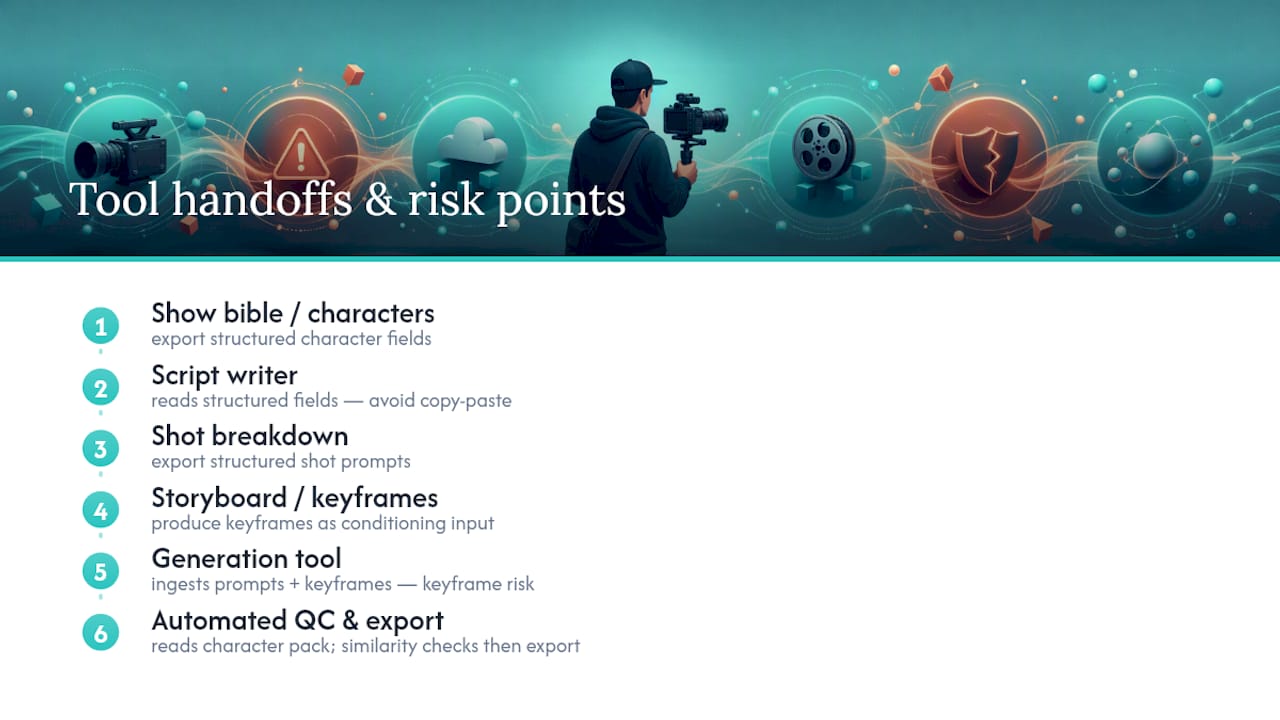
Integration is where most self-built pipelines break down, usually at the handoff between script and shot breakdown, or between generation and QC. The fix isn’t more tools. It’s making sure each tool’s output format is something the next tool can actually ingest without manual reformatting.
Your show-bible manager should export character details in a format your script writer can reference directly, whether that’s a shared document or a structured field the writing tool reads. A dedicated dialogue and voice-consistency guide is worth reviewing if you’re keeping a recurring character’s speech pattern stable across a season, since drift in dialogue voice is just as noticeable to viewers as drift in a character’s face.
Your shot breakdown should feed directly into your generation tool as structured prompts, not a paragraph you retype by hand every time. If your storyboard step produces keyframes, your generation tool needs to accept those as conditioning input rather than a separate reference upload each time. That single integration point, keyframe to generation, is often where solo creators lose the most time, since retyping or re-uploading references for every shot adds up fast across a season.
QC integration matters just as much. If your verification tool can’t read directly from your character pack’s stored references, you’re manually comparing frames by eye, which defeats the purpose of running automated similarity checks in the first place. The tools that save the most time are the ones that pass data forward automatically. Every manual copy-paste between steps is a place where continuity errors sneak in unnoticed until a viewer flags them in the comments.
How Should You Write Scripts for AI Video Production?
Scriptwriting for automated production differs from traditional scriptwriting in one important way: every line needs to translate into something a generation model can actually render. Vague action lines that a human director would interpret on set, like “she reacts,” don’t give a generation tool enough to work with. Write shot-specific direction instead: framing, character position, and a concrete facial or body cue.
Keep dialogue-heavy scenes visually simple and save your visually complex scenes for moments with less dialogue. Asking a model to nail a character’s exact expression while also rendering a busy background is asking for two hard problems at once, and that’s usually where regeneration counts climb.
Write with your character pack in mind from the first draft. If your character DNA specifies a signature gesture or expression, write scenes that let that detail show up naturally rather than forcing new physical behavior the pack was never built to render. Structuring episodes around a recurring visual detail, something episodic creators increasingly build into their world design, gives you callback opportunities across a season without adding generation risk.
Length matters more here than in traditional writing. A script written for a 90 second vertical episode should read tight on the page, since every extra line becomes an extra shot, and every extra shot becomes another generation to manage.
How Do You Manage Versions Across a Full Season?
Serialized content creates a version problem that single-video projects never face: you’re not just tracking one episode’s assets, you’re tracking a season’s worth of character packs, scripts, and generated shots that all need to stay consistent with each other. A character pack update in episode 4 has to somehow reach episode 9 without breaking the shots you already approved in episodes 5 through 8.
The simplest fix is treating your character pack as a versioned asset with a clear naming convention, something like a season and revision number attached to every pack export. When you update a character’s wardrobe or add a new expression reference, that becomes a new pack version, not an overwrite of the old one, so you can trace which episodes used which reference set if continuity questions come up later.
Scripts and show bibles need the same discipline. Keep your show bible as a single living document rather than scattered notes, and log major changes, a new supporting character, a shift in tone, with a date so you can explain why episode 12 looks different from episode 3 if a viewer asks. For generated footage itself, organize by episode and shot number rather than by generation date, since you’ll often revisit a specific shot for regeneration long after the original generation session ended.
Where Does Automation Actually Change the Creative Job?
Automation doesn’t remove creative judgment. It relocates it. The hard work shifts from managing a remote crew and production logistics to writing tighter scripts and designing a show bible that a machine can execute consistently. Humans still win on tone and final editorial arc. Where automation wins outright is volume and repeatability, which is exactly the job platforms like Iguanify are built to handle.
— Leonard
Iguanify Gets You From Script Line to Published Episode Fastest
Iguanify skips the toolchain entirely. Instead of stitching together a bible manager, a generator, a QC step, and an export tool yourself, you write one line of script and the platform runs the full pipeline from there, script through finished vertical episode.

The platform’s character consistency engine holds your cast steady across every episode automatically, which is the exact failure point that makes most solo creators give up on serialized AI video halfway through a season. You keep full ownership of everything produced, no rights questions, no licensing fine print, and output arrives formatted for TikTok, YouTube, and Instagram without a separate export step. That combination, real-time production plus instant delivery, is built for the audience this workflow actually serves: solo creators, influencers, and small publishers who want a finished serialized short, not a stack of software subscriptions to manage.
If you’ve been mapping out a pilot episode using the steps above and want to skip straight to output, the AI Drama Generator turns your premise into a finished first episode without you touching a single generation setting.
Sources
- Video Storyboarding (arXiv, 2024-12-10)
- Invideo
- How to Create Consistent Characters in AI Videos (Neolemon)
FAQ
What Is an Automated Remote Video Production Workflow?
It’s a pipeline that turns a written premise or script line into finished, publish-ready serialized episodes without a manual editing pass or a production crew. Some platforms run this end to end from a single input.
How Many Generation Options Should I Run Per Shot?
Industry workflow guides recommend 3 to 4 options per shot, which gives you selection room without paying for full regeneration cycles on every shot.
How Much Does an AI-Produced Episode Cost?
One documented production benchmark came in at roughly $1,000 per episode across a 10 episode, 3 person, 3 day run, compared to $150,000 to $300,000 per season for traditionally shot micro-dramas.
How Do I Keep a Character Consistent Across Episodes?
Build a character pack with 3 to 5 tight reference images and lock a one-page character DNA document before generating any motion. Run automated similarity checks against that pack for every batch, a method grounded in training-free multi-shot consistency research.
Can I Run This Entire Pipeline Without a Toolchain?
Yes. Integrated platforms like Iguanify handle script breakdown, character consistency, generation, and export in one process, removing the need to assemble and manage separate tools for each pipeline step.