 IGUANIFY
Creators: Budget a 25–50% Retry Margin for One Time Credits Video

One-time credits video means pay-as-you-go credit packs you buy to produce individual episodes or season packs on an AI episodic platform, with no subscription attached. They’re built for pilots, burst production, and one-off client jobs, not steady weekly output. The two things to check before buying: your regeneration budget, and whether you actually own the finished masters.
TL;DR:
- Producing a 1.5 to 2 minute episode typically consumes 15 to 25 shots, with three to four variants per shot, and can cost around $1,000 per episode for a 10-episode run.
- Ownership rights should be verified before purchase, ensuring you have full commercial rights, final master files, and license clearances for music and sound.
- Buying larger credit packs upfront reduces the effective cost per credit and is recommended if producing a season rather than a single pilot.
- For steady output or more than five videos per month, a subscription becomes more cost-effective than one-time credits, which are better suited for pilots and burst projects.
Table of Contents
- What One-Time Credits Video Packs Actually Buy
- How Do You Estimate Credits Per Episode?
- Why You Need a Retry Margin (and How Big It Should Be)
- Buying, Redeeming, and Tracking Your Credit Balance
- Content Ownership and Licensing: What to Confirm First
- The Prototype-Then-Batch Workflow That Saves Credits
- One-Time Credits vs. Subscription vs. Hiring an Editor
- What I’d Tell Any Creator Buying Their First Pack
- Produce Your Season on Your Own Terms with Iguanify
- Sources
- FAQ
What One-Time Credits Video Packs Actually Buy
A credit is a metered unit that pays for a single generation, whether that’s an image frame, a voice line, or a rendered video shot. Every time you generate a shot, request a second option, or bump up to a premium model tier, you spend credits against your balance. Nothing recurs. You buy a pack, you draw it down, and when it’s gone you either stop or top up.
Most platforms sell packs in small, medium, and large sizes, and bigger packs almost always lower your effective cost per credit, similar to buying in bulk. That structure differs sharply from a subscription, where you pay a flat fee whether you produce two episodes or twenty that month. Pay-as-you-go credit systems let creators skip that lock-in entirely and only pay for what they actually produce.
Here’s what typically draws down a balance on a 1.5 to 2 minute episode:
- Shot generation for every distinct camera angle or scene beat in the script
- Extra variants when you request 2 to 4 options per shot for coverage
- Premium model upgrades for hero shots, close-ups, or complex motion
- Post-production passes like extends, upscales, or audio sync fixes
A season of 60 episodes at that length can mean thousands of individual generations once you multiply shots by variants. Free tiers work fine for testing a concept, but they run out fast against that kind of volume.
How Do You Estimate Credits Per Episode?
The math is simpler than it looks once you break it into three variables: shot count, generations per shot, and model tier. Multiply those together, add your post-production passes, and you have a working estimate you can budget against before you spend a dollar.
- Count your shots. Break the script into individual camera setups. A 1.5 to 2 minute episode typically runs between several and a few dozen shots depending on pacing and cut frequency.
- Decide generations per shot. Three to four variants per shot gives you enough coverage to pick the best take without over-shooting your budget.
- Assign model tiers. Not every shot needs your most expensive model. Reserve premium tiers for hero shots and faces; use standard tiers for wide shots and transitions.
- Add post-pass credits. Budget separately for extends, resolution upscales, and audio sync, since these are billed on top of the base generation.
- Multiply and total. Twenty shots times three variants times a mixed-tier rate gets you a real number, not a guess.
A documented 10-episode AI micro-drama run cost roughly $1,000 per episode once shot count, model mix, and extend passes were factored in. That’s a useful anchor if your script runs longer or leans on premium tiers more heavily than average.
Pro Tip: *Run your first episode’s math on paper before you touch the platform.
Why You Need a Retry Margin (and How Big It Should Be)
Budget a retry margin, often between about a quarter and a half of your base estimate, to account for retries. That’s not padding, it’s insurance against the reality that not every generation lands on the first try, and prompt experiments, aspect ratio tests, and outright failed outputs all draw down the same balance as your finished shots.
Experienced creators handle this by treating their first episode or two as prototypes, not final product. They spend cheap credits testing character look, pacing, and tone before committing real budget to a full run. That prototyping discipline is what separates a controlled season budget from one that quietly doubles by episode six.
A few habits keep the margin from becoming an excuse to overspend:
- Approve storyboard frames before generating any video, since image credits cost a fraction of video credits
- Lock your model mix per shot type before you start batch production, not mid-run
- Track regenerations per episode so you can see if one episode is eating a disproportionate share of the pack
Bigger one-time packs shrink cost per credit, so if you know you’re producing a full season rather than a single pilot, buying the larger pack up front usually beats topping up repeatedly at the smaller rate.
Buying, Redeeming, and Tracking Your Credit Balance
The typical flow looks like this: try a free pilot or concept generation first, choose a pack size once you know your episode count, allocate credits to the specific project, then top up if you run close to your season goal. That sequence lets you de-risk your first real spend before committing to a season-sized purchase.
Before you buy, confirm these terms directly with the platform:
- Whether credits expire, and on what timeline
- The refund policy for unused or defective generations
- Whether credits transfer between projects or accounts
- What counts as a spend: does a preview render cost the same as a final export?
- Delivery service-level agreements for turnaround time
That last point matters more than it sounds. Some platforms only charge credits on final renders, letting you preview freely; others meter previews too. Knowing which model you’re on prevents nasty surprises when you’re juggling multiple client projects and need clean, separate accounting for each one.
Content Ownership and Licensing: What to Confirm First
Before you spend a single credit, confirm you get full commercial rights to the episodes you produce. This is not a given across every platform, and it’s the single most important line item to check in the terms of service.
Verify these four things specifically:
- Ownership terms. Do you own the finished episode outright, or does the platform retain any usage rights?
- Music and sound licensing. Short vertical formats often use licensed tracks, so confirm the music rights extend to commercial use on TikTok, YouTube, or Meta.
- Deliverable formats. Ask whether you receive final masters, isolated audio stems, and high-resolution exports for archiving, not just a compressed platform-ready file.
- Where it’s documented. Read the terms of sale and any published ownership checklist rather than relying on a sales page’s marketing language.
Skipping this check is how creators end up with an episode they can post but can’t monetize the way they planned.
The Prototype-Then-Batch Workflow That Saves Credits
Lock your look before you spend video credits, not after. Generate storyboard frames and character reference images first, get those approved, and only then move into full video generation. Image approvals sit on a far cheaper layer than video renders, so every decision you make there instead of in the video pipeline protects your balance.
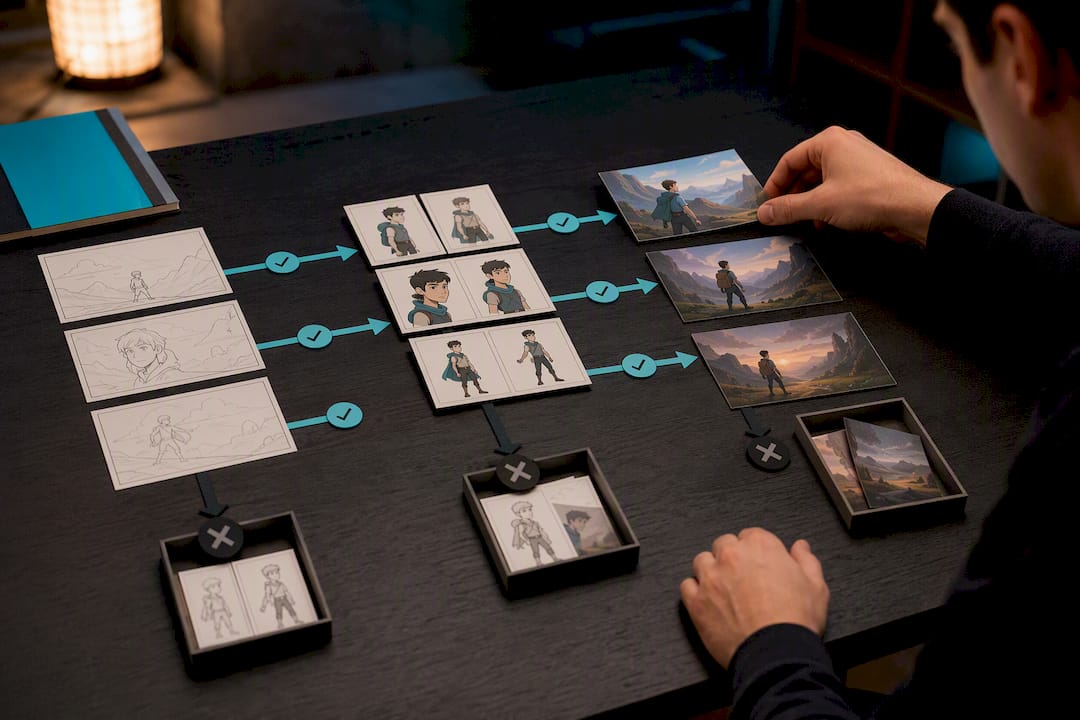
Save your character definitions and a written series bible the moment you approve them. This is what keeps a recurring character’s face, wardrobe, and voice consistent across episode 12 the same way it looked in episode one, which is the exact continuity problem that trips up most generic AI video tools.
Once your pilot is locked, batch-produce the rest of the season against that approved template rather than iterating shot by shot, following a practical video production timeline for efficiency. A practical pilot-to-season timeline looks like this:
- Week one: generate and approve character references and a pilot storyboard
- Week two: produce the pilot episode, review for continuity and pacing
- Weeks three onward: batch-produce remaining episodes against the locked bible
Pro Tip: Keep a single reference document with your character bible, locked model tiers per shot type, and your approved pilot frames. Every future episode should be produced against that document, not reinvented from scratch.
One-Time Credits vs. Subscription vs. Hiring an Editor
One-time packs fit pilots, single client jobs, and burst production where you don’t know if you’ll need this volume again next month. Subscriptions make more sense once your output is steady, since they smooth per-video cost across predictable weekly releases. Hiring a human editor can still beat AI production at very low volume or when brand-match requirements are unusually strict.
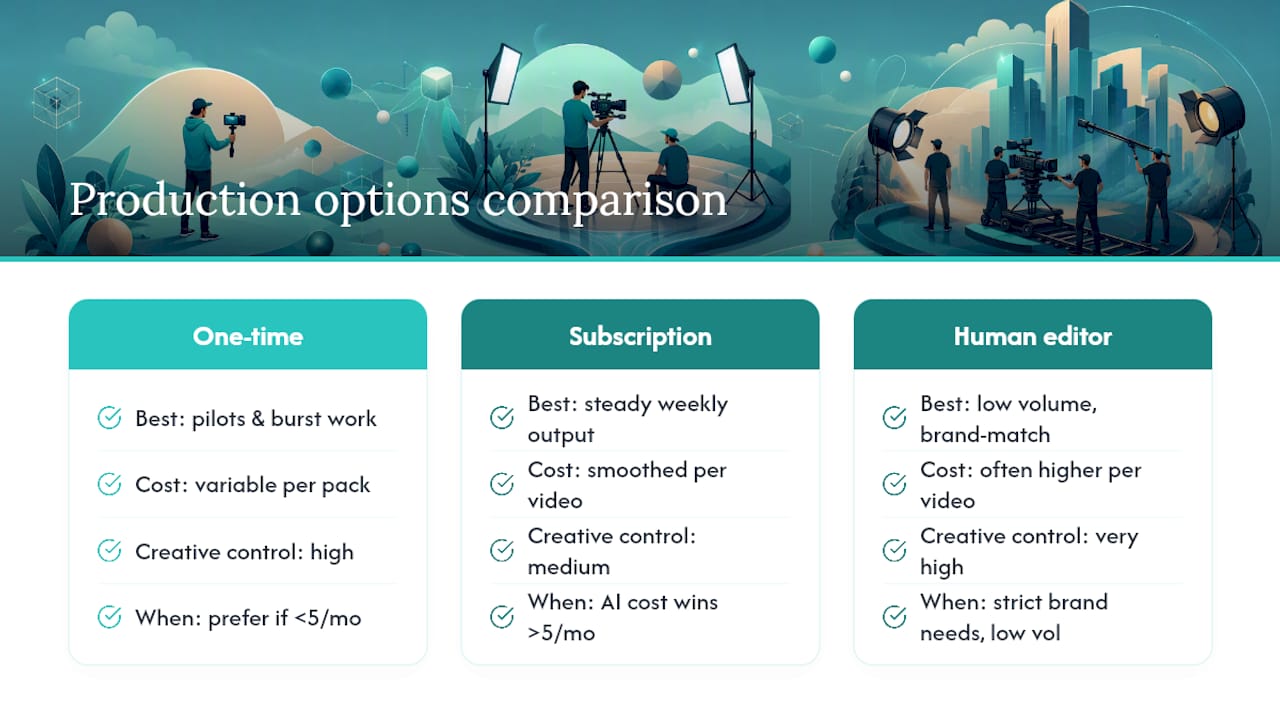
A rough threshold worth knowing: AI production tends to win on cost above about five videos per month for a solo creator. Below that, the math is closer, and the right call depends more on how much creative control you need than on price alone.
What I’d Tell Any Creator Buying Their First Pack
Prototype before you commit real budget, always. And never buy into a platform without confirming you get commercial masters and full ownership. Watching how episodic AI pipelines meter cost against creative iteration has made one thing clear: the buyers who plan their shot count and model tiers before they spend outperform the ones who improvise mid-season, every time.
— Leonard
Produce Your Season on Your Own Terms with Iguanify
Some AI video platforms offer one-time production packs, not a subscription, so users pay once per episode or season and own what they produce. That’s the practical difference for a creator weighing pilot costs against a full season: no recurring fee eating into your margin, and no lock-in if your next project looks completely different from your last one.

The Standard episode and Pilot packs run $34.99 one-off per episode, with Creator, Season, and Studio options available for larger runs. Some packs include saved character continuity across episodes, maintaining consistent cast appearance and sound, with production-ready masters suitable for publishing to platforms like TikTok, YouTube, or Instagram. If your project needs a fully managed build instead of a self-serve run, the commissioned production option covers that too. Before you buy, check the pack sizes, deliverable formats, and ownership terms listed on the product page, then choose the pack that matches your episode count and start your pilot today.
Sources
- Monday
- The unit economics of AI video production in 2026: real per-video cost, the revision tax, and the break-even vs hiring an editor · Kompozy
FAQ
What Counts as a One-Time Credit in Episodic Video Production?
A one-time credit is a metered unit you buy once, with no subscription attached, that pays for a single generation like a shot, an audio line, or a post-production pass. You draw down your balance as you produce, and the credits don’t renew.
How Many Credits Does a Typical Episode Need?
A 1.5 to 2 minute episode usually runs 15 to 25 shots, and at 3 to 4 generation variants per shot, that adds up fast once you factor in model tier and post-passes. A documented 10-episode benchmark run landed around $1,000 per episode in total production cost.
How Big Should My Retry Margin Be?
This margin is standard practice among creators who treat their first episode as a prototype rather than a final product.
Do I Own the Episodes I Produce with Purchased Credits?
Ownership depends entirely on the platform’s terms of sale, so confirm commercial rights before you buy. Iguanify’s production packs include full ownership of the finished episodes, with no ongoing licensing fee.
Should I Buy One-Time Credits or a Subscription?
Choose one-time credits for pilots, client jobs, or bursts where your future volume is uncertain. Choose a subscription once your output is steady and predictable, since the cost math favors subscriptions above roughly five videos a month for a solo creator.