 IGUANIFY
Image Anchors Keep Continuity: Localize Video Series for Solo Creators
“Localize video series” here means something specific: automated episodic production from a single locked premise, with recurring characters and assets that hold steady across every episode. The fastest reliable route is a locked series bible paired with an image-anchored I2V pipeline, and Iguanify is one option that automates that pipeline without a production team.
TL;DR:
- Lock your visual assets, series bible, and delivery targets before starting production to prevent costly drift and rework.
- Chain shots from high-fidelity anchor images and generate multiple variations for critical scenes to maintain consistent visuals across episodes.
- Use templates with consistent file naming, metadata tracking, and batching of episodes to ensure visual and stylistic continuity at scale.
- Regularly check for anatomical, lighting, wardrobe, and background drift, re-anchoring from master references to catch and fix issues early.
- Automating the entire pipeline with a platform like Iguanify helps preserve consistency and reduces the need for a large production team.
Table of Contents
- What Do You Need Before You Localize a Video Series?
- How Do You Produce a 3-Episode Mini-Season Step by Step?
- What Templates Keep a Series Consistent While You Scale?
- Why Do Episodes Start Looking Inconsistent, and How Do You Fix It?
- How Do You Handle Transcription and Translation for Captions?
- How Does AI Voiceover Work for Multiple Episodes?
- How Do AI Editing Tools Keep Pacing and Style Consistent?
- How Do You Quality Check an Automated Production Workflow?
- What Platform Details Matter Beyond Aspect Ratio?
- How Should You Manage Files Across Multiple Localized Episodes?
- Why Disciplined Pipelines Beat Ad-Hoc Prompting
- Try Iguanify’s Automated Episode Pipeline
- Sources
- FAQ
What Do You Need Before You Localize a Video Series?
Before you generate a single frame, you need three things locked: your visual assets, your bible, and your delivery targets. Skip any of these and you’ll spend more credits fixing drift than you would have spent planning.
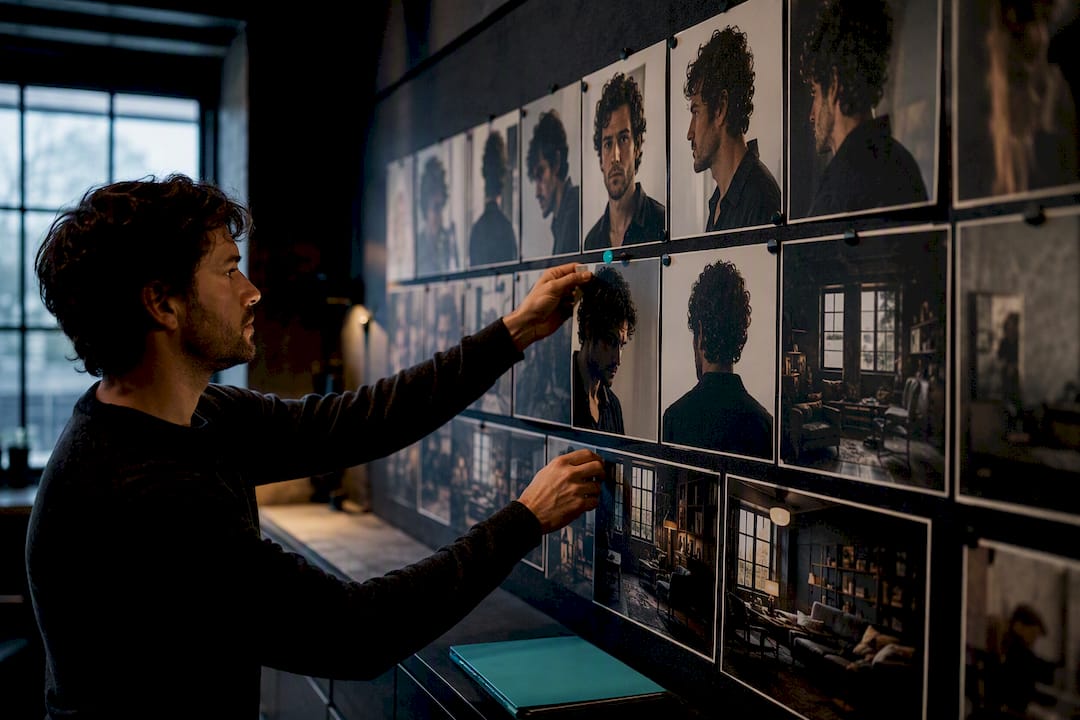
Start with master reference images for every recurring character. That means a front view, a 45 degree angle, and a back view for each face your audience needs to recognize across episodes. Do the same for your key locations. These become the anchor images every future generation points back to, and they’re the single biggest lever against visual drift, according to research on spatial memory and consistency in generative video.
Your series bible needs four essentials: the one-sentence premise, your episode duration (60 to 120 seconds tends to hit the retention sweet spot in documented micro-drama pipelines), your hook structure for the first three seconds, and a locked vocabulary list so character names, place names, and recurring phrases never drift between episodes.
Set your targets before you generate anything:
- World Consistency Score (WCS) target: 0.8 or higher — the benchmark practitioner research uses to judge whether characters and environments stay recognizable episode to episode.
- Minimum Viable Fidelity (MVF) checklist: face match, wardrobe match, and lighting match, checked shot by shot.
- Delivery specs locked per platform (aspect ratio, duration cap, caption placement) before your first batch, not after.
- A credit-use allowance and reroll budget per episode, plus dedicated review time, so an underestimated budget doesn’t stall your season halfway through.
Pro Tip: Build your reroll budget assuming one in four shots needs a second pass. Solo creators who skip this step tend to run out of credits two episodes before the season finale.
How Do You Produce a 3-Episode Mini-Season Step by Step?
Producing three consistent episodes is mostly a sequencing problem. Get the order wrong and you’ll burn credits generating footage that doesn’t match your locked characters. Here’s the sequence that avoids that.
- Lock the premise and format. Write your one-sentence premise, then write one-sentence loglines for each of your three episodes. If you can’t summarize an episode in one sentence, it’s not ready to storyboard.
- Build the series bible and lexicon. Document character names, locations, tone, and recurring vocabulary. Set your MVF and WCS targets now, not after generation starts.
- Storyboard first. Convert each script into shot cards, one card per shot, listing the location, characters present, camera angle, and action. Run a storyboard acceptance test on every card before animating anything, a discipline Oakgen’s storyboard workflow credits with cutting wasted generation credits significantly, since teams stop animating shots that were never going to pass review.
- Produce your anchor frames. Generate the master I2V images for each character and location first. Then generate your establishing shots, the wide frames that set the scene, before any close-up or action shot.
- Chain your generations. Use the previous shot’s final frame as the spatial anchor for the next shot’s starting frame. This is the technique that separates deployable episodes from experimental clips, according to analysis of what breaks generative video pipelines at scale: anchoring assets in high-fidelity stills and chaining shots is what actually prevents drift, not better prompts.
- Batch your critical shots. Generate multiple variations of any shot involving a close-up face, wardrobe detail, or hand interaction, then select the best match Pick the best match against your master reference, don’t settle for the first output.
- Assemble, grade, export. Pull your approved shots into your NLE, run light upscaling if needed, apply a consistent color grade across the episode, and export your platform-specific variants.
The order matters more than the tools. Skip storyboarding and jump straight to generation, and you’ll discover continuity breaks after you’ve already spent your credit budget. Lock the anchor frames first, chain from there, and you convert what would otherwise be a pile of disconnected clips into an actual episode.
What Templates Keep a Series Consistent While You Scale?
Once episode one is done, the real risk is episode four looking nothing like episode one. Templates fix that, and they cost nothing but ten minutes of setup.
Use a consistent file naming convention from day one: something like S1E03_SC02_SH04_v3 tells you season, episode, scene, shot, and version at a glance. Every file also needs three metadata fields tracked somewhere, even a simple spreadsheet: the model or tool used, the seed or job ID, and the attempt count. When a shot drifts and you need to regenerate it six weeks later, that metadata is the only reason you can reproduce the original result instead of starting over. Treating every generation as an asset you might need again, rather than a disposable output, is the mindset industry pipeline guidance recommends for exactly this reason.
Batch cadence matters too. Generating one episode at a time invites inconsistency because your reference “feel” shifts slightly each session. Batching three to six episodes together, and generating all your wide establishing shots across the whole batch before moving to close-ups, keeps your visual baseline stable, a cadence scaling guidance for serialized social content recommends for creators trying to sustain a series past the first few episodes.
| Element | Standard | Why it matters |
|---|---|---|
| File naming | Season/episode/scene/shot/version | Makes any shot traceable and regeneratable |
| Batch size | 3 to 6 episodes per batch | Keeps visual baseline stable across episodes |
| Shot coverage | 2 to 4 variations per critical shot | Gives you a real choice instead of one gamble |
| Metadata tracked | Model, seed/job ID, attempt count | Lets you reproduce or fix a shot without guessing |
For a solo creator, parallelizing means running generation jobs for tomorrow’s batch while you’re reviewing today’s. Review in short blocks, twenty minutes at a time, rather than one long sitting. Fatigue is the enemy of an accurate WCS judgment call.
Why Do Episodes Start Looking Inconsistent, and How Do You Fix It?
Visual entropy creeps in gradually, then all at once. Catching it early saves you from a full-episode reshoot.
Watch for four symptoms specifically: anatomy drift (a character’s face subtly changing shape between shots), lighting jumps (a scene lit warm in one shot and cold in the next), wardrobe or color shifts (a jacket changing shade mid-scene), and jittery backgrounds where static elements seem to shimmer or move.
The fix depends on where the problem sits:
- If a single shot drifted from the prompt or seed, reroll it. That’s a prompt-level fix and it’s cheap.
- If the model consistently struggles with a specific action, like a character eating or typing, that’s a model limitation, not a prompt problem. Research on hand-object interaction failures documents this as a known weak spot; swap the shot for a cutaway or handle it in traditional post-production instead of rerolling ten times.
- If lighting or anatomy drifts across a whole scene, go back to your master reference image, not the previous shot, and re-anchor from there.
Pro Tip: Keep your master reference images pinned in a visible panel while reviewing footage. Drift is far easier to catch side by side than from memory.
A quick troubleshooting pass before you approve any batch: compare each character’s face against the master reference, check wardrobe color consistency scene to scene, and scan backgrounds for shimmer. Three checks, ninety seconds, and you’ll catch most problems before they reach your edit timeline.
How Do You Handle Transcription and Translation for Captions?
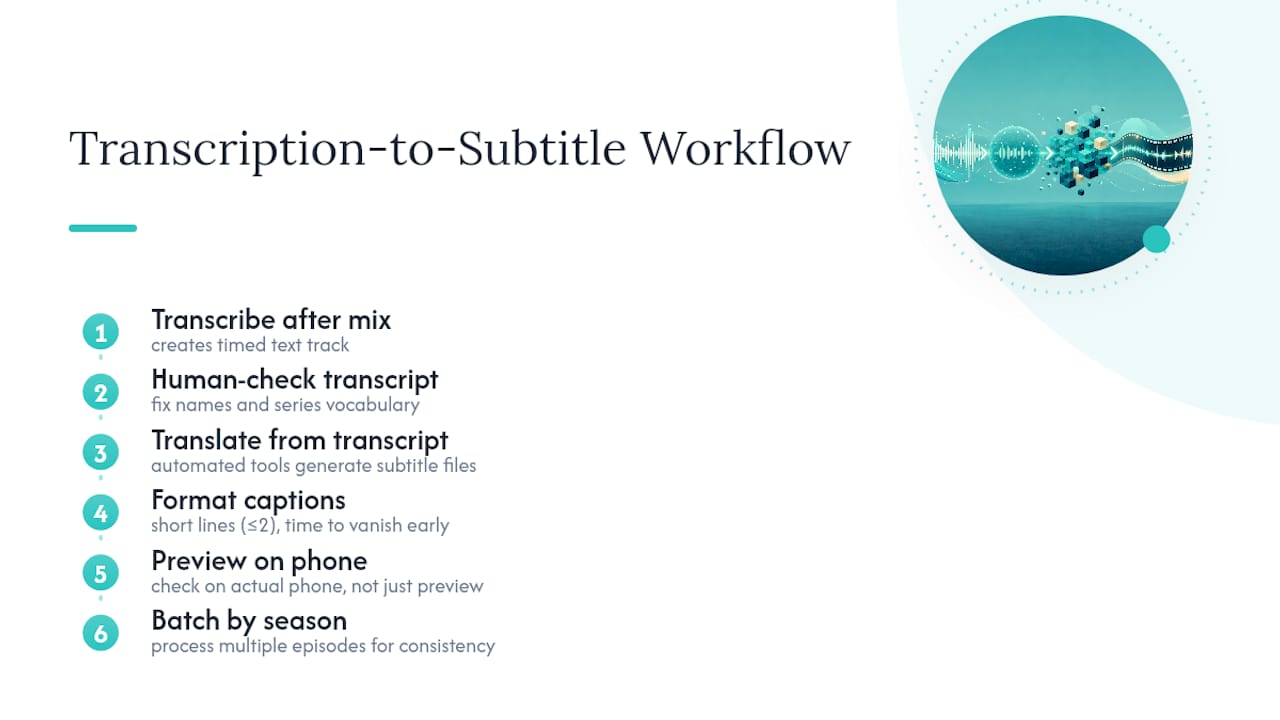
Automated transcription tools generate a timed text track directly from your episode’s audio, which then feeds into both burned-in captions and translated subtitle files. Run transcription immediately after your final audio mix, not before, since any dialogue edits after transcription will desync your timing.
Once you have an accurate transcript, automated translation tools can generate subtitle files in additional languages from that same source text. The workflow that avoids embarrassing errors: transcribe, human-check the transcript for names and invented vocabulary from your series bible (these are the words automated tools mangle most often), then translate. Skipping the human check on proper nouns is the single most common mistake, since translation tools have no way of knowing your character’s name isn’t a typo.
For caption formatting, keep lines short, two lines maximum, and time them to disappear before the next line of dialogue starts. Vertical video gives you less horizontal space than a widescreen frame, so captions that read fine on a desktop preview often crowd the frame on a phone. Preview every subtitle pass on an actual phone screen before you export final files, not just in your editing software’s preview window.
Batch your transcription and translation work across the whole season at once rather than episode by episode. It’s faster, and it keeps your terminology consistent since you’re referencing the same lexicon document for all three episodes at the same sitting.
How Does AI Voiceover Work for Multiple Episodes?
AI text-to-speech tools generate voice tracks directly from your script text, and the consistency principle is the same one that governs your visuals: lock a voice profile per character before episode one, then reuse that exact profile across every episode in the season.
Switching voice models or settings mid-season is the audio equivalent of a face changing shape between shots. Viewers notice a character’s voice shifting pitch or pacing even when they can’t articulate why something feels off.
Match your voiceover pacing to your episode duration target. If you’re locked into episodes with durations generally in the range known to perform well in micro-drama pipelines, your dialogue needs to fit that runtime without sounding rushed, which usually means trimming your script before generating voice, not stretching the audio afterward. Generate your voiceover before your final visual assembly when possible, since dialogue timing often determines your cut points more than the visuals do.
Run each generated line against your lexicon document, the same one from your series bible. Character names and invented terms are exactly where text-to-speech tools default to the nearest real word, mispronouncing anything they don’t recognize. Catching that on the first pass beats catching it after you’ve already assembled the full episode.
How Do AI Editing Tools Keep Pacing and Style Consistent?
AI-driven editing tools can auto-cut to a beat pattern, apply a consistent color grade across a batch of clips, and match pacing rhythms episode to episode, but they need the same anchor discipline as your visual generation.
Set your color grade preset once, during episode one, and apply that exact preset across every subsequent episode rather than adjusting per episode. A grade that shifts even slightly reads as a lighting inconsistency to viewers, the same symptom covered in the troubleshooting section above.
For pacing, decide your cut rhythm early: how many seconds per shot on average, where your hook lands, where your cliffhanger cut sits. AI editing tools that auto-cut to music beats work well for establishing shots and transitions, but dialogue-heavy scenes usually need manual pacing control since automated cutting tends to interrupt lines mid-sentence.
Keep your editing template file (grade preset, transition style, caption style) saved and reused across the whole series, not rebuilt per episode. This is the same file naming and metadata discipline covered earlier applied to your edit suite instead of your generation pipeline. An editing workflow that starts from a fresh template every episode is one of the most common ways continuity quietly erodes over a season, even when every individual shot looks fine.
How Do You Quality Check an Automated Production Workflow?
Quality control in an automated pipeline works best as a checklist applied at three checkpoints: after storyboarding, after shot generation, and after final assembly, rather than one long review at the end.
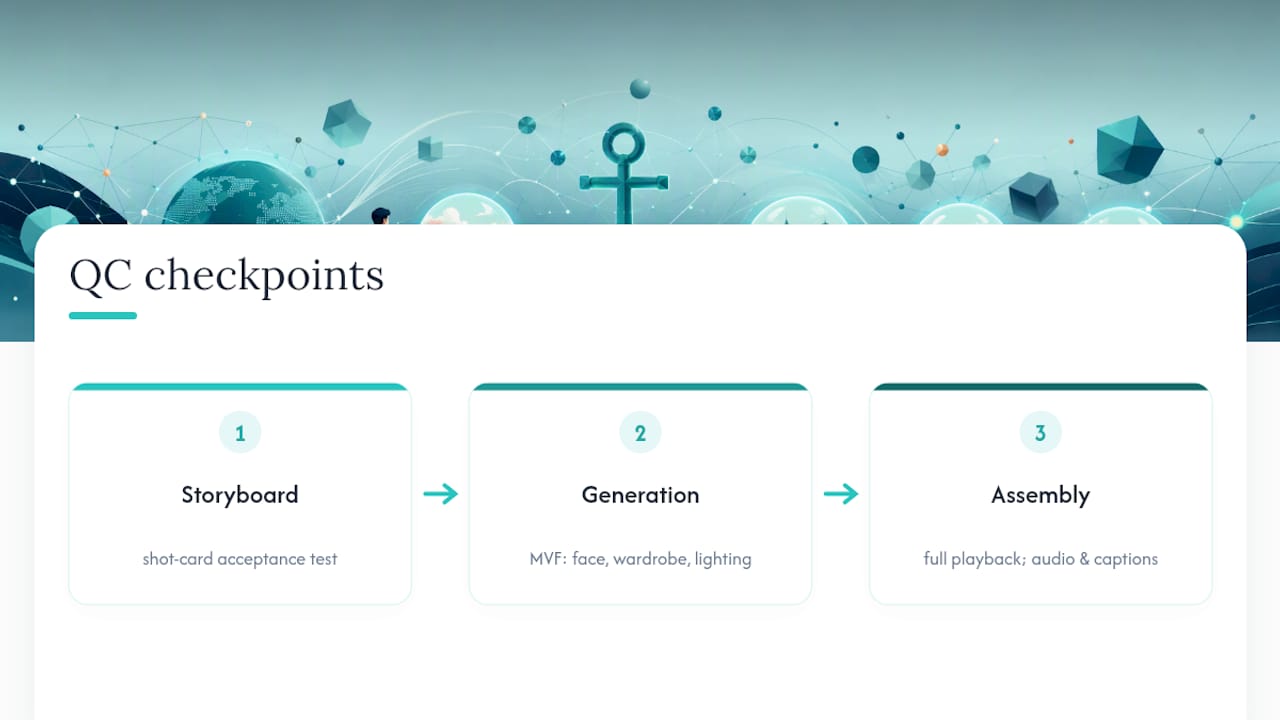
At the storyboard stage, run the acceptance test before animating: does this shot card match the bible’s location, character, and action requirements? Rejecting a shot card costs nothing. Rejecting a finished generated shot costs credits.
At the generation stage, check each shot against your MVF checklist covered earlier: face match, wardrobe match, lighting match. Compare directly against your master reference image, side by side, not from memory.
At the assembly stage, watch the full episode once through without pausing, the way a viewer will. Problems that seem minor shot by shot, a slightly off color grade, a slightly rushed line, often become obvious only in full-episode context. Then watch it a second time specifically checking audio sync and caption timing.
Document what you reject and why. A running note of “rejected: hand interaction failure” or “rejected: lighting drift scene 2” builds a pattern over a few episodes that tells you where your pipeline actually breaks, which is more useful than treating each rejection as an isolated incident.
What Platform Details Matter Beyond Aspect Ratio?
Vertical 9:16 framing gets most of the attention, but the details that actually affect performance sit one layer deeper. TikTok, YouTube Shorts, and Instagram Reels each cap duration and safe zones slightly differently, and content generated for one without accounting for another’s safe zone often gets captions clipped by the platform’s own UI overlay.
Check where each platform places its interface elements, the caption bar, the profile tag, the like button column, before finalizing your caption placement. A caption sitting perfectly in frame on YouTube Shorts can land directly behind Instagram’s comment icon.
Metadata matters as much as the video file. Title, description, and the first line of your caption function as your hook’s second chance if the visual hook doesn’t land in the first second. Keep your episode numbering visible in the title itself (“Episode 3” or “Ep. 3 of 5”) since viewers landing mid-season need that context immediately, and it also signals to platform algorithms that this is serialized content worth surfacing sequentially.
Export separate files per platform rather than one file resized three ways. A single export forces compromises on caption placement and safe zones that platform-specific exports avoid entirely.
How Should You Manage Files Across Multiple Localized Episodes?
Version control sounds like an engineering concern, but for a serialized video pipeline it’s the difference between fixing a shot in ten minutes and rebuilding an episode from scratch.
Every asset, master reference images, approved storyboards, generated shots, and final cuts, needs a version number and a date, not just a filename. When you reroll a shot for the fourth time, “v4” tells you nothing about which prompt or seed produced it, but a metadata log tied to that version number does.
Keep one master folder structure across the entire season rather than starting fresh each episode: a References folder, a Storyboards folder, a Generated folder, and a Final folder, each subdivided by episode number. Consistency in your folder structure matters just as much as consistency in your footage, since a solo creator managing three episodes at once loses far more time hunting for files than generating them.
Back up your master reference images separately from everything else, and treat them as untouchable. If those images get overwritten or lost mid-season, every future episode loses its anchor point, and you’re rebuilding continuity from scratch rather than extending it. A five-minute backup habit protects the one asset your entire season depends on.
Why Disciplined Pipelines Beat Ad-Hoc Prompting
Treat episodic AI production like running a small virtual studio, not like typing prompts until something looks right. That shift in mindset changes everything downstream: what you budget for, what you review, and what you’re willing to reroll.
Consistency matters more than any single striking shot. A gorgeous establishing frame that doesn’t match episode one’s lighting will cost you viewers faster than a merely good shot that holds continuity. Series retention runs on recognition, not novelty, and WCS discipline is what protects that recognition episode after episode.
What automation actually changes is the barrier to entry. Locking continuity, managing rights, and handling multi-platform delivery used to require a production team. A pipeline that automates those pieces, the way automated episodic production approaches work, turns a solo creator’s premise into a publishable season without hiring anyone.
— Leonard
Try Iguanify’s Automated Episode Pipeline
Iguanify runs the exact pipeline this guide describes, so instead of assembling storyboard tools, image generators, voice tools, and an editor separately, you write one premise and the platform handles series bible generation, recurring cast creation, image-anchored production, and multi-platform export in one connected system.

That connected approach solves the specific problem this whole guide has been circling: continuity breaking down between separate tools handling separate steps. Iguanify keeps your characters, locations, and lexicon locked from episode one through episode twenty, because the same system generates all of them rather than passing files between disconnected apps. You keep full rights to everything produced, and publication across TikTok and YouTube is built into the output rather than a separate export headache.
If you’re specifically chasing a ReelShort-style vertical drama format, the platform has a dedicated path for that output style too. Otherwise, the AI drama generator produces finished episodes, not raw clips you still need to assemble.
Start by generating your show concept and cast for free. If it matches what you had in mind, purchase episode credits and produce your first finished episode without hiring an editor or an animator.
Sources
- arXiv: Spatial memory / consistency in generative video (2508.00144)
- Scaling generative video: a creative ops audit of consistency and control — Techhoff
- AI storyboard workflow: script to video — Oakgen
FAQ
What Does “Localize a Video Series” Mean in This Context?
It means producing serialized episodes from one locked premise using automated tools, keeping characters, locations, and pacing consistent across every episode rather than adapting existing footage for different regions.
What Is a Good WCS Target for a New Series?
Aim for a World Consistency Score of 0.8 or higher, achieved through master reference images covering front, 45 degree, and back angles for every recurring character.
How Long Should Each Episode Run?
Documented micro-drama pipelines show episodes with durations generally in the range known to perform well in micro-drama pipelines hit the retention sweet spot for vertical serialized content.
Do I Need a Production Team to Ship a Season?
No. A platform like Iguanify automates series bible creation, recurring cast generation, and multi-platform export from a single script, which is exactly the barrier a production team used to solve.
How Many Variations Should I Generate Per Critical Shot?
Generate 2 to 4 variations for any shot involving a close-up face, wardrobe detail, or hand interaction, then select the version that best matches your master reference image.