 IGUANIFY
How to Produce TikTok Drama Series with AI
AI-driven, end-to-end production is the fastest way to build serialized, TikTok-ready drama episodes, and Iguanify is the recommended platform to get there. Starting from a single premise, Iguanify handles scriptwriting, recurring cast generation, audio, rendering, and metadata output, delivering a finished MP4 plus thumbnail and caption package ready to post. Generate a free show concept at Iguanify before you spend a dollar.
Key Takeaways
AI-driven end-to-end production, with locked reference assets and hook-first scripts, is the most reliable way to produce serialized TikTok drama at scale.
| Point | Details |
|---|---|
| Lock reference assets first | Create a 6–9 image reference bundle per character before generating any episode footage. |
| Script hook-first | Open every episode with conflict in the first 3 seconds and close with a clear cliffhanger. |
| Use image-to-video for characters | Apply image-to-video for recurring cast and text-to-video for backgrounds to hold visual continuity. |
| Validate before publishing | Run a continuity scorecard and audio level check (–14 LUFS) at every review gate. |
| Iguanify runs the full pipeline | From series bible to final MP4, Iguanify automates every production stage; creators retain full ownership. |
Table of Contents
- What does a TikTok drama production pipeline look like?
- What are the TikTok vertical specs for serialized drama?
- How do you produce a drama episode step by step?
- How do you keep characters consistent across episodes?
- How do you publish and grow a TikTok drama series?
- What do AI-produced episodes cost and how long do they take?
- Who owns AI-generated episodes, and what are the rights risks?
- Copy-ready checklist and templates for your first episode
- How does Iguanify handle each step of this pipeline?
- What creators get wrong about AI drama series
- Iguanify produces finished episodes, not just clips
- Sources
What does a TikTok drama production pipeline look like?
The full production flow runs in a single ordered sequence:
Planning → Series Bible → Script → Visuals → Audio → Render → Review → Final MP4 + Thumbnail + Metadata → Publish
Each stage has a clear owner: AI handles the heavy lifting, and you handle the judgment calls. The video-factory pipeline demonstrates this well, tracking render checkpoints, retries, validation gates, and cost traces to produce a finished MP4, thumbnail, and metadata package automatically.
The practical rule: automate every repeatable task (script drafts, image generation, TTS, rendering, caption burn-in, metadata formatting) and apply human review at three gates: after the script, after the first assembled cut, and before publishing.
Stages best automated: series bible generation, per-shot image generation, TTS voiceover, caption burn-in, render assembly, and metadata output. Stages that need your eyes: story logic, character consistency, pacing, and final platform compliance.
What are the TikTok vertical specs for serialized drama?
Getting the format right before you generate a single frame saves you re-renders. For TikTok vertical drama, the non-negotiables are:
| Spec | Requirement |
|---|---|
| Aspect ratio | 9:16 |
| Recommended resolution | 1080 × 1920 px |
| Frame rate | 24–30 fps |
| Episode duration | 60 seconds per part |
| Safe zone (captions/overlays) | Keep within center; avoid bottom 20% (UI overlap) |
| Subtitle style | High-contrast, word-highlighted |
| Thumbnail | 1080 × 1920 px, face or conflict visible in top 60% |
Your creative brief for each episode should lock these fields before generation: episode hook (first 3 seconds), core conflict, cliffhanger point, character beats per scene, pacing (seconds per shot), and subtitle style. Locking these upfront means your AI tool generates to spec rather than requiring post-render corrections.
Pro Tip: Set your first frame as a static high-contrast image with the character’s face and a one-line tension text overlay. TikTok’s algorithm uses the first frame as a de facto thumbnail in many placements, so treat it like a poster, not a loading screen.
How do you produce a drama episode step by step?
A runnable sequence keeps you from skipping review gates under deadline pressure. Follow this order:
- Write the concept and series bible. Lock character names, voice presets, visual style, and recurring props before generating anything.
- Script the episode hook-first. Open with conflict in the first 3 seconds. Keep each scene to 15–30 seconds of dialogue. The faceless-video-engine approach of driving everything from a single
config.jsonis worth adopting: one source of truth for voice, pacing, and scene order. - Generate reference assets. Create a three-shot reference pack per character (frontal, three-quarter, full body). These frames anchor every subsequent generation.
- Generate per-shot visuals. Use image-to-video for recurring characters, text-to-video for backgrounds and B-roll. This split is the most reliable way to hold character identity across shots.
- Produce word-timed TTS audio. Use Google Cloud Text-to-Speech or Microsoft Edge Neural TTS with a locked voice preset per character. Export word-level timing files for caption alignment.
- Burn in captions. Align subtitles to the word-timing file. Validate that no caption overlaps the TikTok UI safe zone.
- Render and assemble. Run Remotion as the primary renderer with FFmpeg as the fallback. Apply crossfades between shots (4–8 frames). Assemble the full episode timeline.
- Run the review gate. Check continuity scorecard (identity, wardrobe, lighting, motion), audio levels (target –14 LUFS for mobile), and caption alignment.
- Export final deliverables. Output: MP4 (1080 × 1920), thumbnail PNG, burned-in caption file, and metadata package.
Pro Tip: Split each episode into shot units of 15–30 seconds and re-anchor from your original reference pack every ~45 seconds. Longer sequences drift without this reset, and catching drift at the shot level costs far less than re-rendering a full episode.
- Pass/fail at the script gate: does the hook land in 3 seconds? Is the cliffhanger clear?
- Pass/fail at the cut gate: do characters look consistent shot to shot? Is pacing under 30 seconds per scene?
- Pass/fail at the export gate: correct resolution, audio levels, no UI overlap?
How do you keep characters consistent across episodes?
Visual and audio drift is the most common failure in serialized AI drama. The fix is a locked reference bundle, not willpower.
Your series bible should lock: character portraits (frontal, three-quarter, full body), wardrobe notes per character, voice preset IDs, mood palettes (hex codes or style descriptors), recurring props, and set rules (lighting direction, background constraints).

Locking a reference bundle of 6–9 images per series and reusing it for every clip is the practical difference between a coherent show and a collection of unrelated clips. Treat that bundle as your series’ style guide.
| Asset | What to lock | Reuse rule |
|---|---|---|
| Character portraits | 3-shot pack per character | Use as anchor frame for every new shot |
| Voice preset | TTS voice ID + speed + pitch | Never change mid-series |
| Music stems | 2–3 licensed instrumental loops | Same stems per episode; vary mix only |
| Thumbnail template | Layout, font, color overlay | Apply to every episode thumbnail |
The anchor-frame method reinforces this: use the last frame of clip N as the start frame for clip N+1, and re-anchor from your original reference pack every ~45 seconds. For voice, record or layer human ADR only when an emotional beat requires nuance that TTS cannot carry, such as a crying scene or a whispered confrontation.
A continuity scorecard validates identity, wardrobe, environment, lighting, and motion across every shot before you assemble the episode. Run it at the review gate, not after publishing.
How do you publish and grow a TikTok drama series?
Publishing cadence and metadata matter as much as production quality for serialized content.
Metadata template per episode:
- Caption:
[Series name] Ep. [N] | [One-line hook] #drama #[genre] #[character name] #serialdrama #fyp - Thumbnail: character face visible in top 60%, tension text in high-contrast overlay
- First comment: post a teaser for the next episode within 5 minutes of publishing to drive comment engagement
- AI disclosure: include
#AIGeneratedor an on-screen label per TikTok’s current community guidelines on synthetic media
| Cadence | Expected trade-off |
|---|---|
| Daily | Maximum algorithmic push; high production load; risk of quality drift |
| 2–3× per week | Sustainable for solo creators; strong retention between episodes |
| Weekly | Easiest to maintain quality; slower audience compounding |
For cross-platform repurposing, post the same vertical MP4 to Instagram Reels and YouTube Shorts within 24 hours. Stitch and remix features on TikTok can extend reach if you invite viewers to react to a cliffhanger moment. Pin a series playlist in your bio link to help new viewers start from episode one.
What do AI-produced episodes cost and how long do they take?
Costs vary by tooling stack and how many re-rolls you budget per episode.
- Image generation: per-shot costs depend on the model; budget for 10–20 generations per episode including re-rolls
- TTS audio: Google Cloud Text-to-Speech and Microsoft Edge Neural TTS both offer low per-character rates; a 90-second episode script typically runs well under $1 in TTS costs
- Rendering: Remotion and FFmpeg are open-source; compute costs depend on host environment
- Human review time: budget 30–60 minutes per episode for script review, continuity check, and final export validation
| Deliverable | Description |
|---|---|
| Final MP4 | 1080 × 1920, 9:16, 24–30 fps, burned-in captions |
| Thumbnail PNG | 1080 × 1920, series-consistent template |
| Metadata package | Caption, hashtags, first-comment template |
| Production trace | Render checkpoints, retry log, cost estimate |
Turnaround for a single automated episode with human review runs roughly 2–6 hours depending on generation queue times and how many re-rolls the continuity check requires. With a fully automated pipeline and no re-rolls, some creators report same-day delivery from brief to final MP4.
Who owns AI-generated episodes, and what are the rights risks?
When you use Iguanify, you retain full ownership of the produced episodes. That is the model for end-to-end platforms that generate content on your behalf: you supply the creative direction, you own the IP.
Ownership principle: the creator who commissions and directs the production owns the output. Document your creative inputs (series bible, scripts, character briefs) to establish authorship in any dispute.
Music and stock licensing carry the highest practical risk. Use only properly licensed music pools (TikTok’s Commercial Music Library, Epidemic Sound, or Artlist for cross-platform rights). Document every license. For stock visuals sourced via Pexels or similar, confirm the license covers commercial use in AI-assisted productions.
Content-safety checklist before publishing:
- No real person’s likeness used without consent
- No trademarked logos or branded products visible in generated frames
- No defamatory or impersonating dialogue
- AI disclosure label present per TikTok community guidelines
This article provides general information, not legal advice. Confirm current platform rules and licensing terms with the relevant platform or a qualified attorney.
Copy-ready checklist and templates for your first episode
One-page production checklist:
- Series bible locked (characters, voices, palettes, props)
- Reference bundle created (6–9 images per character)
- Episode script written hook-first, cliffhanger confirmed
- Per-shot generation complete, continuity scorecard passed
- TTS audio exported with word-timing file
- Captions burned in, safe zone validated
- Episode assembled, crossfades applied
- Audio levels checked (target –14 LUFS)
- Final MP4 exported at 1080 × 1920
- Metadata package complete (caption, hashtags, first comment)
2-line script hook template: Thumbnail checklist:
- Character face in top 60% of frame
- One-line tension text in high-contrast overlay
- Series logo or episode number in corner
- No text in bottom 20% (UI overlap zone)
Metadata caption template:
[Series name] Ep. [N] — [One-line hook]. Follow for the next episode. #drama #[genre] #serialdrama #AIGenerated #fyp
First-comment engagement prompt:
Episode [N+1] drops [day]. Drop a 🔥 if you want [character name] to [next story beat].
How does Iguanify handle each step of this pipeline?
Iguanify maps directly to every stage of the workflow described above. It generates the series bible, writes scripts, builds the recurring cast with consistent visual identity, produces voiceover, renders the episode, and outputs the full deliverable package, including the MP4, thumbnail, and metadata.
- Series bible and concept: generated from a single premise; free to create before purchase
- Script: hook-first episode scripts with cliffhanger structure built in
- Reference bundle: recurring cast generated and locked for visual continuity across episodes
- Image-to-video and render: Remotion and FFmpeg handle assembly; creators do not manage the render stack
- TTS audio: voice presets locked per character for series-wide consistency
- Metadata output: caption, hashtags, and thumbnail delivered with every episode
- Ownership: creators retain full rights to every produced episode
What you get from a single Iguanify production run: a finished MP4 (1080 × 1920, 9:16), a series-consistent thumbnail PNG, a metadata package (caption, hashtags, first-comment template), and a production trace log. No editing software required.
The business model is credit-based with no subscription: buy episode or season packs, generate a free concept first, and scale when you are ready. The AI Drama Generator product page shows the full deliverable set and lets you start with a single episode before committing to a season.
What creators get wrong about AI drama series
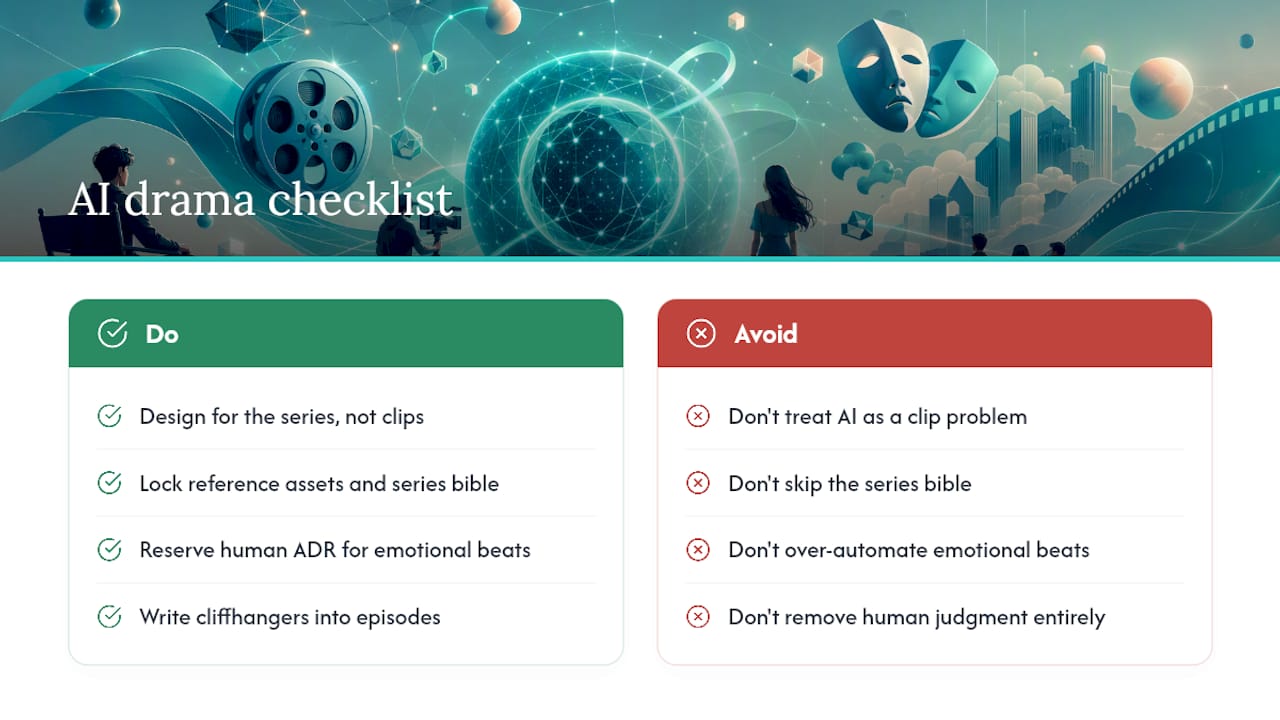
Most creators treat AI-generated drama as a clip problem. They generate individual scenes, stitch them manually, and wonder why the show feels incoherent. The real unit of work is the series, not the clip.
Locking reference assets before generating a single frame is not optional prep work. It is the production decision that determines whether you have a show or a folder of unrelated videos. Creators who skip the series bible and reference bundle almost always rebuild from scratch after episode three, when character drift becomes impossible to ignore.
The other common mistake is over-automating emotional beats. TTS handles exposition and dialogue cleanly. It struggles with grief, rage, or humor that depends on timing and breath. Those moments are worth a human ADR pass, even in a fully automated pipeline. The goal is not to remove all human judgment; it is to reserve your judgment for the decisions that actually move viewers.
Episodic short-form drama on TikTok has a structural advantage that longer formats do not: the cliffhanger is built into the format. Sixty to ninety seconds is just long enough to establish stakes and cut before resolution. That tension is what drives follows and return views, and it costs nothing extra to write it in from the start.
Iguanify produces finished episodes, not just clips
Producing a serialized TikTok drama series used to mean a production team, a shoot schedule, and weeks of editing. With Iguanify, you supply the premise and creative direction; the platform handles everything from series bible to final MP4. You own the episodes outright, with no recurring fees and no editing software required.

Start with a free concept generation at Iguanify’s AI Drama Generator, or go straight to a micro-drama episode pack if you are ready to produce your first episode today. Your show, your IP, produced.