 IGUANIFY
Facebook Reels Series: Ship 4–8 Episodes Without a Crew for Creators

A Facebook Reels series, for the purposes of this guide, means a serialized vertical episode show: continuity-maintained characters, a running plot, and a batch-production plan behind it, not a single viral clip. The fastest way in is simple: write your premise in one sentence, commit to 4 to 8 episodes, and lock a production method before you shoot anything. Iguanify exists to make that last step automatic.
TL;DR:
- Creating a serialized Facebook Reels series requires a clear premise, a fixed episode count, and a batch production plan to ensure consistent quality and flow.
- The most effective formats include micro-dramas, tutorial arcs, challenge series, or documentary strands, each designed with unresolved hooks to promote binge-watching.
- Automation tools like Iguanify can generate entire episodes with consistent characters and visuals, drastically reducing production time and maintaining continuity.
- Success depends on publishing episodes with a fixed schedule, optimizing metadata with consistent naming, and building community engagement through comments and cross-platform promotion.
- Focusing on episode-to-episode retention, completion rates, and viewer saves offers better monetization insights than raw view counts alone.
Table of Contents
- What Is a Facebook Reels Series, and How Do You Start One?
- What Makes a Serialized Vertical Video Format Actually Work?
- How Do You Batch-Produce Episodes Without Burning Out?
- How Do You Measure and Monetize a Reels Series?
- Why Continuity Breaks Most Automated Video Tools, and How to Fix It
- What Software Should You Use to Edit and Schedule a Reels Series?
- How Do You Build Community Around a Reels Series?
- How Do You Optimize Captions and Metadata So People Actually Find Your Series?
- How Do You Cross-Promote a Series to Grow Its Audience?
- What Are Your Automation Options for Producing a Series?
- What Actually Works After Testing a Reels Series Concept
- Turn a One-Line Premise Into a Finished Series
- Sources
What Is a Facebook Reels Series, and How Do You Start One?
“Series” gets thrown around loosely, so let’s be precise. A Facebook Reels series here means episodic vertical drama, comedy, or serialized content with recurring characters and an arc that spans multiple posts, the same model driving what Forbes calls vertical social TV. That’s different from posting unrelated Reels and tagging them into a collection after the fact. The order matters, the characters return, and each episode is built to make you need the next one.
Here’s the minimum checklist to move from idea to a published Episode 1 without stalling in planning purgatory:
- Pick your format and lock an episode count. A modest number of episodes is ideal: enough to build a real arc, but short enough to finish without burning out.
- Write the premise in one sentence, then draft a hook for every episode before you shoot a frame.
- Build your batch plan. Either a one-day shoot covering all episodes or an automated pipeline that renders them from scripts.
- Set your cadence, tag episodes into a Series or playlist, and standardize titles and thumbnails.
- Define your KPIs (completion rate, retention, saves) and pick one monetization path to test.
- Check your legal boxes: FTC disclosure on every sponsored episode, not just the first, and signed creator agreements that cover the whole arc.
Skip the checklist and you’ll end up with three episodes and no plan for the fourth. That’s the single most common failure mode in this format.
What Makes a Serialized Vertical Video Format Actually Work?
Format choice decides whether episode 2 gets watched at all. A few structures consistently outperform generic “part 2 coming soon” content:
- Micro-drama: relationship or workplace conflict told in 60 to 90 second beats, built for a cliffhanger every episode.
- Tutorial-arc: a skill or transformation broken into sequential steps, where each episode requires the last one to make sense.
- Challenge series: a repeated format (a daily attempt, a countdown) that creates its own cadence.
- Interview or documentary strand: recurring subjects or a single ongoing investigation, released in chapters.
The real skill is writing Part 1 so resolution is physically impossible without Part 2. Social Media Examiner frames this as designing each episode to work for a viewer landing mid-series, while still leaving the loop open. That means a hook in the first three seconds and an unresolved question at the end, every time.
Naming and visual branding matter more than creators think. A consistent title card, font, and color treatment tells the algorithm and the viewer this is one show, not a one-off. Cast for stamina too: a character who can carry six more episodes beats one who was fun for a single punchline.
Pro Tip: Write all your episode-ending hooks before you write the middles. If you can’t summarize why someone needs to watch the next one in five words, the episode isn’t done yet.
How Do You Batch-Produce Episodes Without Burning Out?
Treat the series like a small production, not six separate shoots. Start with a series bible: character bios, tone, recurring locations, and a one-page arc summary. Every episode gets a brief pulled from that bible, and every creator or contractor signs an agreement scoped to the full run, not episode by episode.
A workable one-day batching schedule looks like this:
- Morning: shoot all A-roll for episodes 1 through 4 in the same location and wardrobe.
- Midday: swap set dressing or wardrobe for episodes 5 through 8.
- Afternoon: capture B-roll, transitions, and any recurring intro graphics in one pass.
- Evening: dump footage, tag by episode number, and start rough cuts against your caption and hook templates.
Templates save real time here. Pre-built caption structures, a bank of hook phrases, and a standard on-screen text style mean editors aren’t reinventing formatting for every episode. Social Media Examiner’s research on repeatable formats found batching and a locked structure can cut per-episode production time significantly while keeping quality consistent, which is the entire economic case for treating a series as a system instead of six standalone projects.
This is exactly where automation replaces the slowest manual steps. Script-to-episode rendering, automatic preservation of a recurring character’s face and voice, and instant delivery to your platforms remove the three biggest bottlenecks: reshoots for continuity errors, editor hours, and platform-by-platform reformatting.
Run a quality-control pass before publishing anything: check that character appearance, tone, and callback jokes haven’t drifted from episode 1. Narrative drift is the fastest way to lose the audience that stuck around for episode 3.
Pro Tip: Keep a single shared document with every character’s exact physical description and speech pattern. Continuity breaks are almost always a documentation failure, not a creative one.
How Do You Measure and Monetize a Reels Series?
Distribution for a series isn’t the same game as posting a single clip. Group your episodes using Facebook’s Series or playlist tools and keep titles, thumbnails, and captions consistent so the platform’s recommendation system reads them as one connected unit rather than six unrelated uploads, a pattern YTShark documents driving longer binge sessions on YouTube that applies just as well to vertical feeds. Publish on a fixed cadence, weekly or biweekly, since Sprout Social notes predictable release timing paired with recurring characters is what actually builds appointment viewing, not just a good hook.
Three numbers matter more than views:
- Completion rate tells you if the episode itself is too slow or too long.
- Episode-to-episode retention tells you if your cliffhanger actually worked.
- Save rate and profile visits tell you if viewers are treating this as a show worth returning to, not a clip they scrolled past.
Monetization should follow the arc, not interrupt it. Progressive sponsorship reveals (a brand mentioned lightly in episode 2, integrated by episode 5) outperform a hard sell dropped into episode 1. Gated finales, where the final episode requires a follow or a link click, work well once you’ve built real retention. Merchandising and affiliate links land best in mid-series episodes, once viewers are invested but before they’ve lost patience. Map each episode to a funnel stage when you brief creators: early episodes build awareness, middle episodes build trust, and the finale converts.
Why Continuity Breaks Most Automated Video Tools, and How to Fix It
Most AI video generators fail a series the moment they generate a second clip. The character’s face shifts, the voice changes, the outfit resets. That’s fine for a single Reel. It’s a dealbreaker for episode 4 of a show your audience has been tracking for two weeks.
The failure modes are predictable:
- Character drift: faces, proportions, or voices subtly change between generations.
- Inconsistent tone: dialogue style resets instead of building on prior episodes.
- Manual continuity patching: creators end up hand-correcting every new clip, which erases the time savings automation was supposed to deliver.
Iguanify was built around solving exactly this. It turns a single line of script into a finished episode, preserves recurring characters across the whole run, and hands you full ownership of the output, no licensing gray areas. Delivery is instant and ready for TikTok, YouTube, or Facebook without a separate export or reformatting step.
Global revenue for micro-drama apps jumped from $178 million in Q1 2024 to nearly $700 million by Q1 2025, and that growth is being fed by exactly this kind of production speed. When a full episode batch can move from script to publish-ready in the time it used to take to plan one shoot day, creators can test more concepts and monetize the ones that land faster.
What Software Should You Use to Edit and Schedule a Reels Series?
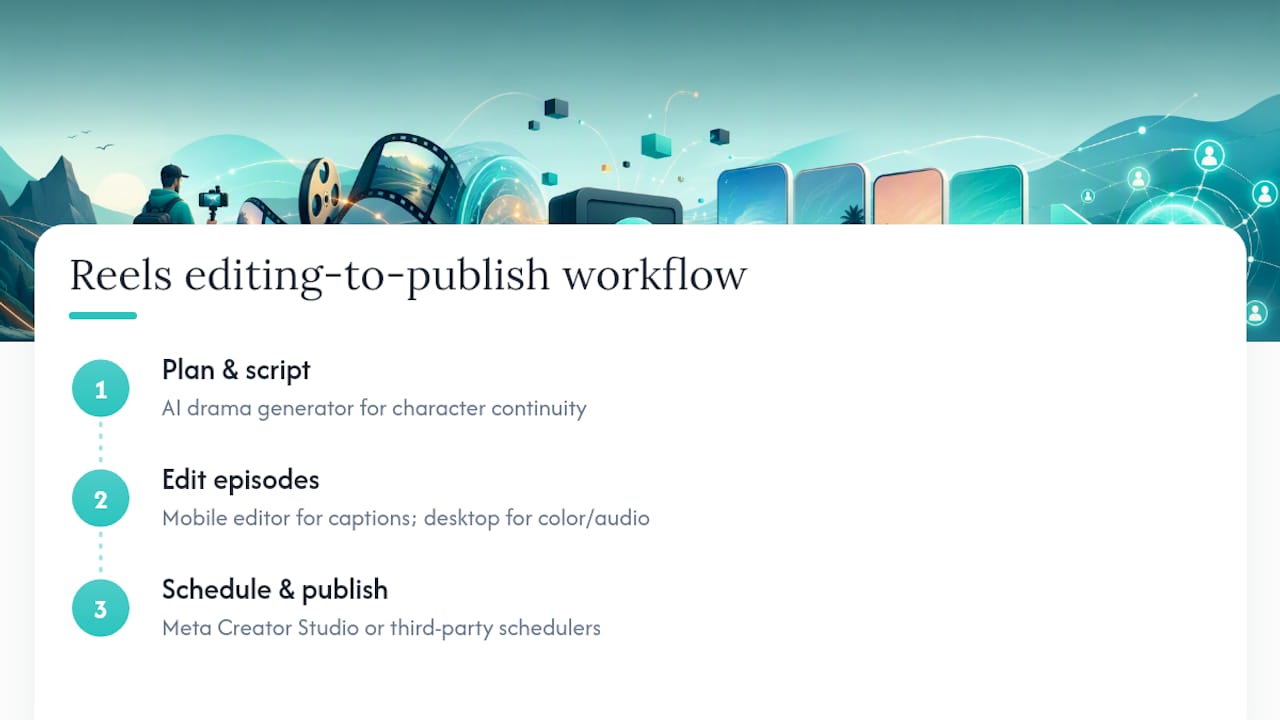
Editing tools matter less than the workflow wrapped around them, but the right stack still saves hours per episode. For editing, mobile-first apps like CapCut handle vertical formatting, caption burn-ins, and template reuse well, which matters when you’re cutting six episodes against the same visual template. For teams producing at higher volume, desktop tools like Adobe Premiere Pro give more control over color matching and audio consistency across a full arc, both of which prevent the “this doesn’t look like the same show” problem between episodes.
Scheduling is where most solo creators lose consistency. Meta’s native Creator Studio lets you queue Reels in advance and tag them into a Series, which keeps your cadence intact even during weeks you can’t post live. Third-party schedulers built for multi-platform posting help when the same episode needs to go to Facebook, Instagram, and TikTok on a staggered release without you manually uploading three times.
The workflow that actually holds together end to end: script and continuity handled through an AI drama generator so characters stay consistent, light finishing touches in a mobile editor for platform-specific caption styling, then scheduling through Meta’s native tools to lock in your cadence. That combination removes the two biggest time sinks, continuity fixing and manual re-uploading, without asking you to learn a full production suite.
Pro Tip: Build your caption and hook templates once, store them in a shared doc, and reuse them across every episode. Reinventing formatting per episode is where batching plans quietly fall apart.
How Do You Build Community Around a Reels Series?
A series creates something a single Reel can’t: a returning audience that talks to each other in your comments. Use that. Pin a comment on episode 1 asking viewers to predict what happens next, then reference the best guesses in your caption for episode 2. That single move turns passive viewers into people invested in being right.
Reply to comments with in-character voice when it fits the format. A micro-drama’s antagonist responding to a comment as the character, not as the creator, extends the story into the comments section itself and gives casual scrollers a reason to check back even between episodes.
Run light community rituals tied to your cadence: a “guess the twist” poll before each drop, a recurring Q&A where the audience asks the characters questions, or a fan-vote on a minor plot detail for an upcoming episode. None of this requires extra production. It requires you showing up in your own comments consistently, which is the part creators skip once they’re four episodes deep and tired.
Cross-tag loyal commenters when relevant and highlight standout fan theories in your Stories. That visibility loop is often what pushes a casual viewer into someone who checks your profile the day a new episode is due, the exact behavior a good series is designed to produce.
How Do You Optimize Captions and Metadata So People Actually Find Your Series?
Discoverability for a series lives or dies on consistency, not clever one-off captions. Use the same naming convention every time: “Show Name, Episode 3” beats a different clever title per post, because it tells both the algorithm and a scrolling viewer instantly that this belongs to something bigger.
Front-load your caption with the hook, not a setup. The first line needs to work as a stand-alone reason to watch, since Facebook truncates captions in the feed. Save context, hashtags, and calls to action for after the fold.
Use two or three tightly relevant hashtags tied to your series name and genre rather than a wall of generic tags. A branded hashtag unique to your show, used on every episode, becomes a searchable archive of your own content over time.
On-screen text should repeat key names and terms exactly as written elsewhere, since inconsistent spelling of a character’s name across episodes fragments your own searchability. Add a short “previously on” caption line for episodes 3 and beyond so new viewers landing mid-series get oriented without needing to hunt down episode 1 first.
How Do You Cross-Promote a Series to Grow Its Audience?
Every platform should point back to the same show, not compete with it. Post the same episode natively on Facebook, Instagram Reels, TikTok, and YouTube Shorts rather than just cross-linking, since each platform’s algorithm favors native uploads over shared links.
Stagger releases slightly instead of dumping every episode everywhere at once. Releasing on Facebook first, then Instagram a day later, then TikTok, gives you three separate discovery windows instead of one, and lets you gauge which platform’s audience responds best to a given hook before the others go live.
Use Stories and static posts as trailers. A 15-second teaser posted the morning of a new episode, with a countdown sticker or a direct link, primes your existing followers to watch the moment it drops rather than scrolling past it later. Cross-post character content, behind-the-scenes stills, or a “which character are you” quiz between episodes to keep the feed active on days you’re not publishing a new installment.
Long-form platforms are worth the extra step too. Compiling three or four episodes into a single YouTube upload, formatted as a proper playlist, captures viewers who prefer to binge rather than wait week to week, a pattern YTShark ties directly to longer session times and better recommendation placement.
What Are Your Automation Options for Producing a Series?
Three broad paths exist once you decide to stop shooting everything by hand.
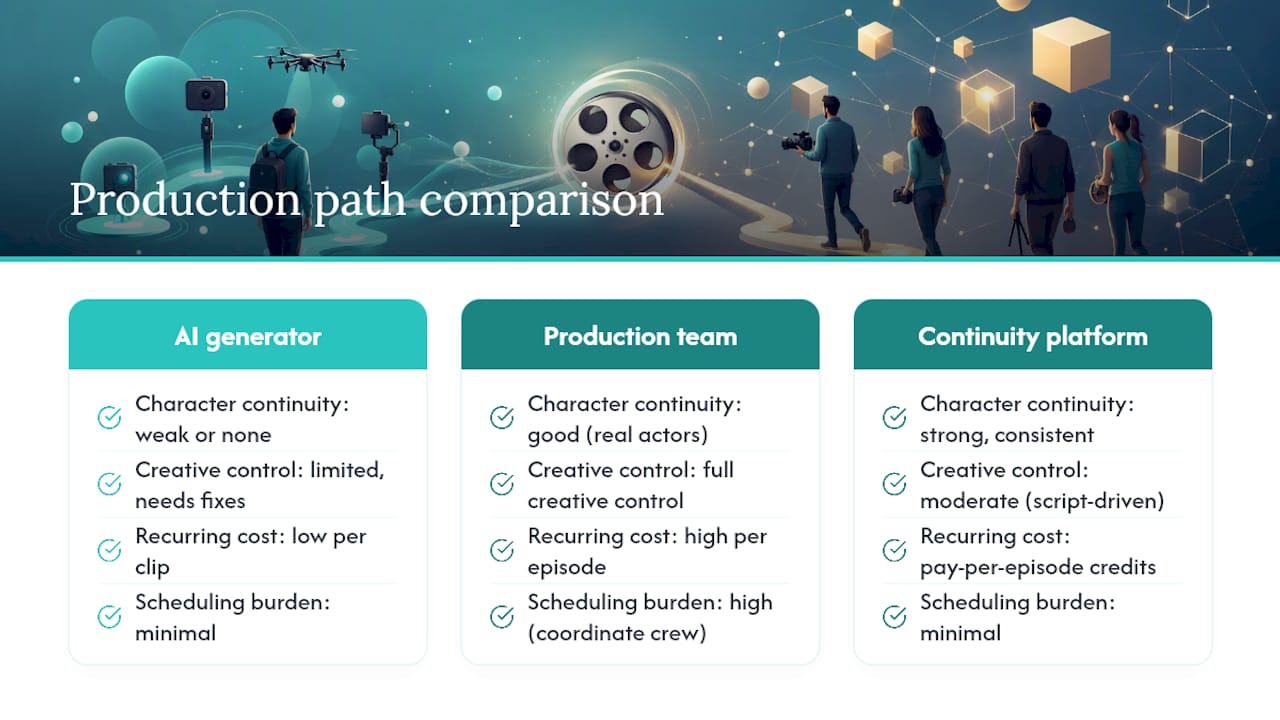
The first is a general AI video generator: fast, cheap per clip, but built for single outputs. Character consistency across episodes is usually weak or nonexistent, so you end up manually correcting faces and voices, which erases most of the time savings.
The second is hiring a small production team or freelance editor to batch-shoot and edit your series. This gives you full creative control and real actors, but costs scale with every episode and scheduling six people around one shoot day is its own project.
The third is a continuity-first platform like Iguanify, purpose-built for episodic output. You write a single line of script, and the platform generates a finished episode with the same characters, voice, and visual style carried through the whole run. Pricing runs on one-time credit packs rather than a subscription, so you pay for episodes you actually produce instead of a recurring fee whether you post or not. Ease of use favors this route heavily if your bottleneck is technical production rather than the creative concept itself: there’s no editing software to learn and no continuity to hand-check episode by episode.
Choose based on where your actual constraint is. Time and continuity control point toward automation; a need for live-action human performers points toward a production team.
What Actually Works After Testing a Reels Series Concept
Series beat singles because they turn a viewer into a returning viewer, and that only happens with a real hook every episode and a cadence you don’t break.
Thirty-day quick start: 1) write the one-line premise and six episode hooks before shooting anything, 2) batch-produce all episodes in one session using a locked template, 3) publish on a fixed cadence and track episode-to-episode retention from day one.
The mistakes that kill most series: abandoning the arc after episode 3, inconsistent hooks that don’t escalate, and finales with no clear next step for the viewer.
— Leonard
Turn a One-Line Premise Into a Finished Series
Iguanify gets your series in front of viewers faster than hiring a crew or fighting continuity errors in a general AI tool. Every workflow above, the series bible, the batch schedule, the continuity checks, gets compressed into one step: write a line of script, and Iguanify renders a finished episode with the same recurring characters, voice, and look carried through your whole run.

Buyers work on a one-time credits model, no subscription, and get full ownership of every asset produced. Start with the free show concept and cast generator to test a premise, then request a sample episode or purchase a credits pack sized to your first 4 to 8 episode run through the AI Drama Generator. If you’re specifically chasing a ReelShort-style aesthetic, the ReelShort-alternative workflow shows how that output maps to Iguanify’s process. Once episode 1 is live, build your publishing rhythm using an episodic content calendar so cadence never slips between drops.
Sources
- The future of TV is vertical, episodic and on your phone (Forbes)
- Social media content series (Sprout Social)
- Short-form video series (Deloitte)
- How to create a short-form video series (Social Media Examiner)
- How to plan a YouTube video series that keeps viewers coming back (YTShark)